
Marketer, analyst, ex-CMO focused on the Google ecosystem (Ads, Merchant Center, GA4, GTM). Google Partner. 150+ projects, 100+ positive reviews on Freelancehunt, 12+ countries.
- I work directly, with no account managers or subcontractors
- I measure results in sales, not in-platform conversions
- Maximum expertise in the Google ecosystem — instead of “PPC, social ads and SEO, all in one”
If you’ve read articles from the “Boring Numbers” series, where I break down projects purely through numbers, you already know: Google Ads runs on statistics. A Google Ads specialist runs on statistics too. When there isn’t enough of it, you either make the wrong decisions, or the promotion turns from a system into a series of random actions.
That’s why at the very first meeting I tell every client: Google Ads doesn’t work in the first month. It doesn’t work in the second. Results start somewhere in the third, and from the third month you can scale. If your first thought is “let’s run it for a month and see how it goes”, you won’t see anything.
Contents
- “Let’s run it for a month and see”
- About the project
- Merchant Center: what was there and why it was a matter of time
- Bad title — irrelevant clicks
- Product feed enrichment: why do it
- Shipping rules for products of different sizes
- Not every call is a sale, not every purchase is a sale
- Switching to CRM data
- What real data actually looks like
- Why the first month isn’t about results
- Forecasting in Google Ads: 4 time series forecasting methods
- Conclusions
- FAQ
Horoshop + Google Ads: Sending Real CRM Sales to the Account to Stop Wasting Budget

“Let’s run it for a month and see”
I turn such projects down. A recent example: a marketing agency offers to launch Google Ads for three lines of business at once (social ads, website development and turnkey marketing). The budget is $500 a month for everything. The client’s plan: “we’ll run it for a month, look at the output and decide”.

In these niches, the average click costs from UAH 100 ($2), and with smart bidding it can reach UAH 200+ ($4+). $500 is at best about 220 clicks a month for all three lines, that is, about 70 for each. The conversion rate in such competitive niches is 2% at best. Even if we imagine 5%, the first month would bring 4–10 leads for everything combined. What decision can you make on such a sample? None. This data is statistically insignificant. To collect proper statistics, a project like this would need about three lifetimes, one for each line.
I declined. The only thing you can offer on such a budget is adding and excluding keywords and changing bids. You can’t call that promotion, because there’s no room to maneuver.
Now to the project. Closer to the end it will become clear why I started with the first month.
About the project
An online store of mattresses of its own manufacture on Horoshop. Tasks at the start: Google Merchant Center, call tracking, then CRM and end-to-end analytics. The client came in early July, not the peak season for the niche. This summer was difficult for most niches overall.
Merchant Center: what was there and why it was a matter of time
The client registered Merchant Center himself, uploaded the feed himself and even passed moderation (at least before the ads were launched). When I looked at the website and the feed, it was clear that a suspension was only a matter of time. So the first thing I did was fix the technical pages of the website and Merchant Center itself.
I won’t go into the technical pages in detail, everything there is as usual. What exactly you need on the website before launch, I described in the case of launching Merchant Center without suspensions. But shipping had a nuance, more on that below.
Bad title — irrelevant clicks
This is what the product title looked like in the feed:
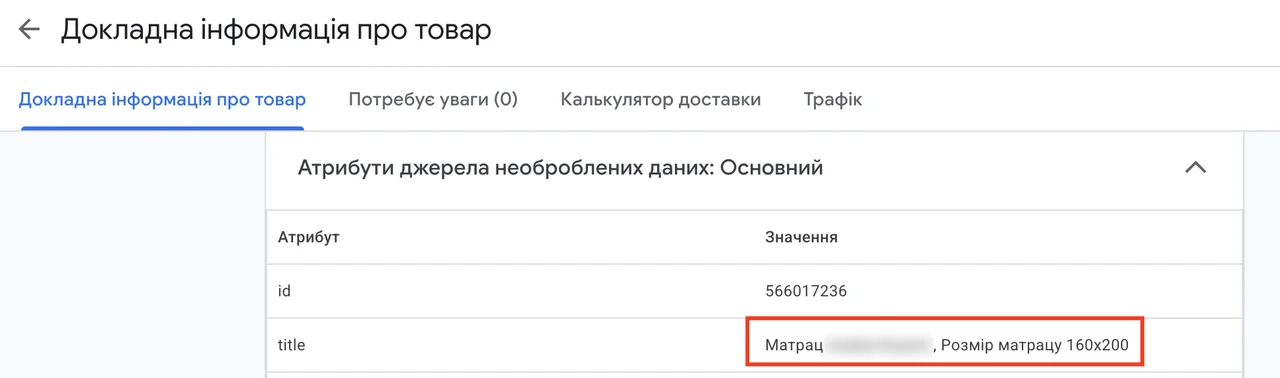
The main thing for a mattress is its size, and it was at the very end. People search for mattresses by size: for a bed, for a specific 160×200. So, through a supplemental feed, I rewrote the title in this order: size first, then the word “mattress” in Ukrainian, then the model name, and at the end the Russian spelling of “mattress”. People often type that spelling in search too.
A supplemental feed is a separate table that is attached to the main feed and overwrites or adds attributes by product ID. You don’t need to touch the website or the admin panel.
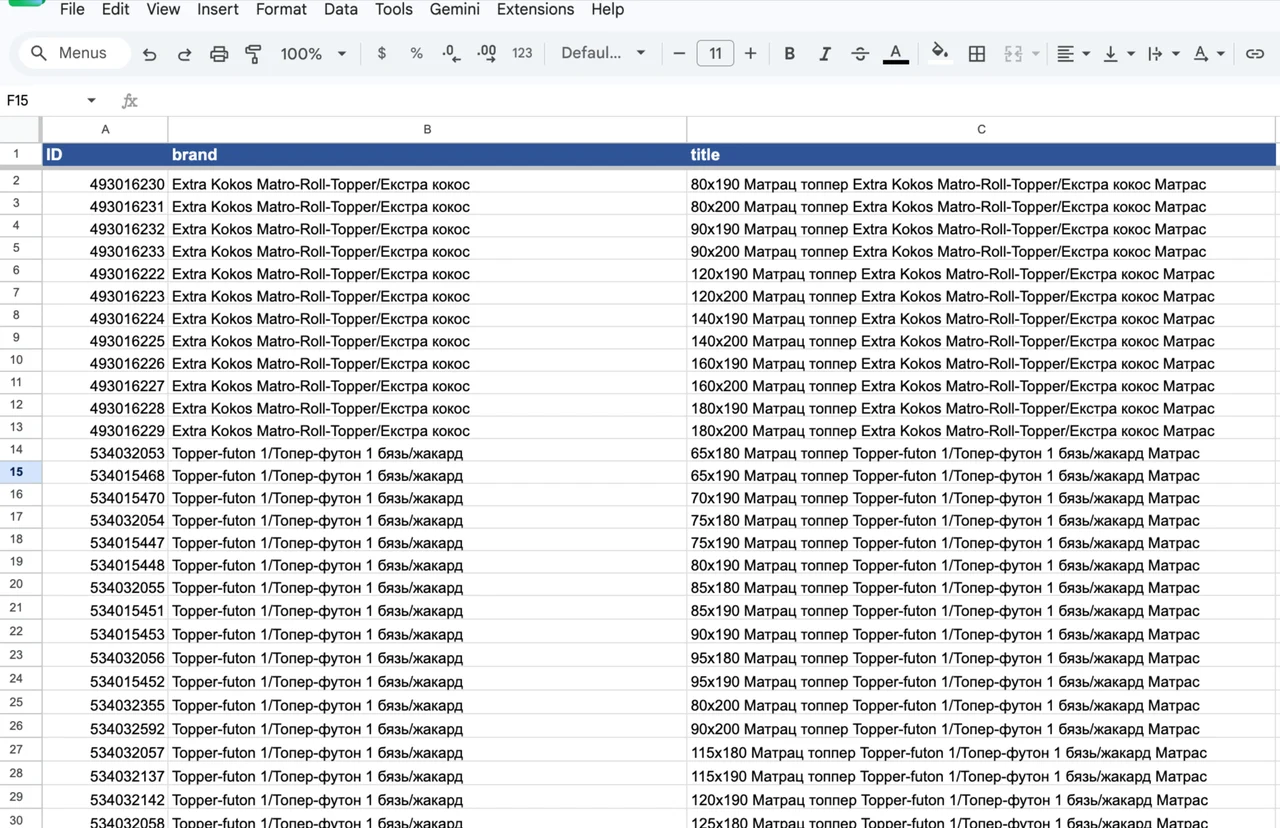
At the same time, I added a brand attribute to all products, pulling it out of the product name.
It’s not some super game-changer. But already at the search results stage, the buyer immediately sees the size they need, and the ad’s relevance to the query increases.
Product feed enrichment: why do it
Since I was already editing the products, I decided not to stop at the title. These products have no GTIN (international barcodes), because they are made in-house. This means everything Google knows about a product comes from the feed attributes. The more of them there are, the better the system understands what the product is and whom to show it to.
What I added:
- item_group_id — groups variants of one product together. The store has about 1,600 SKUs, but essentially it’s 100 models in 16 sizes. Without grouping, Google treats them as 1,600 separate products and learns on each one separately. With grouping, it learns on 100 groups, and the statistics for a model aren’t spread across 16 parts.
- product_length, product_width, product_height and size — product dimensions. Again, people search for mattresses by size.
- material — what the mattress is made of.
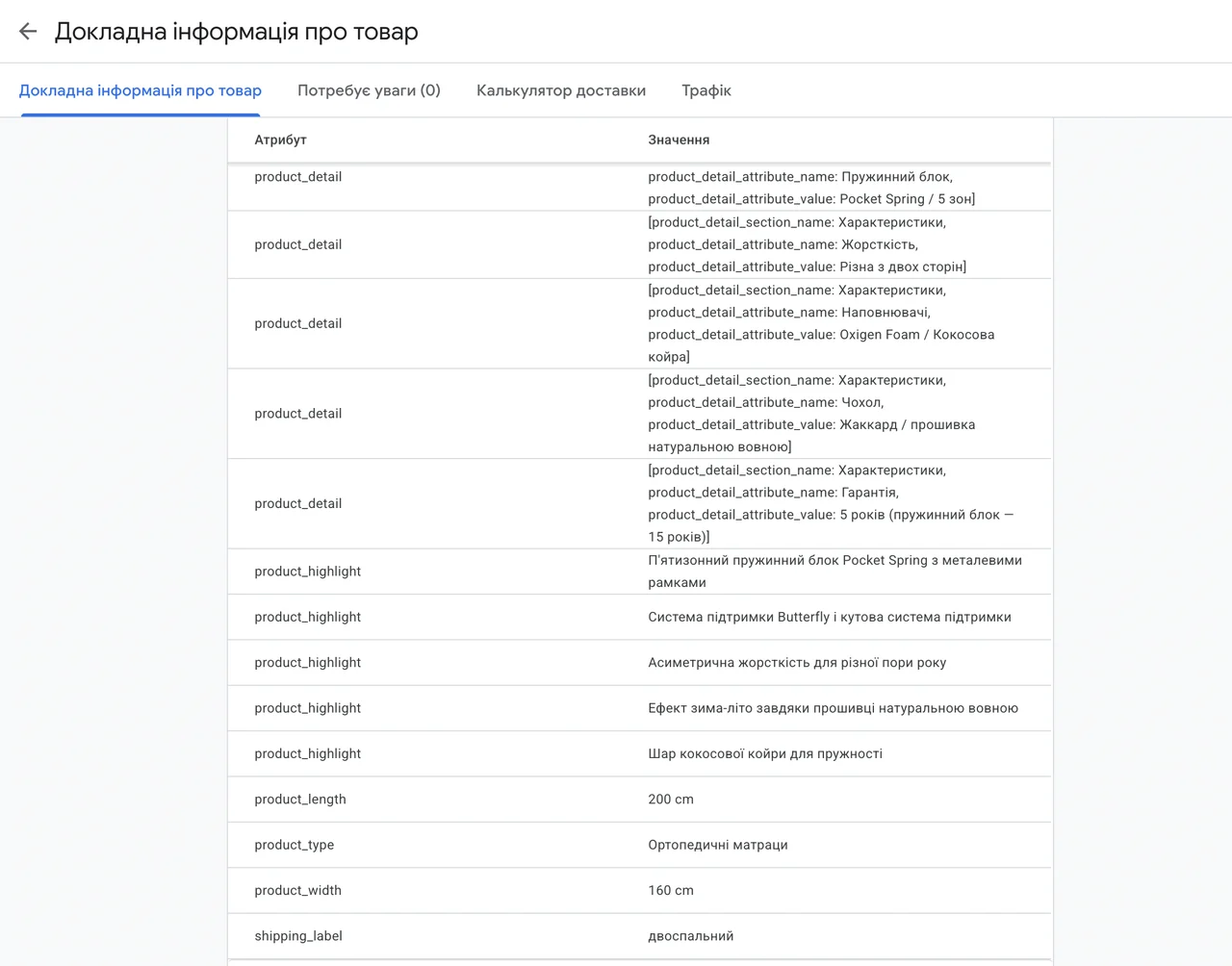
- product_highlights and product_detail — key benefits and specifications that help the system understand the product better.
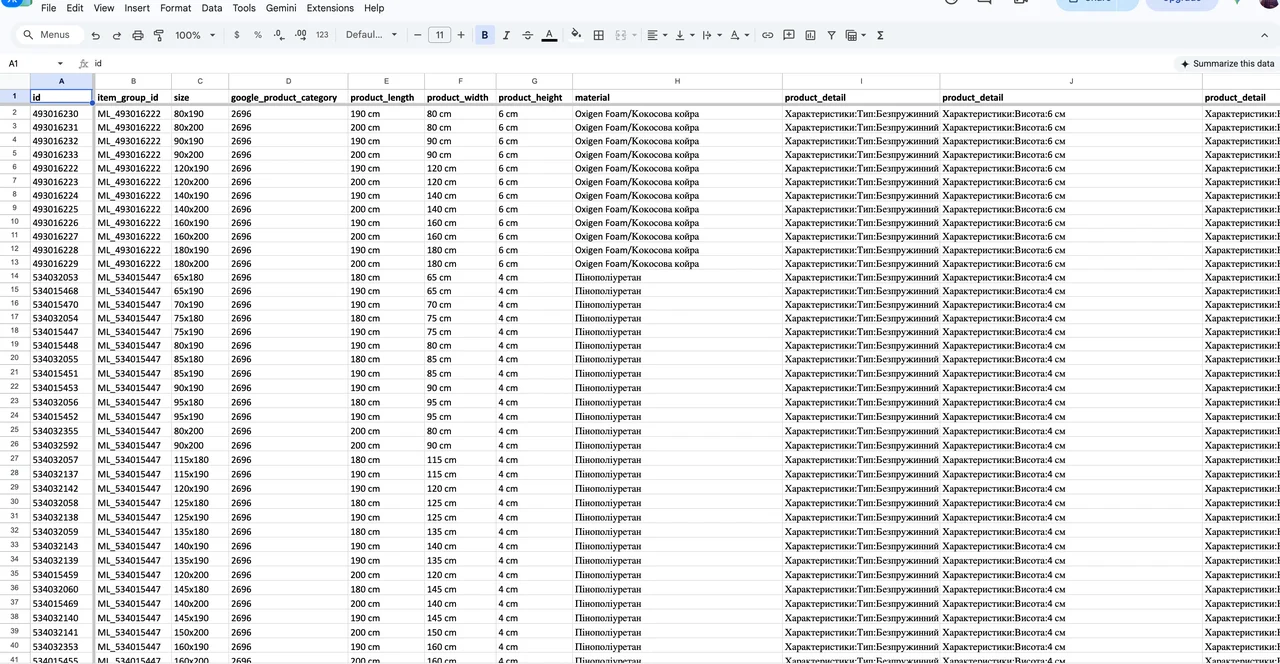
All of these are small things that improve how products show up, and you don’t have to pay anything for them. In theory, all of this can be filled in in the admin panel. But if the client filled it in manually for 1,600 products, you would never have read this article. That’s why such things are done with feed rules in Merchant Center or supplemental feeds.
This is what the product card looks like now:
Shipping rules for products of different sizes
Now about the nuance. There are single mattresses and double mattresses, and shipping them costs differently. Stating this on the shipping page of the website is easy. But the same information has to be passed to Merchant Center, otherwise the data on the website and in the feed won’t match.
That’s what the shipping_label attribute is for — a label you can attach a separate shipping rule to. Through a supplemental feed, I gave every SKU the label “single” or “double”. Not by hand, of course.
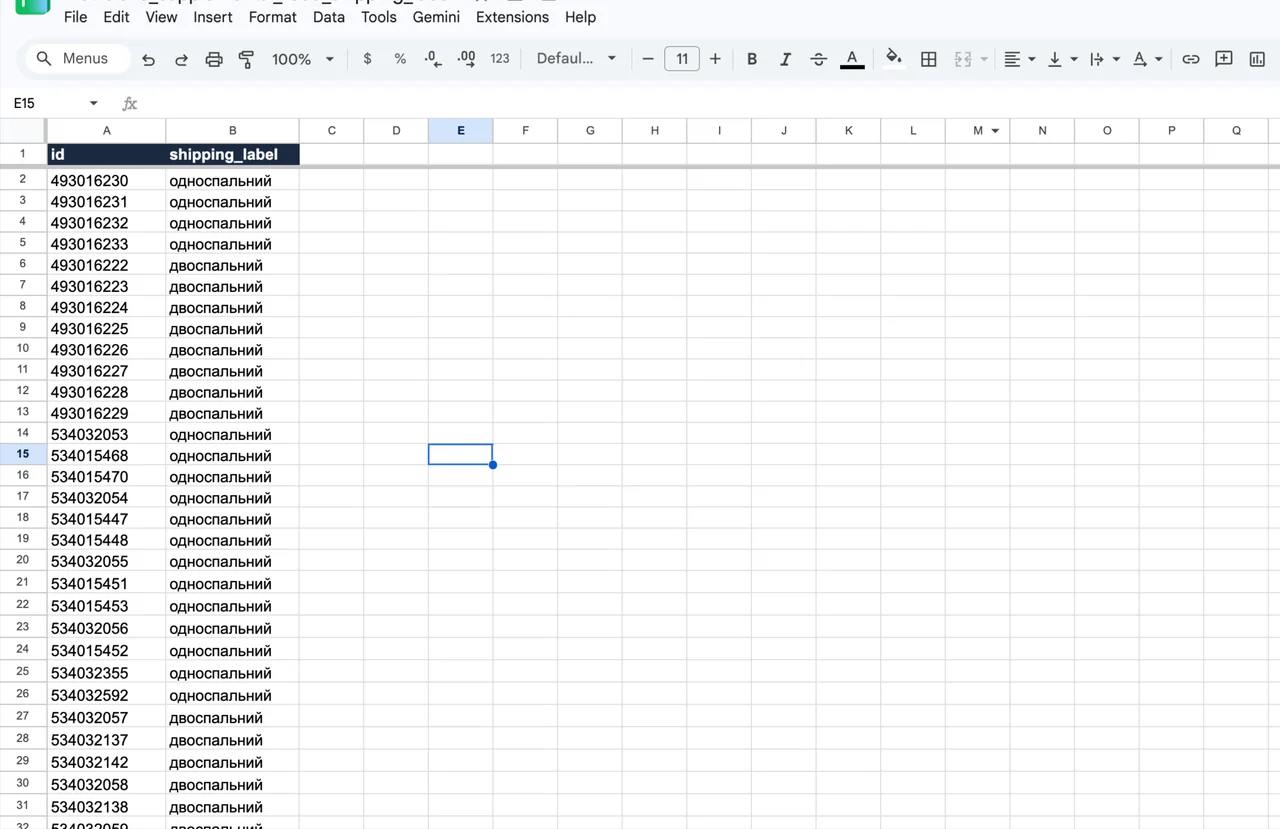
Then in Merchant Center I created two shipping rules: one for single mattresses with their fixed cost, the other for double ones.
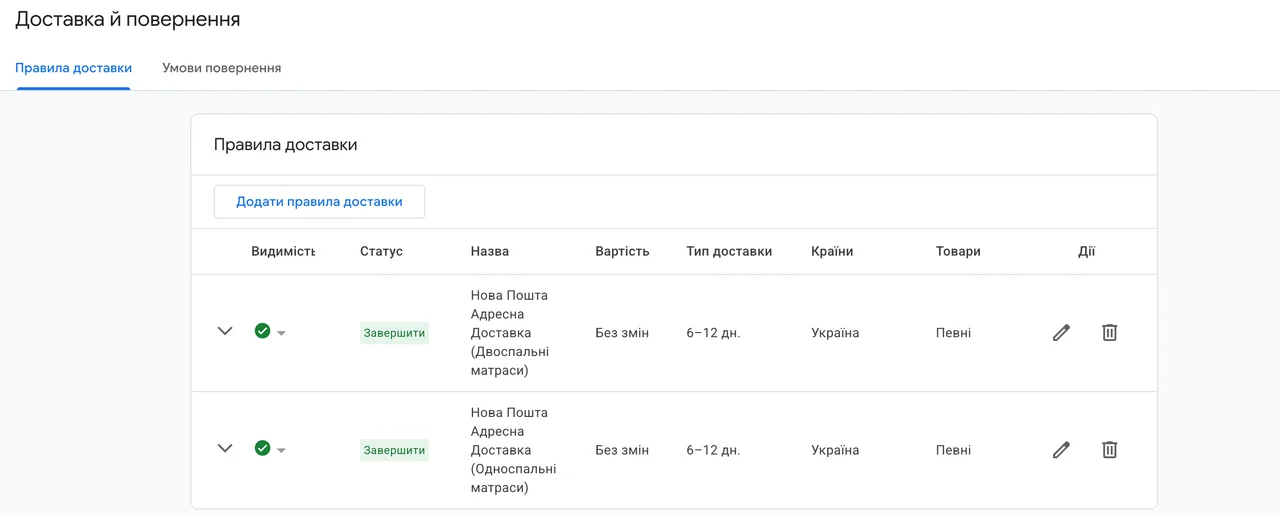
If your products differ in size and weight, with different shipping costs, and your Merchant Center gets suspended, don’t be surprised. The reviewer saw that you offer shipping for, say, UAH 120 ($3) for equipment weighing 50 kilograms. That can easily be a reason for suspension. That’s why products of different sizes need to be split into different shipping rules in Merchant Center via shipping_label. More on what gets you suspended and how to get unblocked — in the Merchant Center “Misrepresentation” unblock case.
11 — Merchant CenterGoogle Merchant Center unblocking“Misrepresentation”, data mismatches, site suspensions. 100+ unblocks and launches without suspensions.Not every call is a sale, not every purchase is a sale
Of course, I started by optimizing for cart purchases. But I quickly persuaded the client to set up call tracking. I had access to another mattress store, and I saw that about 70% of inquiries there came by phone.
That’s logical. The average order value here is almost UAH 12,000 ($267), and such products are bought over the phone: people want to clarify, get advice, agree on delivery. In “Boring Numbers” about calls and average order value, I showed with numbers that as the average order value grows, so does the share of calls. Same here. Looking only at Google Ads data, the period had 96 cart “purchases” and 153 calls. That is, almost two thirds of inquiries came by phone.
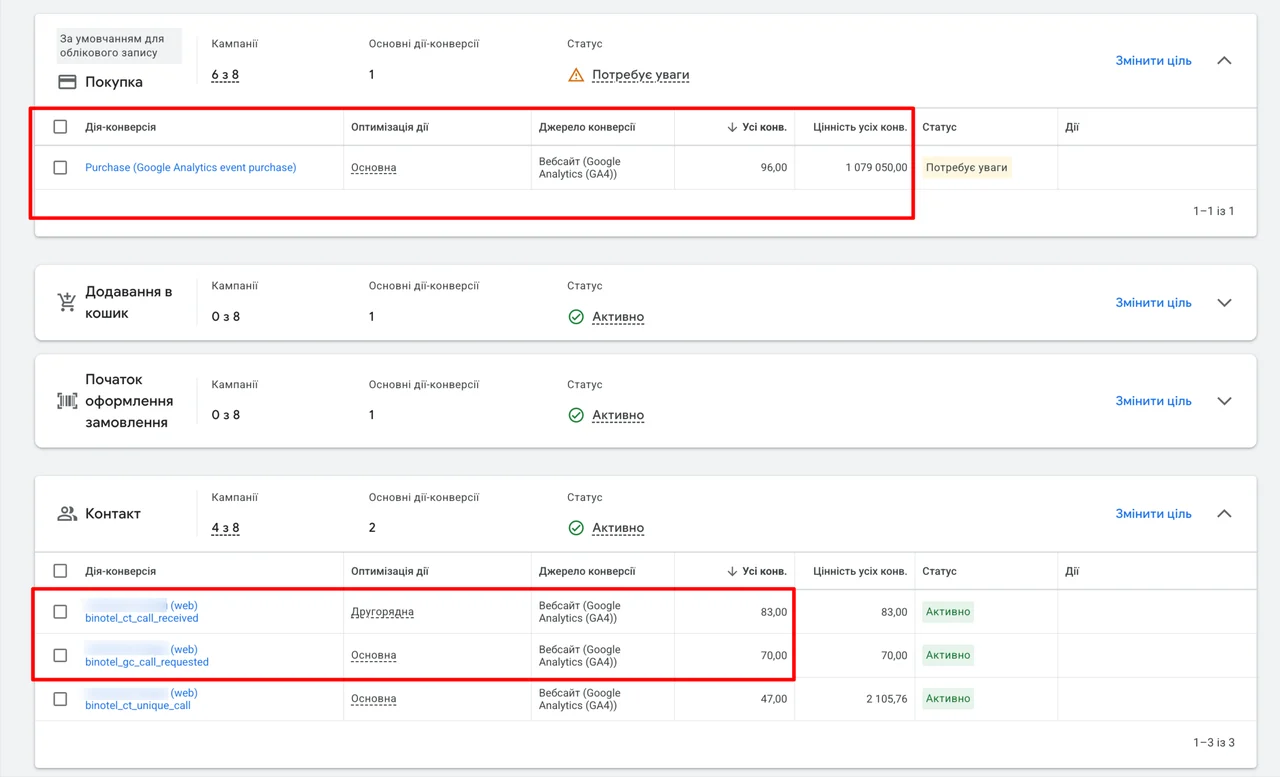
Everything looked great. A conversion cost roughly UAH 300 ($7), counting carts and calls together. With such a figure, someone else would already be writing a case study “cost per conversion in the mattress niche — UAH 300”. But not me. Because the client set up a CRM, and after the very first report it became clear that my numbers had nothing to do with reality.
What turned out:
- Cart “purchases” are pre-orders, and some of them ended in refusal.
- Some of the calls are “where is my order?” and “when will it be delivered?”.
- Some people were calling the wrong store altogether. There are about five stores with the same name on different domains. A person googles the brand, clicks the first result and asks about an order they placed elsewhere.
Google Ads treated all of this as quality inquiries and learned from them.
This is how the number of calls and leads gets “increased”: every call, callback and cart counts as a conversion. The numbers in the ad account grow, the report looks great, and meanwhile the algorithm learns to bring more and more people who buy nothing.
Switching to CRM data
I explained this to the client. He is a reasonable person, agreed and set up KeyCRM. Then I integrated the CRM with Google Ads and started sending real orders to the ad account. I showed in detail how this setup works in the offline conversions case, ROMI +45 pp
An important nuance: I don’t send the final “sale” status, but “sent to production”. At this stage the client has already paid. From order to “sale” status it takes up to three weeks on average because of production and delivery. That’s too long for Google Ads, especially on a project with little statistical data. And the conversion from “sent to production” to sale is 100%: there are no returns or unclaimed orders, because the money has already been paid. If the client weren’t in a hurry, we could wait for the final status. But it’s the season now, and there’s no point in losing three weeks.
What real data actually looks like
Now the most interesting part. For the same period in which the ad account showed 249 conversions at UAH 300 ($7), the CRM received 134 orders. No fake calls, no “checking on my order”, no other stores’ customers. And these are all orders, including those that later fell through: delivery wasn’t agreed, they bought elsewhere, other refusals.
134 out of 249 is 54%. In other words, the ads were optimizing half on real data and half on junk.
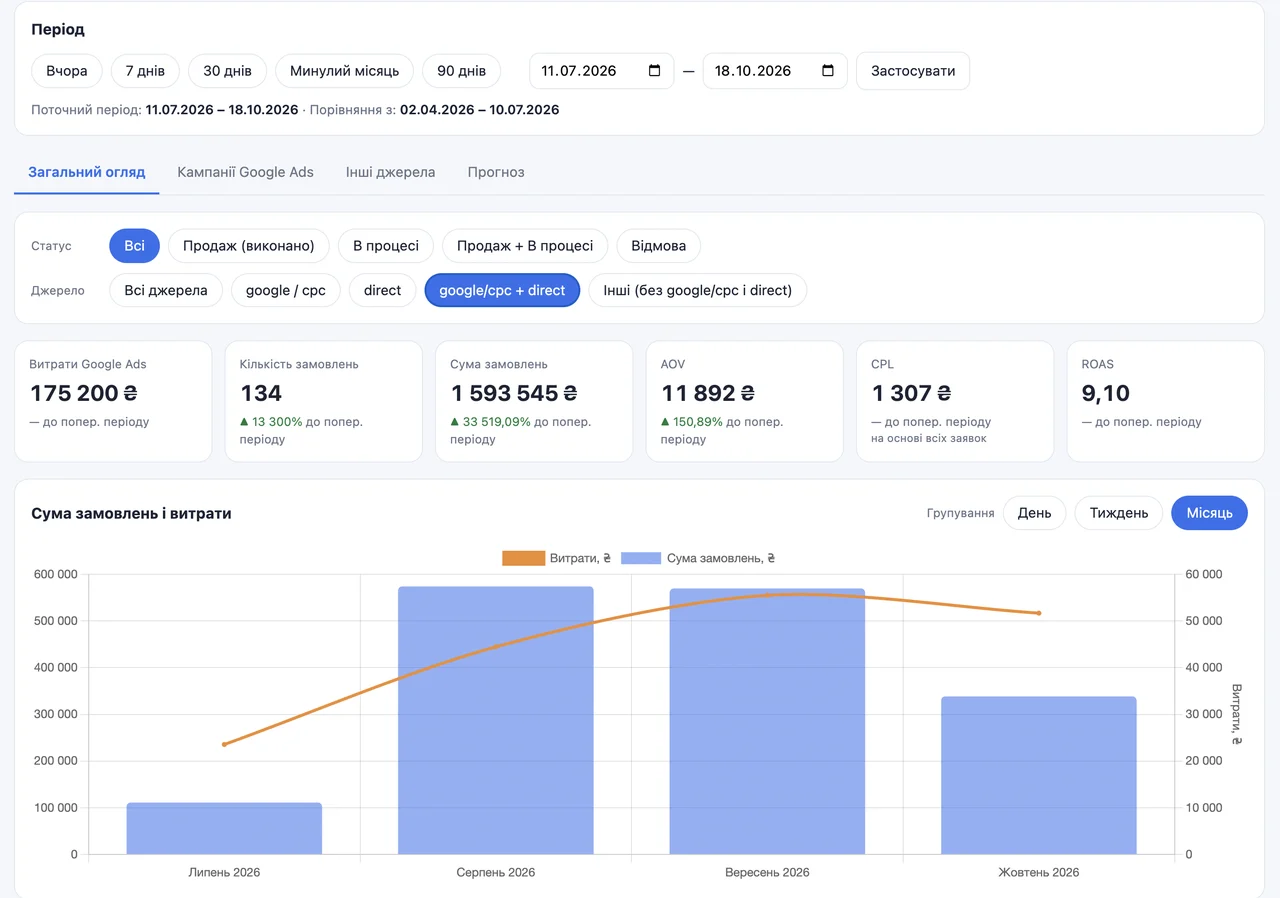
The screenshot shows all order statuses, including refusals, which is why the numbers here are higher than in the dynamics table below.
Where do these numbers come from? The project has end-to-end analytics set up: a dashboard that combines Google Ads spend and CRM orders. It shows everything you need in any breakdown: by status, source, campaign. For me this is nothing new — I have a dashboard like this on almost all my projects. I wrote in more detail about what reporting based on such data should look like in “Google Ads Reporting from an Expert” — which, by the way, is a report for this same store.
Why the first month isn’t about results
And now, what this whole case was actually about. Monthly dynamics:
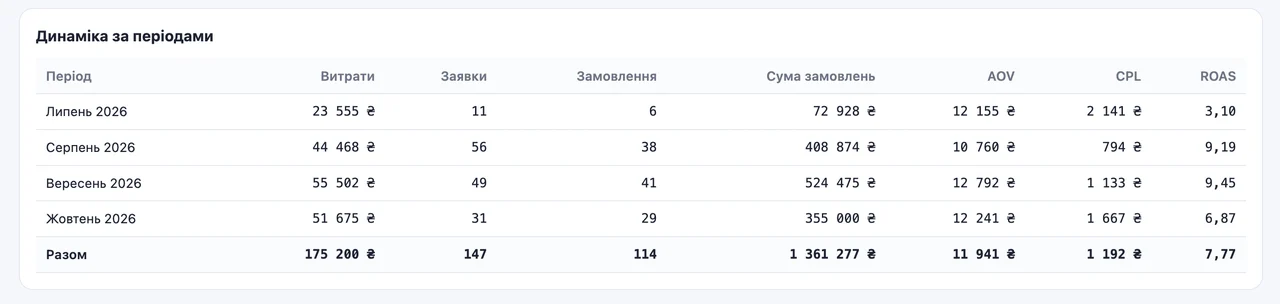
July is the hardest month. A budget of UAH 23,555 ($523), which was enough for 11 leads. 6 of them converted into orders. ROAS 3.10. ROAS is ad revenue divided by ad spend. For this niche, 3.10 is a loss. And this is the period when the ads were still learning on dirty data.
August — the budget was increased. Of 56 leads, 38 turned into real orders, that is, 68%. ROAS 9.19.
September and part of October — already optimizing on real CRM data. 88% of leads convert into orders.
Interestingly, August, despite the large number of orders that didn’t happen, delivered a ROAS of 9.19 on actual data. Could we have kept working like that? In theory, yes. The client was more than happy with this figure, because it’s very high for this niche. But the data wasn’t clean. Sometimes, thanks to statistics and random sets of audiences, the system really does deliver decent results even on dirty data. It just doesn’t last long. Sooner or later the algorithm starts bringing more “fake” conversions, because it learns from them. Then their number snowballs, and the ads slide down to 50% junk, and sometimes to 100%.
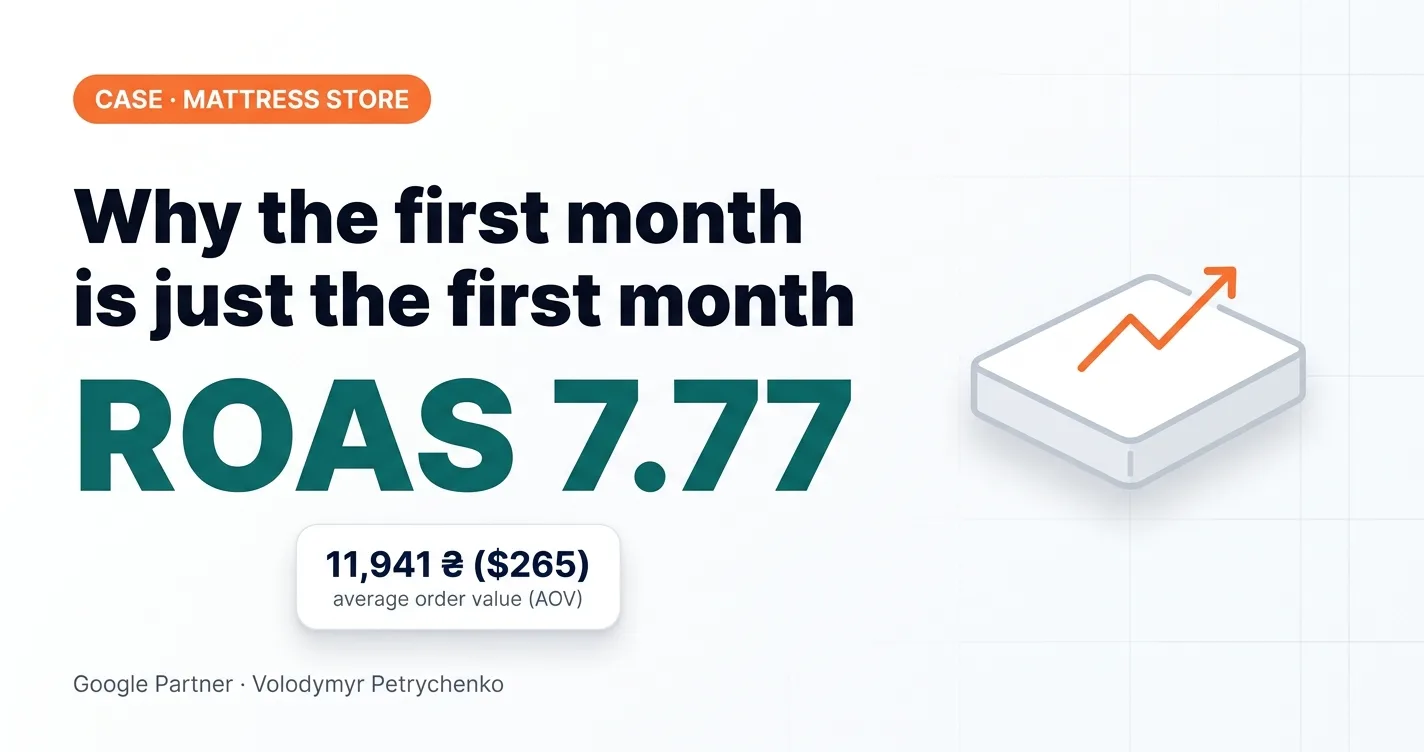
The overall ROAS for the whole period is 7.77, the average order value is UAH 11,941 ($265). Note that October is only part of the month. The attribution window is at work: in this niche it takes 2–3 weeks from the first click to an order, and some October orders are still to come. That’s why October’s ROAS (6.87) is currently lower than the previous months. We’ll see the real October figure in November, and it will be better.
Forecasting in Google Ads: 4 time series forecasting methods
The dashboard has a “Forecast” tab. The key point right away: I wouldn’t promise the client any forecasts right now. This forecast is purely statistical and is not a guarantee of results. But it gives an idea of where and how the project is moving and shows a possible scenario.
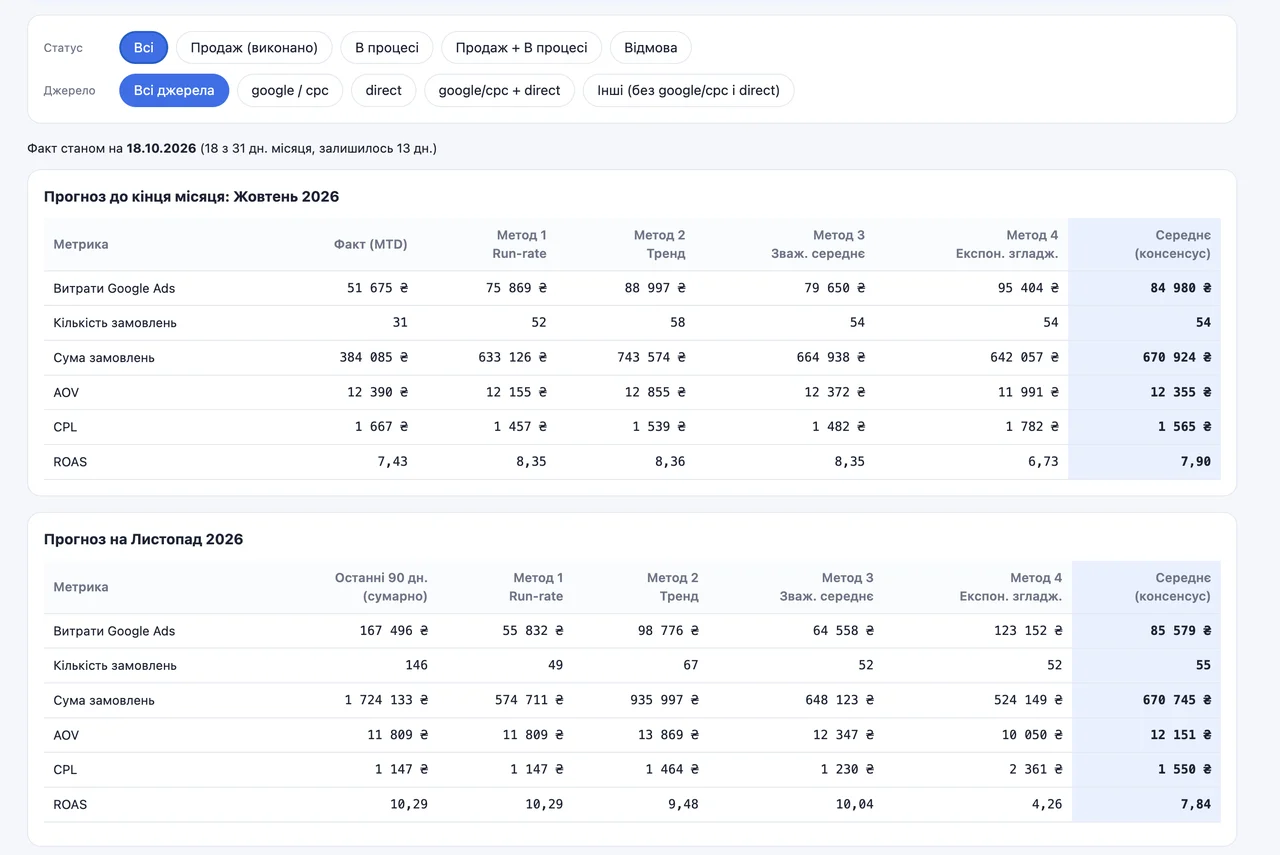
How it works. Daily data for the last 90 days is taken: spend, number of orders and order value. In statistics, such a time-ordered set of values with a stable step (daily) is called a time series. Each metric is calculated separately using four time series forecasting methods. The forecast for the current month is the actual figure from the first of the month plus the forecast for the remaining days.
Why four methods? Because none of them on its own deserves to be considered accurate.
Method 1. Run-rate. I call it the “average temperature across the hospital”. The daily average over 90 days is multiplied by the number of days remaining. The simplest method. It says: if everything goes as on average, this is the result. It sees neither growth nor decline.
Method 2. Trend. A straight line (linear regression) is drawn through 90 points and extended forward. If the metric is growing, the forecast will be above average; if it’s falling, below. The weak spot: the line keeps pulling the trend further even if the growth has already ended.
Method 3. Weighted average. The same average as in the first method, but recent days carry more weight. The first day of the 90-day window has a weight of 1, the last one 90. So yesterday is 90 times more important than a day three months ago. The method reacts to recent changes, but without sharp jumps.
Method 4. Exponential smoothing (Holt’s method). It calculates two numbers: the current level and the current trend. Each new day updates the level by 30% and the trend by 10%. It’s the method most sensitive to recent changes, which is why it gives the widest spread. In this case, it forecasts a ROAS of 4.26 for November, while the other methods show 9.5 to 10.3.
Consensus. This isn’t a separate super-method, but the average of the four methods for spend, number of orders and order value. Average order value, CPL and ROAS in the consensus aren’t averaged, but recalculated from these totals. No single method gets it right on its own, but when four different approaches give a similar figure, you can more or less trust it.
All four methods share one drawback: the forecast is built on a small sample. The consensus gives about 54–55 orders a month, and that’s very little for a quality forecast. For November, the consensus shows 55 orders worth UAH 670,745 ($14,905) and a ROAS of 7.84.
Conclusions
First: yet more proof that you can’t work on ad account data. 249 conversions in the ad account and 134 orders in the CRM — that’s the difference between “everything’s great” and reality.
Second: use every free opportunity to improve your ads. A supplemental feed, the right title, attributes, shipping_label cost nothing but time and willingness.
Third, and most important. If the client had stopped after the first month with a ROAS of 3.10, he wouldn’t be earning in August, September and October. He’d be looking for another contractor who would start everything from scratch and feed him nonsense. Instead of staying on the course that had already started to work.
So forget about the first month. The first month is always technical work and collecting initial data. If someone promises you results in seven days or a month, you’ve been hooked. And for another three months they’ll keep telling you it’s just around the corner, until you change contractors.
05 — CRMCRM integration with Google AdsOffline conversions: real sales from your CRM flow back into Google Ads, so the algorithm learns from revenue, not leads.The same feed work — attribute enrichment and product segmentation — is available as a separate service: Merchant Center product feed optimization. And the product campaigns that run on this feed: Performance Max and Shopping campaign setup.
Where to find me
Message me on Telegram or by email — I respond quickly. Telegram channel and YouTube are for those who want to see real cases before reaching out and understand my approach.