
Marketer, analyst, ex-CMO focused on the Google ecosystem (Ads, Merchant Center, GA4, GTM). Google Partner. 150+ projects, 100+ positive reviews on Freelancehunt, 12+ countries.
- I work directly, with no account managers or subcontractors
- I measure results in sales, not in-platform conversions
- Maximum expertise in the Google ecosystem — instead of “PPC, social ads and SEO, all in one”
First, let’s sort out what end-to-end analytics actually is, because people often call just about anything end-to-end analytics when it isn’t.
Contents
Google Ads Conversions ≠ Profit: End-to-End Analytics Shows the Real Picture

Why did I add this as a service in the first place? Because I never have enough data. To work effectively with your ads and your marketing, I need as much information as possible. End-to-end analytics covers exactly that.
I’ve been implementing various end-to-end analytics systems for a couple of years now. It’s easier these days: there are plenty of technical tools and ready-made groundwork that help me roll this out quickly on any new project.
What end-to-end analytics really is
It’s a method, a data collection system that combines information from every possible source. Even within a Google Ads service there are several sources: the Google Ads account itself, Google Analytics, call tracking, the CRM, messengers, email and maybe some custom setups.
The job of end-to-end analytics is to take all of this and combine it into a single system, so a person (the specialist or the client) goes to one place and sees the whole situation. Not logging into the CRM separately. By the way, a CRM can also be called a kind of end-to-end analytics system; I’ve seen that interpretation. Binotel or Ringostat are analytics systems too, but they pull data together around their own tool and ignore everything else. End-to-end analytics brings it all into a single end-to-end system.
Why a business needs it
First, the most accurate possible calculation of the effectiveness of anything: lead quality, ROMI, gross profit and so on.
Second, budget optimization. The system lets you scale the campaigns that bring real money and turn off the ones that don’t.
Example: on one project they’ve been working on organic quite actively for a long time. If you work on organic for the sake of traffic, rankings and site visits, you get a picture with a low conversion rate into real quality leads. This isn’t a dig at the person doing that work, just an illustration of the general point end-to-end analytics makes.
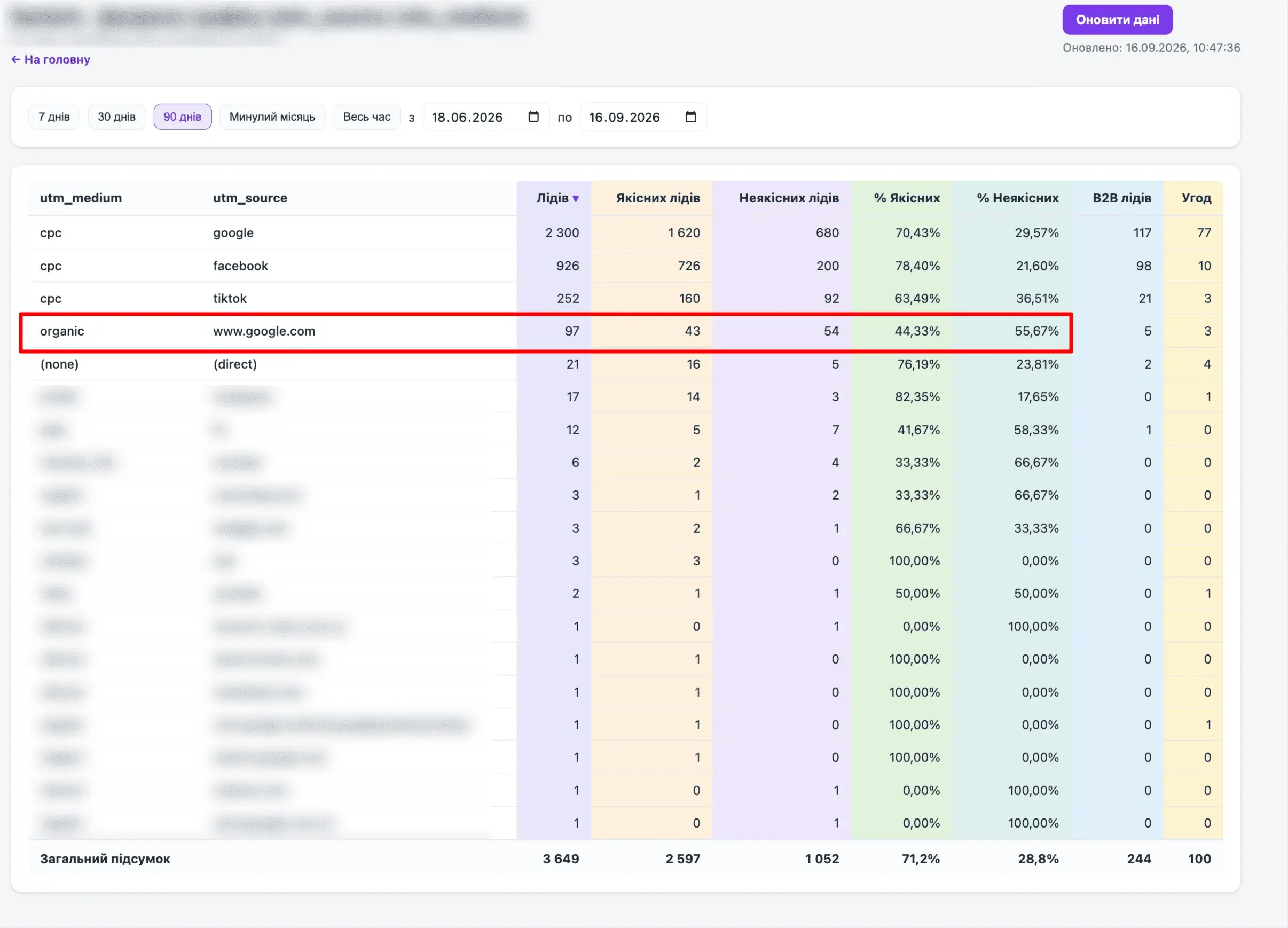
In the screenshot we see that organic traffic does bring leads, no doubt, but their quality compared to paid channels is extremely low. Only 44% are quality leads, while paid search gives 70% and Facebook 78%.
That doesn’t mean you should stop investing in SEO. It means the strategy needs adjusting somewhere, because organic traffic generates the fewest quality inquiries. Without end-to-end analytics you’d never see it.
Third, maximum transparency in the specialist’s work. Not just Google Ads reports about piles of leads and orders, but clear, transparent information on how the ads actually perform, for both the client and the specialist.
Example: rejection reasons by sales manager
Another example of something you can see in an end-to-end analytics system but not in a CRM. In my opinion, CRMs aren’t built for marketing analysis at all.
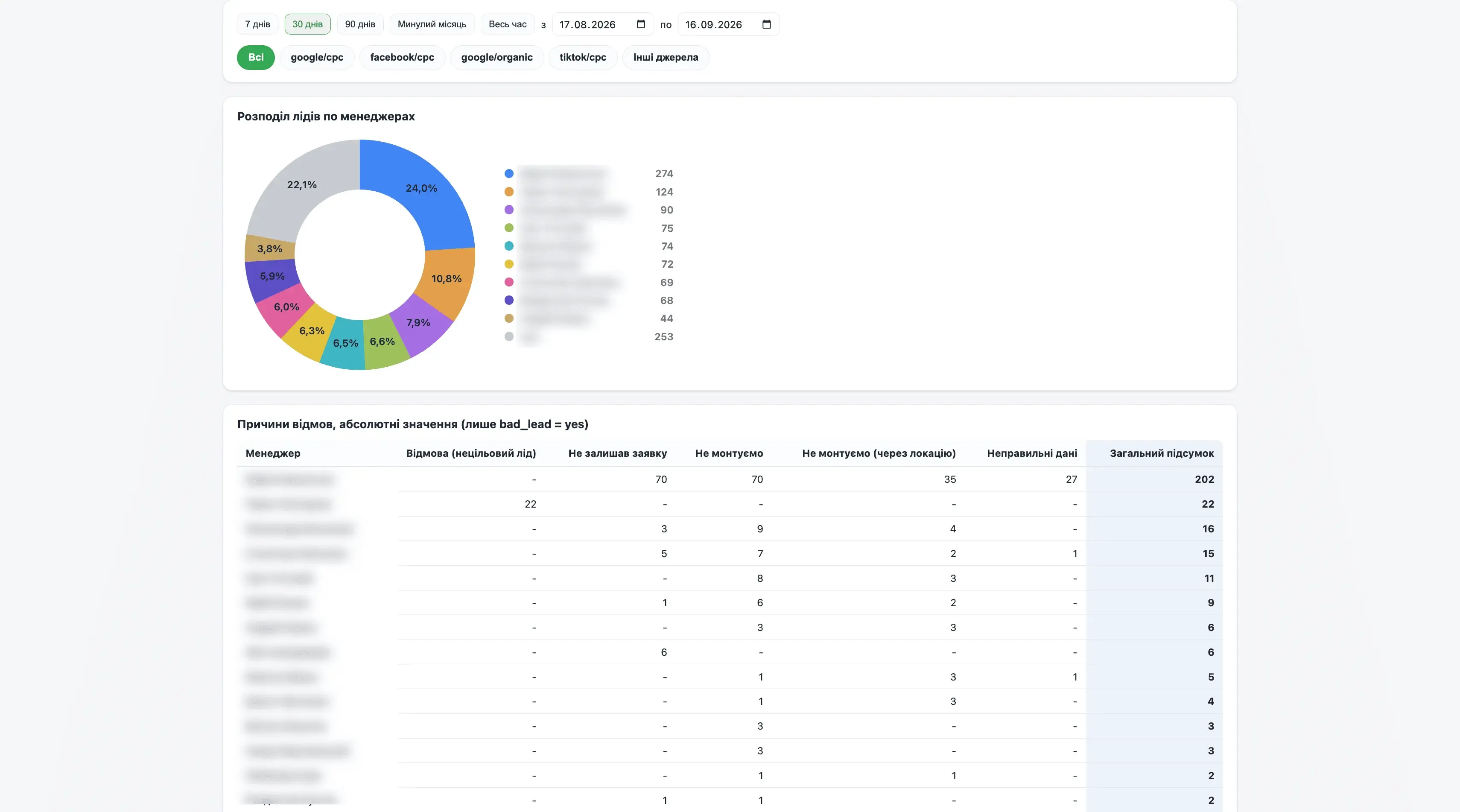
The first screenshot shows lead rejection reasons broken down by manager, to see whether one of the managers might be underperforming.
The second screenshot shows the rejection rate by manager. Some managers have a rejection rate well above the team average. For example, the first row shows 73% rejections against an average of 27.3%.
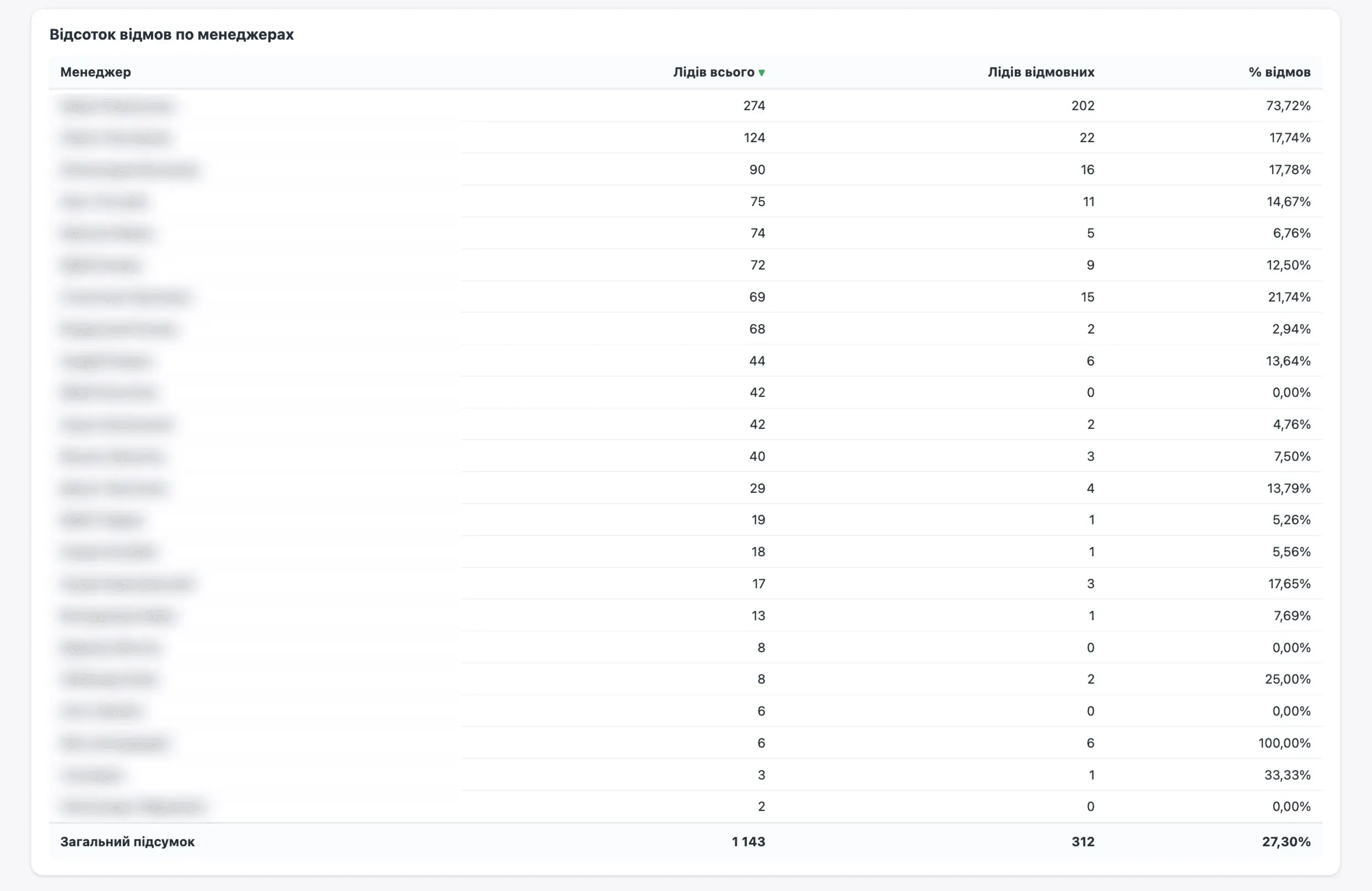
Here you need to dig deeper with the sales team into why this particular manager has such a high rate. Likely reasons: he gets the least promising leads, he can’t tell a qualified lead from an unqualified one, or he’s simply slacking off. It needs looking into. The end-to-end analytics system is what highlights all of this.
How I work with an end-to-end analytics system
I take everything available, combine it into a single system and give the client a link to the dashboard.
An important point: none of the end-to-end analytics systems I build are templates. Every business is unique and has its own KPIs. Doing what agencies do, slapping together one bland Looker Studio dashboard and pushing it on everyone, isn’t my approach.
Key point: an end-to-end analytics system should be useful, not just exist.
My dashboards serve two purposes: for the business owner, to see key metrics and their trends; and for the specialist, to help make decisions.
Dashboard #1: lead generation, the simplest version
The three metrics the client cares about most: spend, number of leads, CPL. Below that, a breakdown by whatever this particular client is interested in.
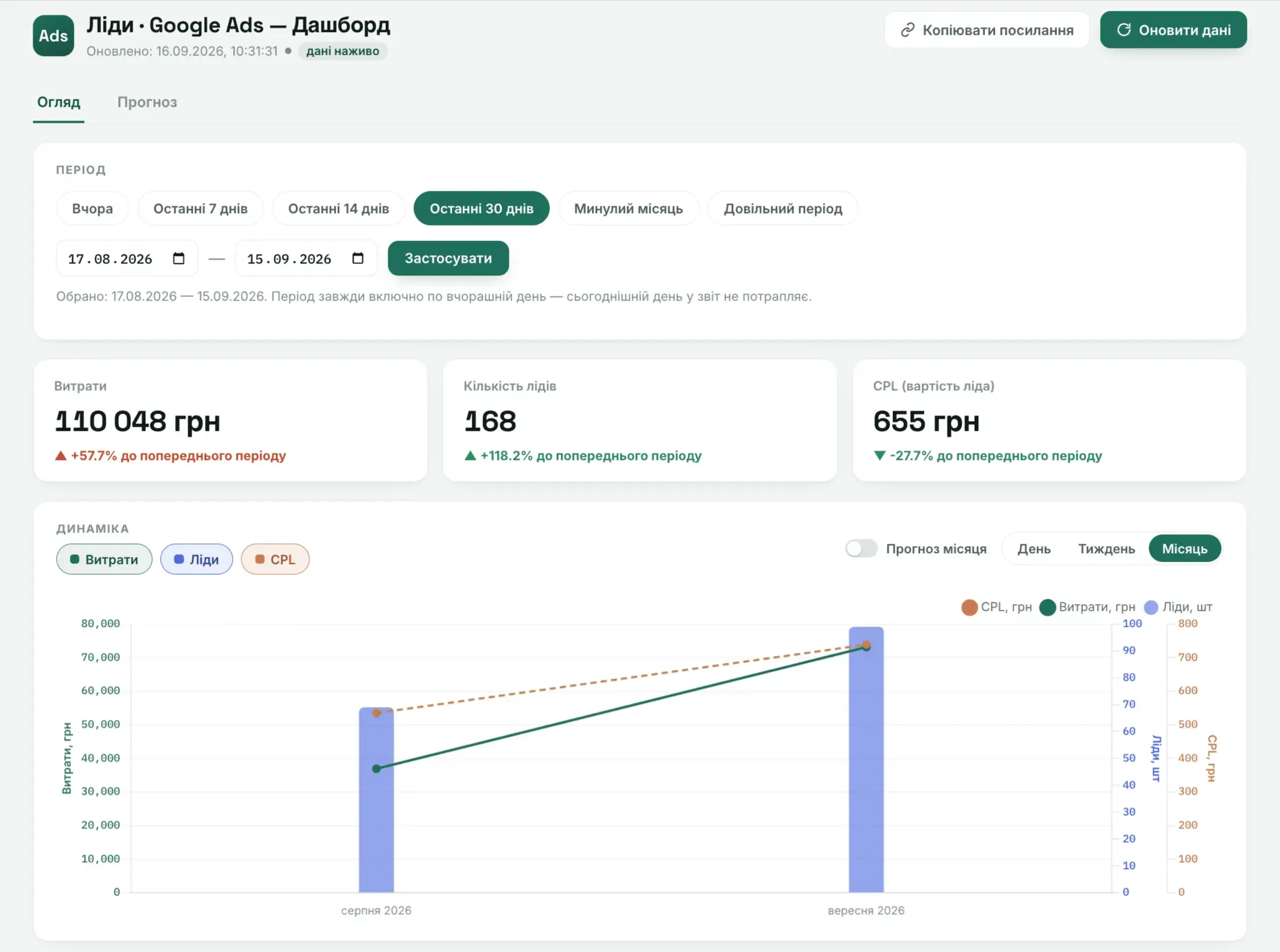
This is a relatively new dashboard. It now has a “Forecast” tab that predicts results using four statistical methods. Important: a forecast isn’t a guarantee; it’s based on data from previous periods using different statistical methods.
Dashboard #2: also lead generation, with deeper detail
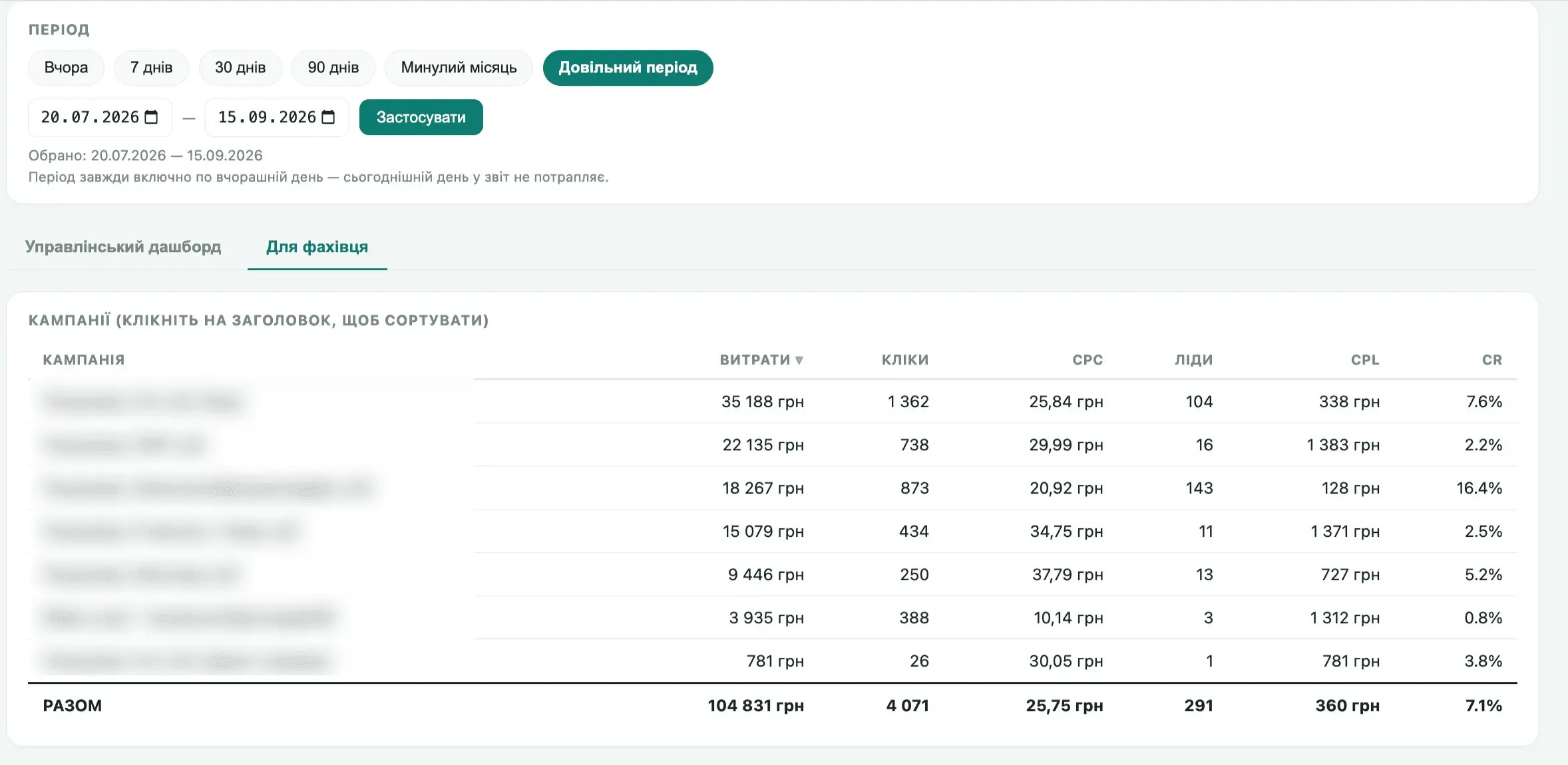
We only send data about quality leads into the system. In one click the client sees the key metrics: spend, number of quality leads, cost, and the site’s conversion rate into a quality lead. That’s the overview.
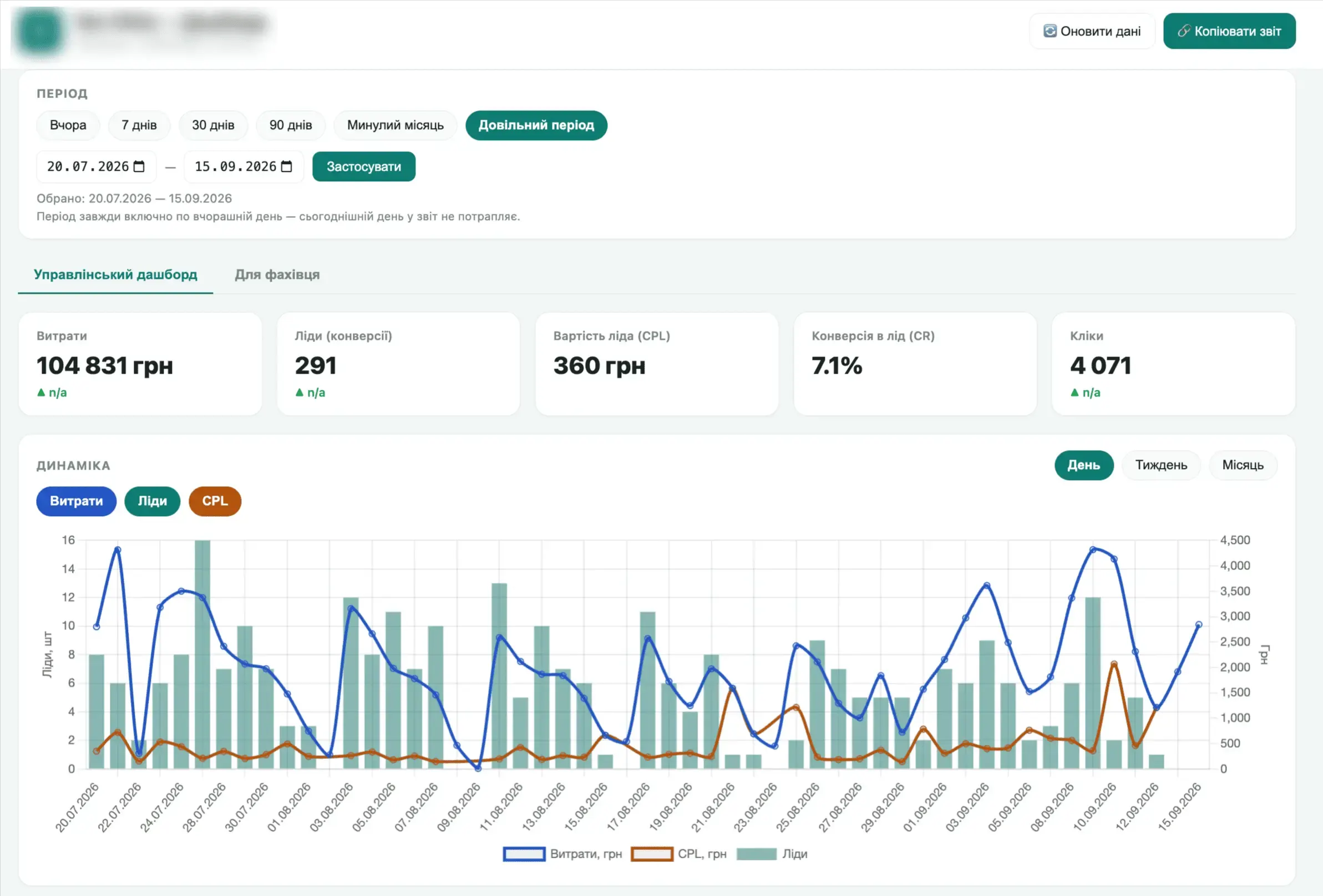
There’s a “For the specialist” tab with a more detailed breakdown by line of business. Overall numbers are nice, but you need to understand what works better and what works worse. Campaigns are blurred here, but you can already see that some areas have different conversion rates into quality leads: some convert better, others worse, and for the weaker ones you need to figure out why.
Dashboard #3: the biggest in my toolkit
It combines information from every possible source. The first block is for management, for the head or owner of the business. Below are blocks for individual specialists and for the head of sales.
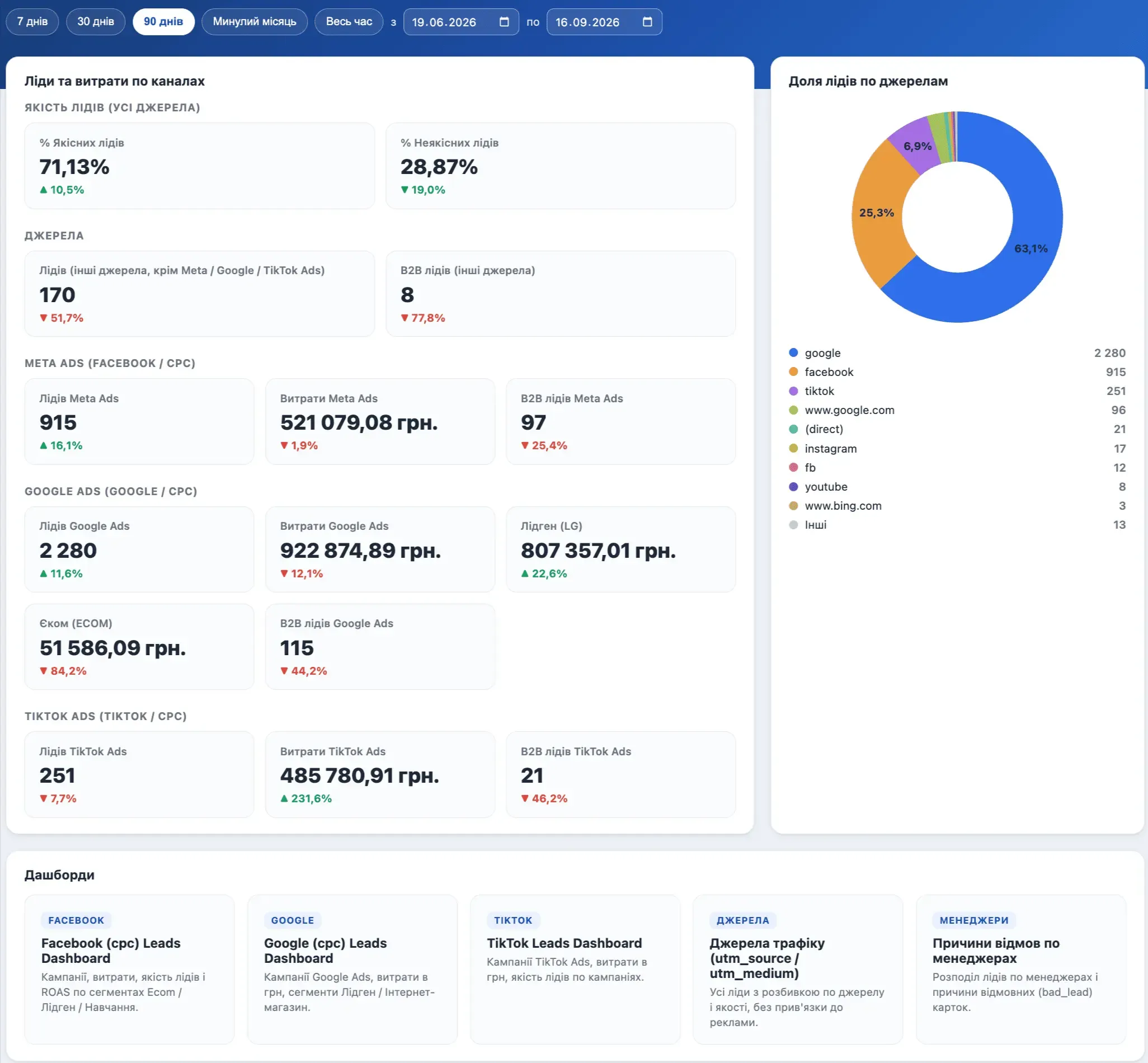
More detail on the Google Ads paid search tab, for reacting quickly to changes. A breakdown by campaign in terms of lead quality, cost per B2B lead and other metrics.
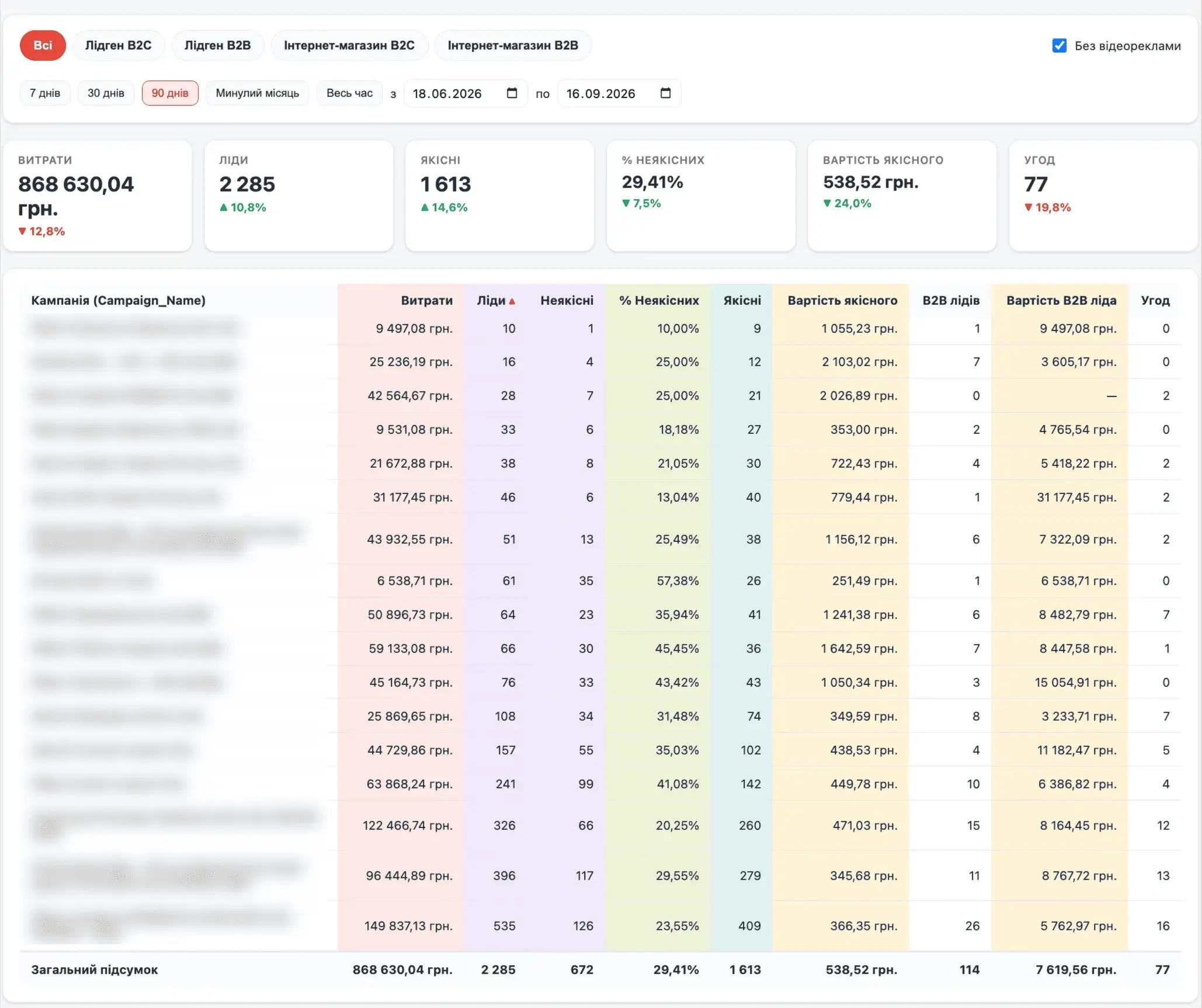
There are over 20 campaigns here, and the budget allows for experimenting. The dashboard shows the cost per quality lead in each campaign, the cost and number of B2B leads per campaign (because a B2B client is always a priority, with a completely different order value), and a “deals” block with actually closed deals, so you can see which campaigns generate leads and which of those leads actually turn into deals.
An interesting clinical case. I had a client I built a dashboard like this for right at the start of our work together. A week later he says: great job, everything’s awesome, but I’m not getting any more leads.
Before that, his numbers never once matched what his previous contractor reported. The contractor looked at the ad account, counted every phone inquiry (qualified, unqualified, repeat calls and so on) and callbacks, and didn’t track forms at all. The usual story. The client, meanwhile, was looking at the real lead quality and how much money those leads brought in.
I showed him the real cost per quality lead. And he said: that’s expensive. So it became expensive once I showed him the real numbers, while the two years he’d lived with it didn’t bother him. Surreal stories like this aren’t rare.
First of all, leads can’t multiply in a week. I covered separately in an article why “make me a profit in 7 days” is pure fantasy. Especially since at the time of the handover we had practically no data, even though the account had supposedly been running for 2 years. There were inquiries, but their quality was unknown, so it wasn’t really data at all, and we had to collect everything from scratch to understand where the quality leads were and where they weren’t.
Dashboard #4: e-commerce with a mixed B2B and B2C audience
You’ve probably already seen this dashboard in my case studies. Specifically, for this project there’s a case study where we grew gross profit almost fivefold in three months.
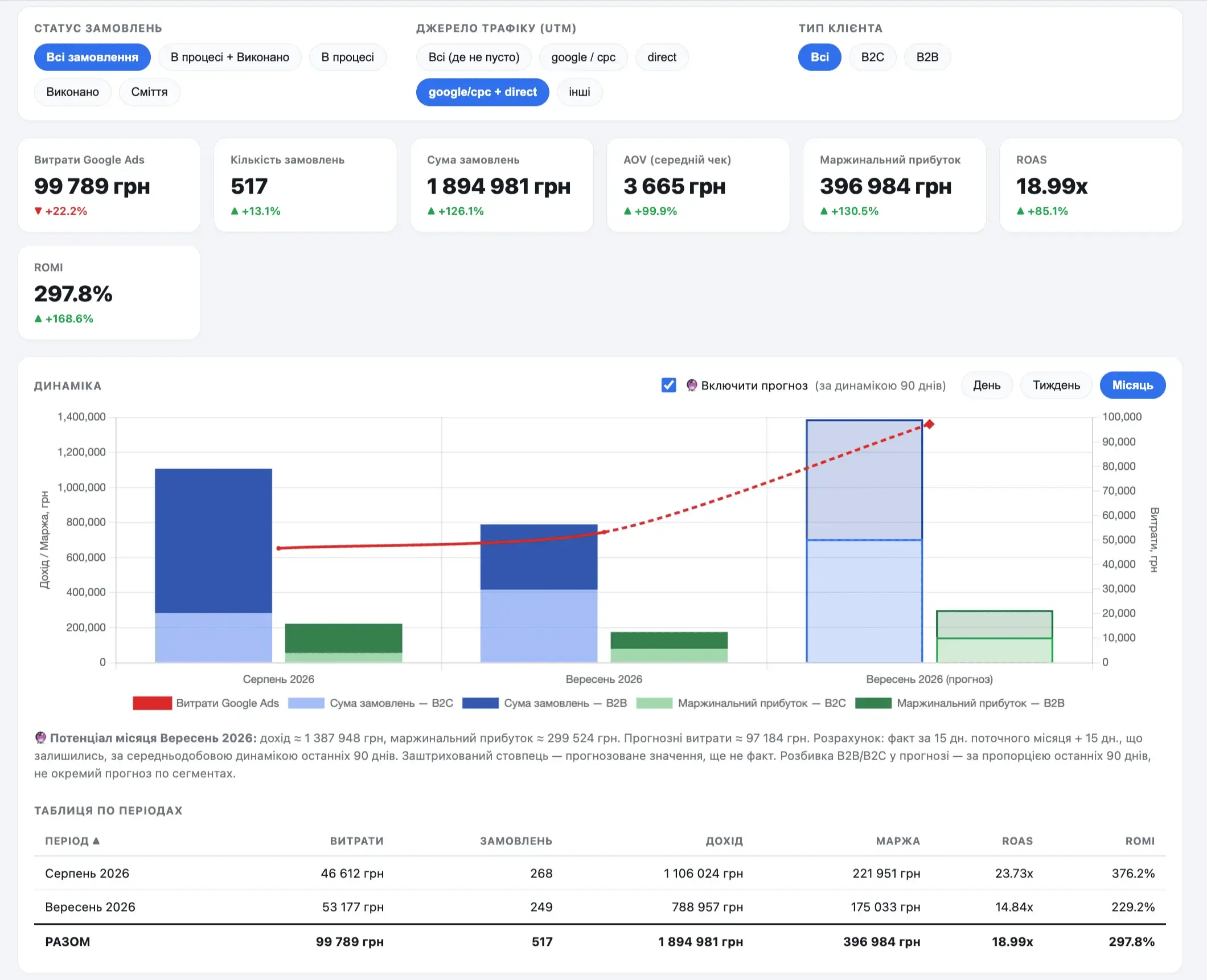
Compared to the other dashboards, this one has a block of status filters. One of the key metrics is the number of rejections, because it reflects either traffic quality or how well the managers work. Again, you need to dig in and get into the details.
On average across my projects, about 90% of inquiries convert into sales or deals, and the other 10% are rejections, email rejections, fake inquiries and so on. If your number is worse, you need to find out why.
Since the audience here is mixed B2B/B2C, there’s a B2C and B2B breakdown to see each segment’s trend separately.
Summary
End-to-end analytics isn’t just a pretty dashboard with numbers. It’s an important tool in the work of a good Google Ads specialist. A good specialist works from real data.
If you don’t have end-to-end analytics, it’s time to think about changing contractors. Right now you just have someone who sets up ads and pushes buttons, that’s all. You’re not doing marketing.
I covered the difference between an agency and a freelancer in a separate article: with that approach you’ll always lose in the long run. Picture it: there’s your business, and there’s the business of a client I manage, where data flows into an analytics system. Over a few months you’ll always lose, because you’re optimizing blindly, without knowing what works better and what works worse. Meanwhile we’re feeding quality data into the system, seeing the project’s math, and scaling what works while switching off what doesn’t.
For what a monthly report built on this kind of data looks like — with CRM orders, revenue, ROAS and a plan for next month — see “Google Ads Reporting from an Expert: A Real Example”.
What happens when analytics data depends on the people at the front desk — see the clinic case where nobody marked missed calls and Google Ads saw only half the leads: “Three Months Treating the Ads. The Front Desk Was Sick”.
To get more data into your end-to-end analytics, set up Google Tag Gateway: tags send data through your own domain and get blocked less often. How to do it — in the article “Google Tag Gateway: +14% More Data in 2 Minutes”.
What you can see once Google Ads leads are tagged in the CRM by segment and status — in the breakdown “B2B Leads from Google Ads: Where They Really Come From”.
Error-free links with UTM tags are built by the free UTM builder.
Standard GA4 reports that cover 95% of tasks — see 11 GA4 reports I use in my work.
Where to find me
Message me on Telegram or by email — I respond quickly. Telegram channel and YouTube are for those who want to see real cases before reaching out and understand my approach.