
Marketer, analyst, ex-CMO focused on the Google ecosystem (Ads, Merchant Center, GA4, GTM). Google Partner. 150+ projects, 100+ positive reviews on Freelancehunt, 12+ countries.
- I work directly, with no account managers or subcontractors
- I measure results in sales, not in-platform conversions
- Maximum expertise in the Google ecosystem — instead of “PPC, social ads and SEO, all in one”
Almost every project that comes to me for an audit — by my estimate about 95% — has tracking problems: it doesn’t work, it duplicates conversions, or events fire on the wrong actions. And the ads are then built on that data. Demand for analytics setup is growing fast for me right now, so I decided to show the Google Analytics 4 reports I use regularly and explain why each one matters.
Only standard reports here. Custom reports in Explorations are a topic for a separate article. Screenshots are from an online store for the last 28 days, September 27 to October 24, 2026.
Contents
11 GA4 Reports Every Marketer Should Know

1. Realtime report
It shows what’s happening on the site right now: how many people, where they’re from, which pages they’re viewing, which events and key events are firing.
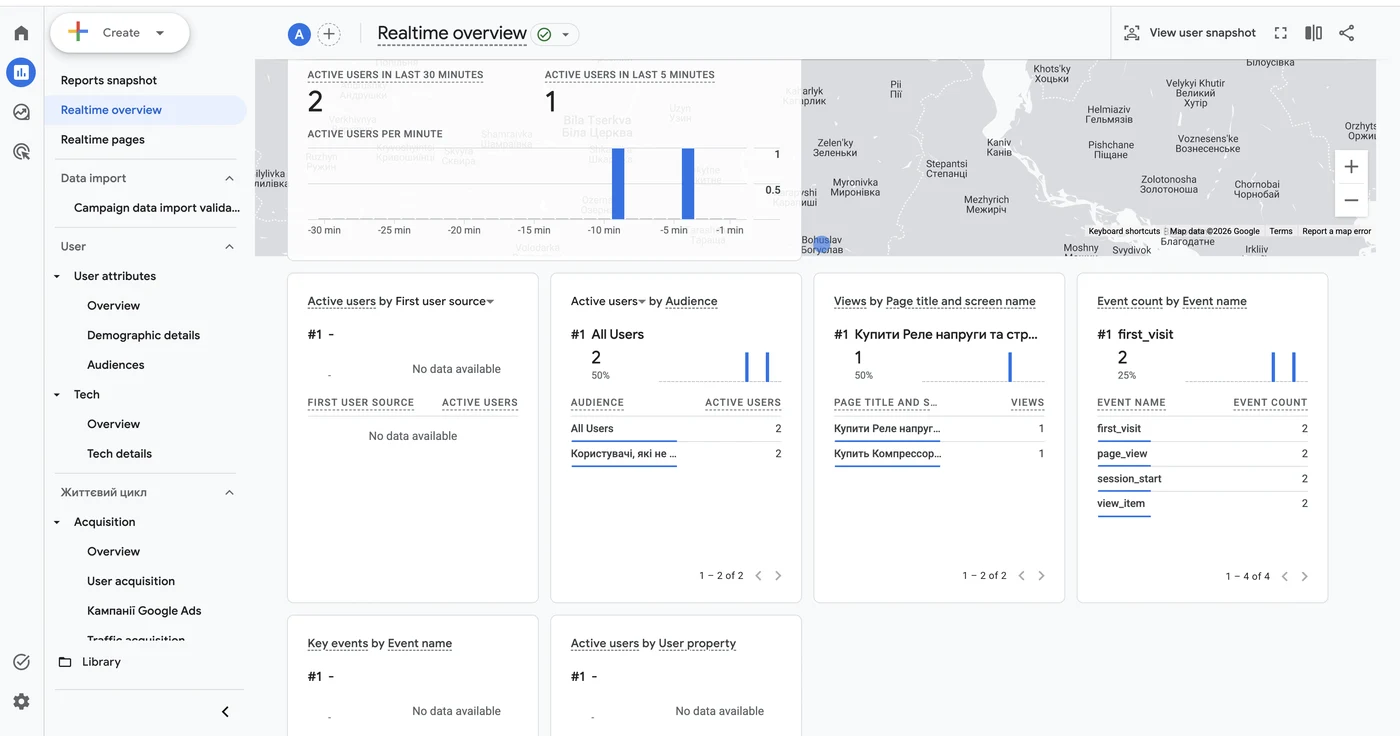
I use it to check that events fire. I usually check through Tag Assistant myself, but sometimes I need to show a client visually: here’s the event, it’s coming in. DebugView also works for this, but not always.
A business owner may find it interesting for another reason. When I was still a marketing director, on peak days I liked to open it and watch sales grow in real time. It gives nothing for analysis, but it’s great for morale.
2. Key event attribution paths
Advertising section. It looks scary but shows an important thing: which channels a person came to the site through before buying.
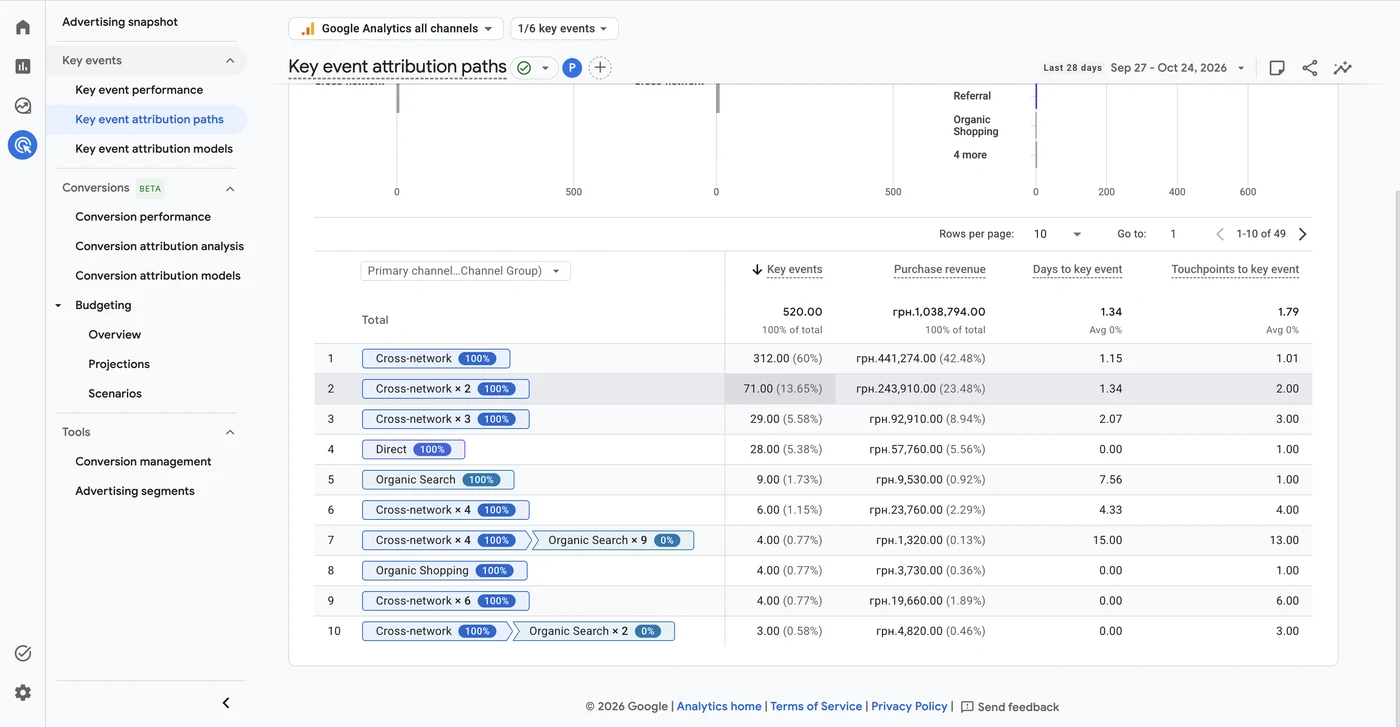
I’m often asked whether it’s worth adding social ads, YouTube or other channels. It is, because marketing works as a whole, and this report confirms it: some people return to the site several times before buying, from one channel or from different ones.
The store in the screenshot has 520 purchases. 60% of them came from a single Performance Max touch, another 14% from two such touches, 6% from three. On average there are 1.79 touchpoints and 1.34 days before a purchase. These are products people buy quickly. For a more expensive and complex product the path will be much longer, and this is exactly where you see which combination of channels brings people to a purchase or lead. How channels work together on real data, I covered in the article on Google Ads, SEO, Meta and TikTok across 9,171 leads.
3. Key event attribution models
An attribution model decides how conversion value is split between the channels a person interacted with. GA4 used to have several models; now Google has kept data-driven attribution and last click. For a marketer, data-driven is a black box: Google doesn’t explain exactly how it distributes value.
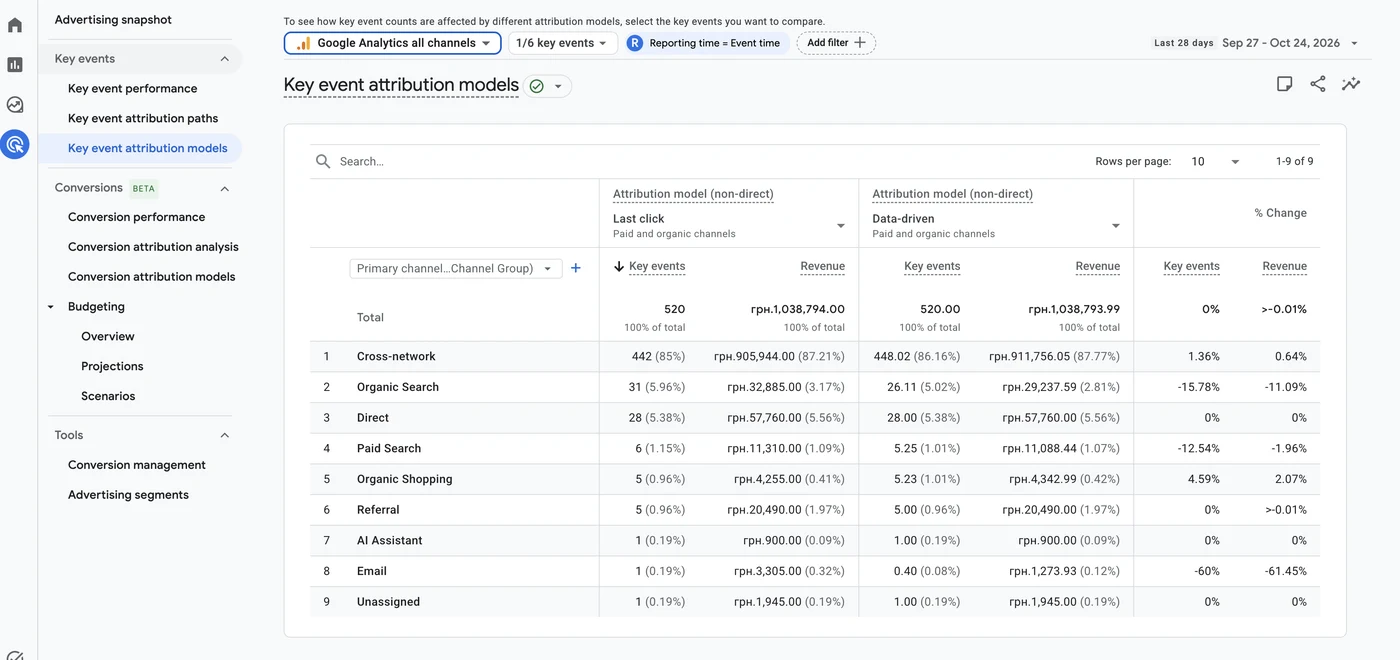
In this report you can put two models side by side and see how the numbers change. It doesn’t create more sales, but it shows how important a particular channel is. In the screenshot, under last click Performance Max gets 442 of 520 purchases, under data-driven 448. Organic search is the opposite: 31 under last click and 26 under data-driven, minus 16%.
The gap is small because the main source here is paid Google ads, and all other channels together bring about 15% of purchases. In a project where SEO works properly, the difference between models will be much more noticeable.
4. Google Ads campaigns report
The report I start and end my working day with. Without any custom reports, it shows users, sessions, key events and revenue for each campaign. For a basic analysis of ad performance that’s enough.
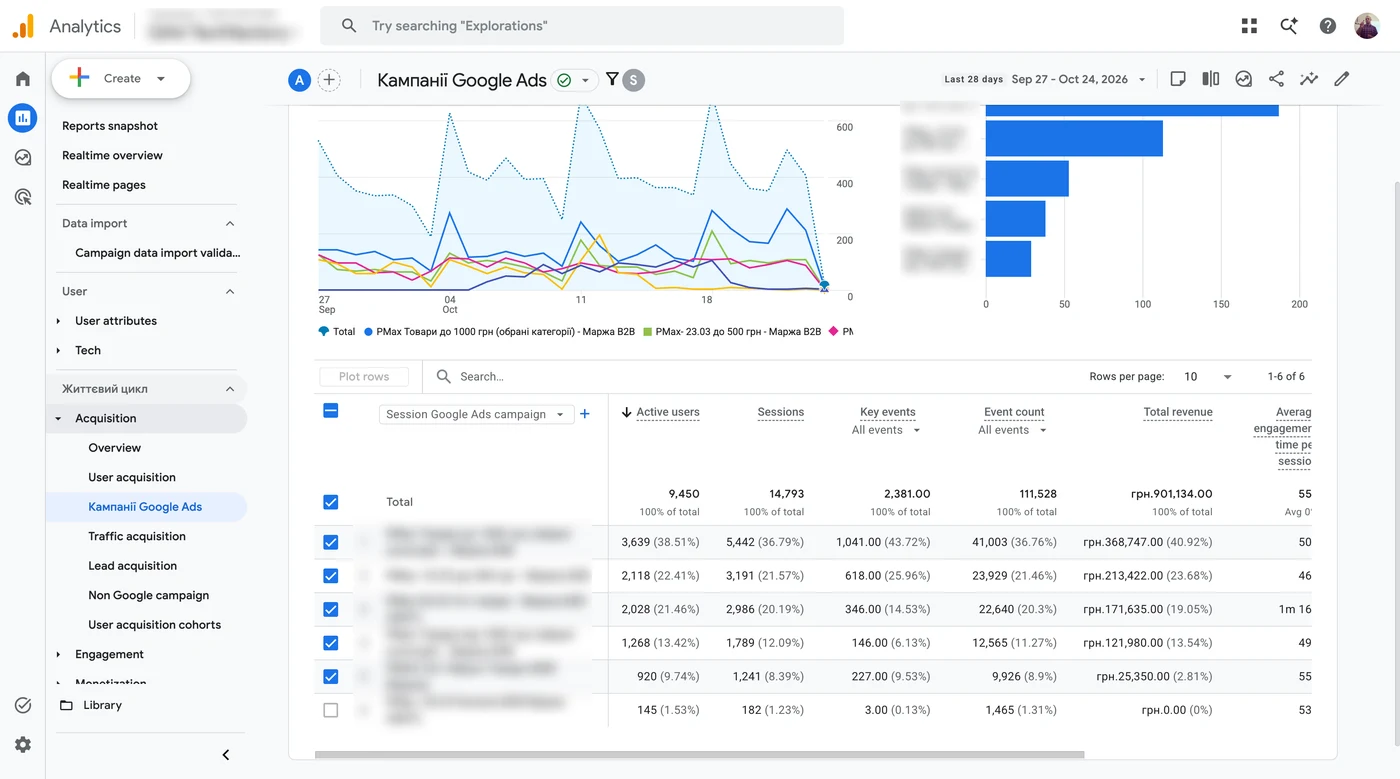
If there are several ad accounts, you can compare them in one click. This is the level of overall numbers: seeing which account performs better. A specialist then digs deeper anyway, from the top down.
Most people analyze ads only in the Google Ads account. But the data there isn’t always accurate, especially if conversions are imported from GA4: some of the statistics simply never reach the account. By accuracy I rank the sources like this: Google Ads lowest, then Google Analytics, and the site admin or CRM highest, if it works properly. Why, in detail, in the article on end-to-end analytics.
5. Advertising segments
To run remarketing in Search, YouTube, Display or Gmail you need collected audiences, and each network has size requirements. This report shows how many users are already in each segment and each network separately, so there’s no guessing whether you can launch yet.
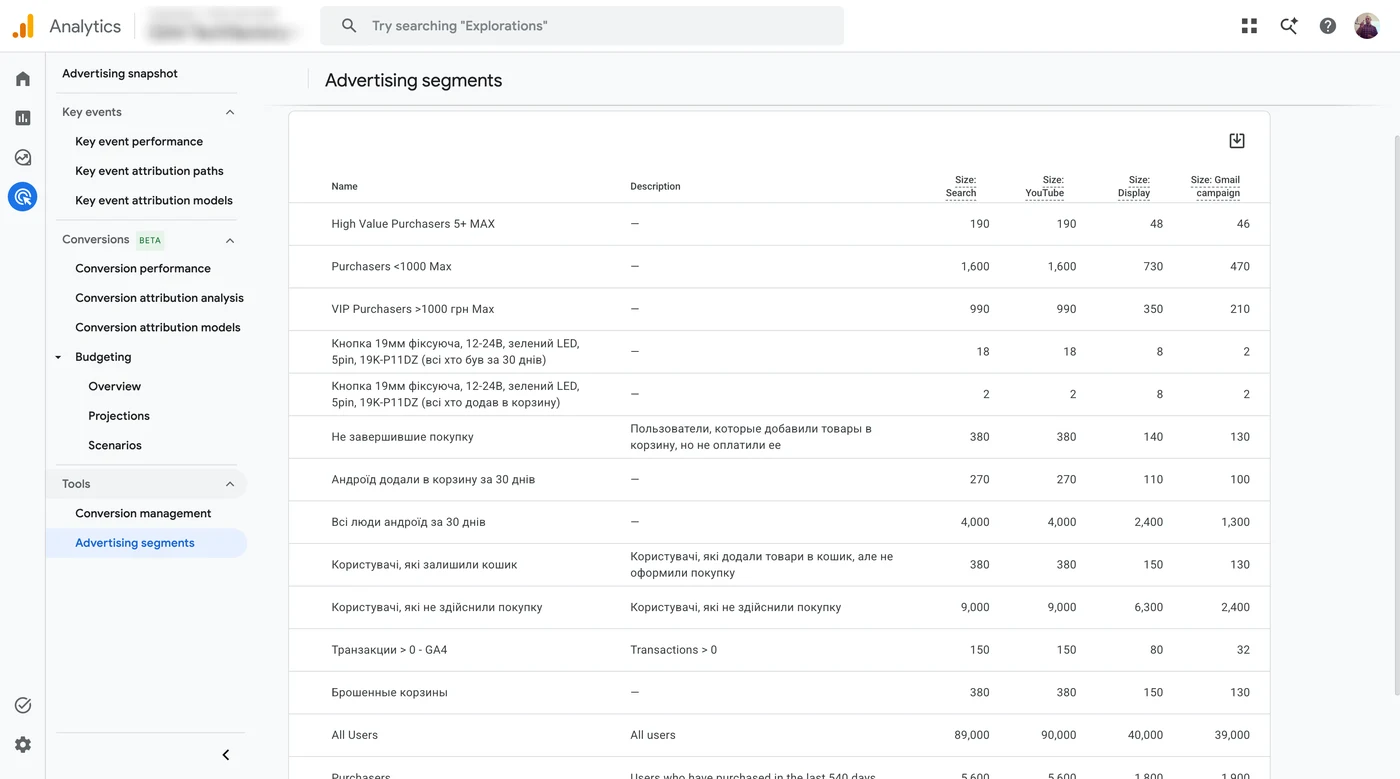
Sizes differ by network. In the screenshot, the “all Android users for 30 days” segment is 4,000 people for Search and YouTube, but 2,400 for Display and 1,300 for Gmail. Segments for one specific product collected 2–18 people, which is too few for remarketing.
6. Traffic acquisition
Covers all channels. You can see which sources bring higher-quality traffic, the conversion rate of each and how much money it brings.
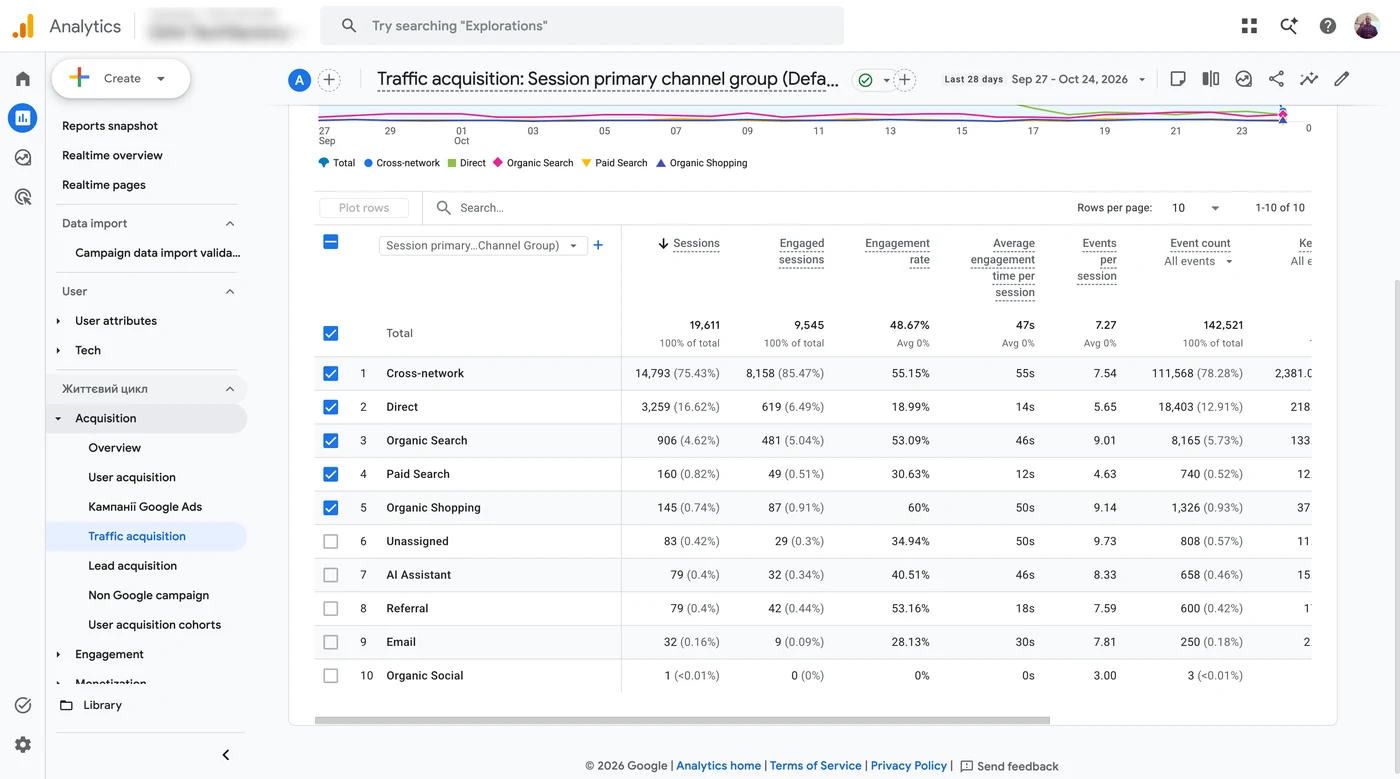
In the screenshot 75% of sessions are Performance Max with a 55% engagement rate. Direct visits bring 17% of sessions, but their engagement rate is only 19%. A gap like that is a reason to figure out what this traffic is. And note the AI Assistant channel: GA4 now shows visits from ChatGPT and other AI assistants separately.
Numbers in different GA4 reports may not match even for the same channel. Even in this store, the home page shows 546 purchases for 28 days, the transactions report 522, and the attribution reports 520. The reports use different attribution models and count data differently.
Standard reports can be customized: add or remove metrics and save as a new report. For example, people often ask for bounce rate — a habit from Universal Analytics. You can add it, but looking at bounces by channel is superficial. If you analyze it at all, do it by individual pages and together with scroll depth.
7. Demographic details
User attributes section. Countries, regions, cities, languages, age and gender if that data is available. I look at it in terms of conversion and revenue: regions that perform better get scaled, worse ones get investigated.
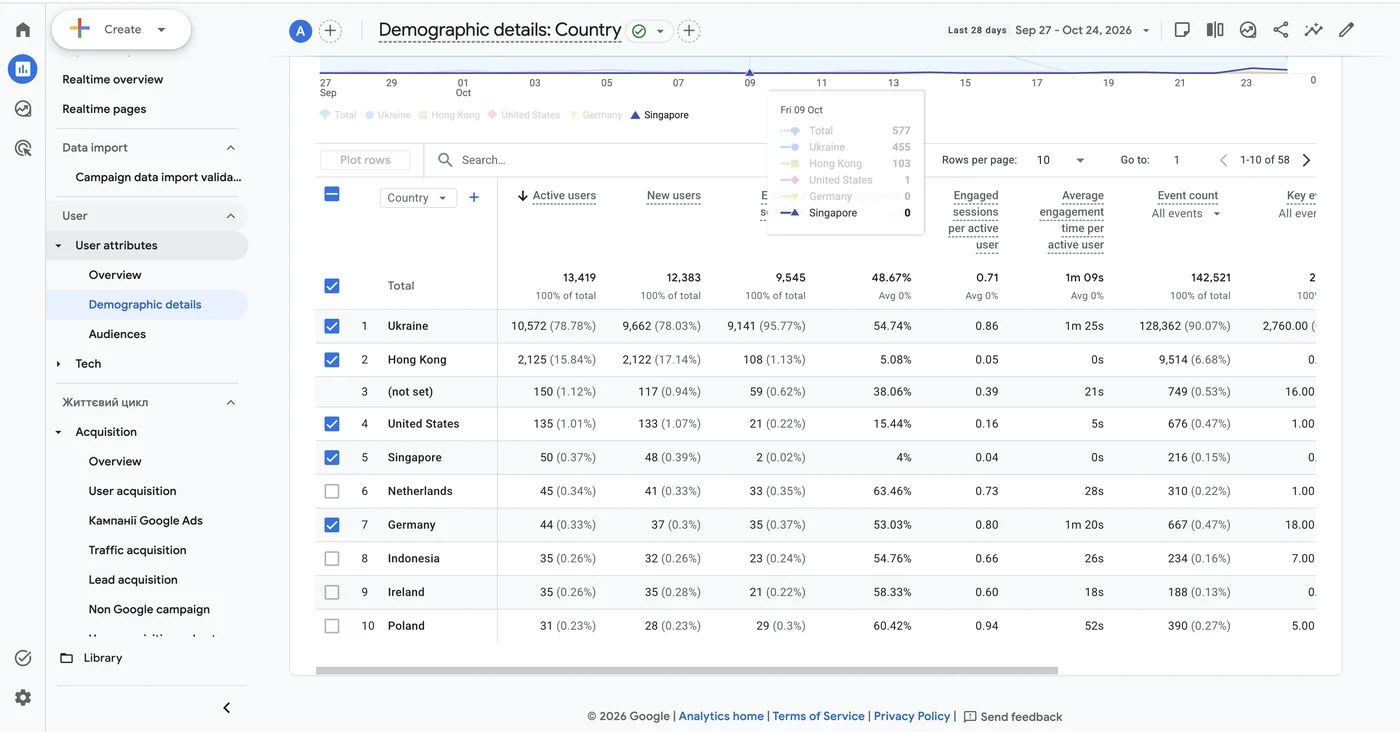
This is also where junk shows up. In the screenshot, 16% of active users are from Hong Kong, with a 5% engagement rate and zero time on site. The store sells in Ukraine, so these are almost certainly bots. Without this report they would simply dilute the averages.
I don’t use interests as a basis at all. They’re general audiences like “news enthusiasts”, and the target audience is defined before launching ads, not after. In the hierarchy of data useful for ads, interests rank lowest. A sale or a lead — the bottom of the funnel — weighs much more.
Before asking for a report, ask yourself one question: what do I want to see in it? Time on page by itself gives nothing. If we work for results, the conversion rate, how much we earned and whether the ads pay off matter more than the fact that people in Lviv Oblast spend 15 seconds less on a page than in Kyiv Oblast. For 95% of tasks, the standard reports are more than enough.
8. Tech details
Devices, browsers, screen resolution. The report helps you look for technical problems on the site.
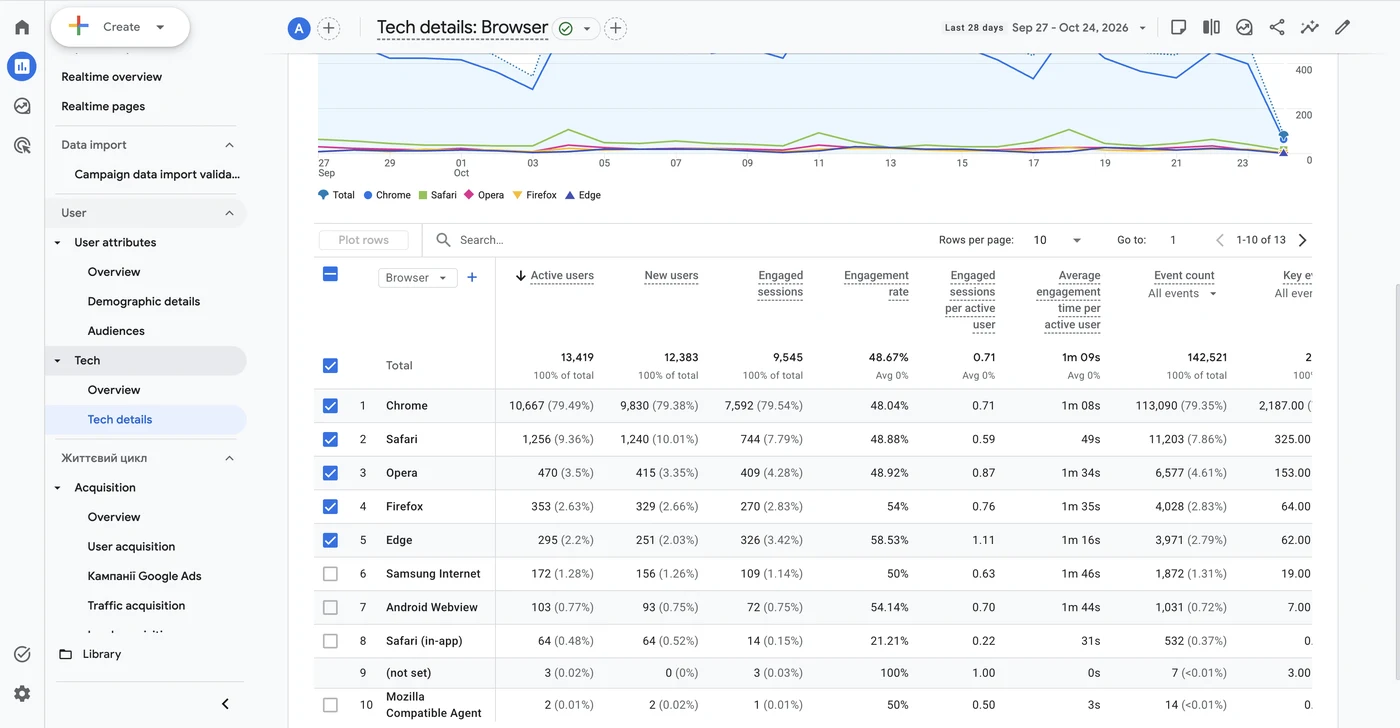
If a browser with a noticeable share of traffic has a sharply lower conversion rate, the site most likely isn’t adapted for it. This often happens with Firefox. If conversion is noticeably lower on some device type, look for what’s getting in people’s way there. And with resolution: a clumsy template can break on certain screens, and the cart button disappears or becomes tiny. What else on a site keeps ads from bringing sales, I covered in the article on CRO for Google Ads.
9. Ecommerce purchases
Monetization section. If ecommerce is set up correctly, you see a funnel for each product: how many viewed it, added it to cart and bought it.
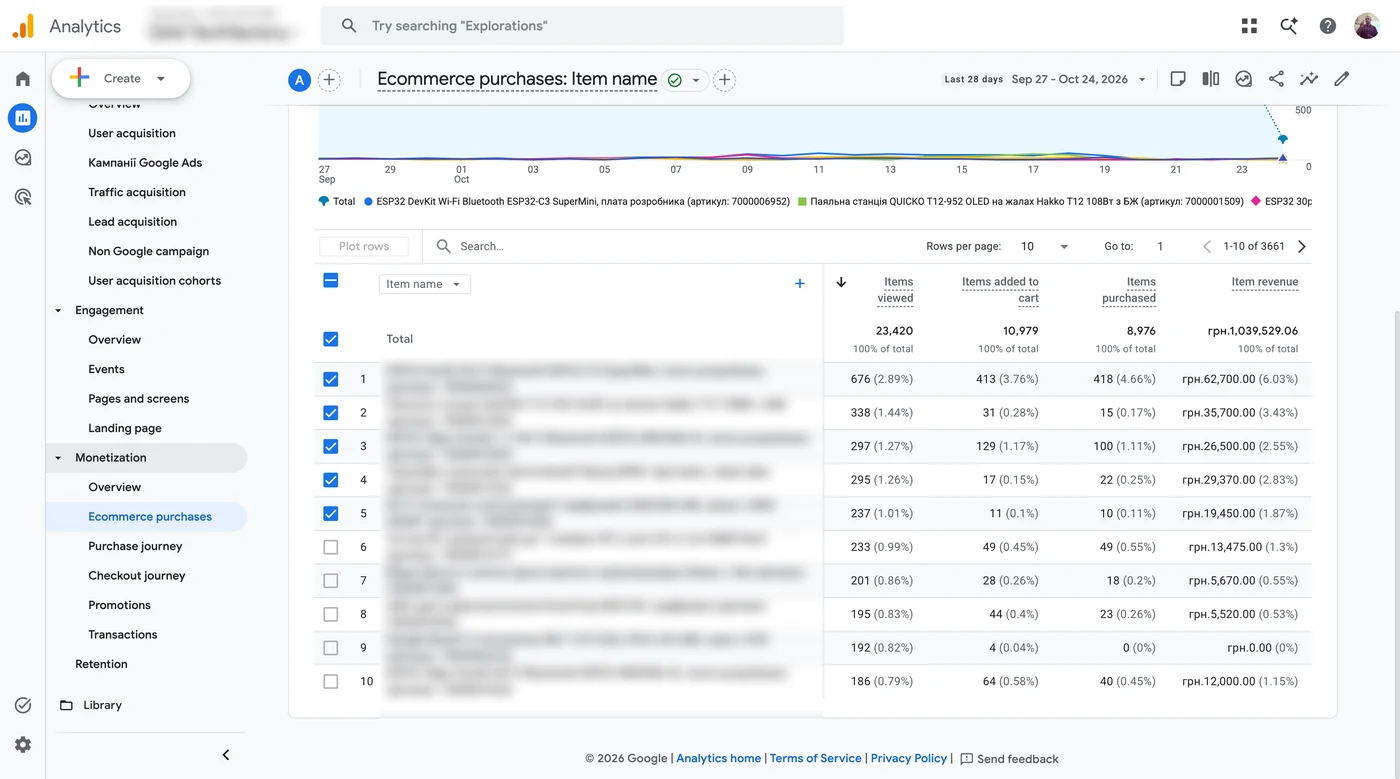
Look at products that get lots of views but no purchases. The screenshot has a product with 192 views, 4 add-to-carts and zero purchases. The reasons vary. The product may be out of stock while ads keep sending traffic to it. In one of my projects an expensive product was never bought through the cart at all — people bought it by phone. The client didn’t want call tracking, so these sales exist in the CRM but not in analytics.
A purchase in GA4 isn’t a sale yet. It’s more of a pre-sale: after it the order has to be confirmed and shipped, and the person has to pick it up at the post office. For the Ukrainian market this stage is especially important. So rely on actual sales from the CRM or admin.
10. Purchase journey
I used to build this funnel by hand in Explorations, then found the ready-made report. It shows at which stage users drop off, broken down by device, country, region and language.
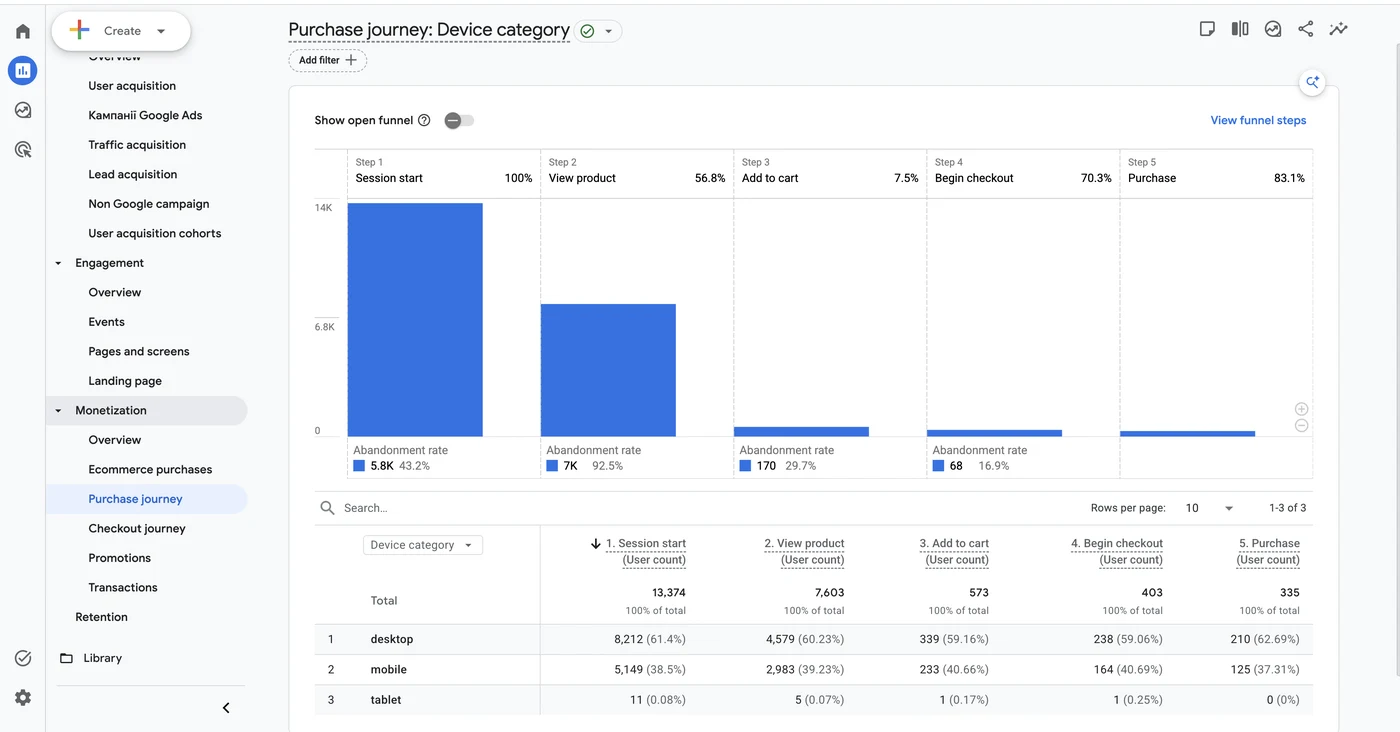
First of all I look at the step from checkout to purchase. If more than half of people drop off there, you have a checkout problem: the person has already chosen a product, put it in the cart, started filling in details — and didn’t buy. There’s some blocker, and it has to be found.
In the store in the screenshot only 17% don’t get from checkout to purchase, which is fine. The weak spot is elsewhere: 7,603 people view a product page, but only 573 add to cart, or 7.5%. So the work should go into product pages and prices, not the checkout.
11. Transactions
The last report shows clearly how inaccurate analytics data is. It lists transactions with revenue for each, if ecommerce is set up correctly. The store in the screenshot has 522 transactions for UAH 1,039,529 ($23,100) in 28 days.
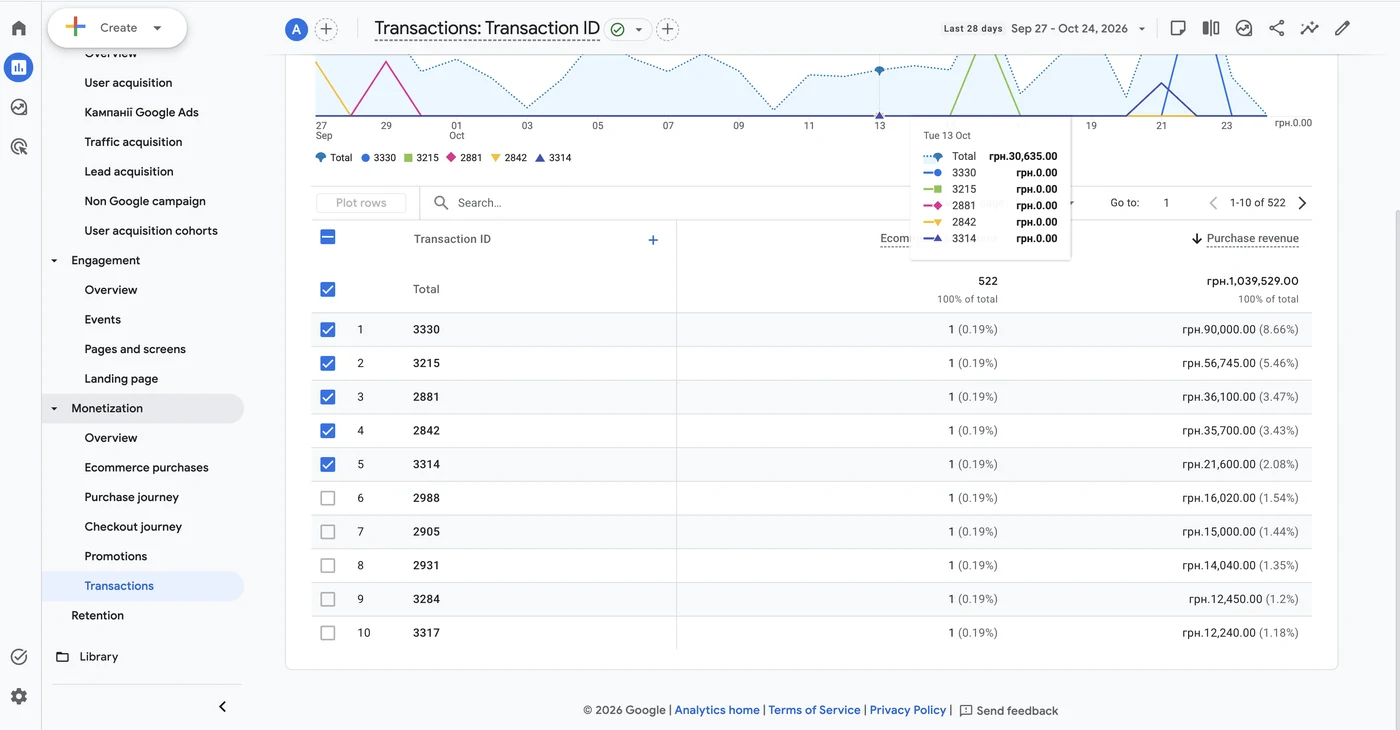
Sort transactions by ID and you’ll see that some never made it into analytics. The reasons vary; one of them is ad blockers, which I wrote about in the article on what blockers do to events on your site.
How many transactions get lost decides whether this data can be analyzed. If it’s 5–10%, you can. At 15–20% the error is already noticeable. The accurate tool is the CRM; analytics always gives an incomplete picture.
What to check in your GA4
Open the Transactions report for the last month and compare the number of transactions with the number of orders in your admin or CRM for the same period. If the gap is more than 10%, fix the tracking first and only then analyze the ads.
04 — AnalyticsConversion tracking with GTM and GA4Accurate tracking: Google Tag Manager, GA4, Enhanced Conversions, Google Tag Gateway.
Where to find me
Message me on Telegram or by email — I respond quickly. Telegram channel and YouTube are for those who want to see real cases before reaching out and understand my approach.