
Marketer, analyst, ex-CMO focused on the Google ecosystem (Ads, Merchant Center, GA4, GTM). Google Partner. 150+ projects, 100+ positive reviews on Freelancehunt, 12+ countries.
- I work directly, with no account managers or subcontractors
- I measure results in sales, not in-platform conversions
- Maximum expertise in the Google ecosystem
The ads are live, there is a budget, and the account shows zero impressions. It’s a typical situation, and there can be several causes.
The main thing is not to panic. Take the checklist at the end of the article and go from top to bottom: from the account down to the smallest settings.
Contents
Over the last couple of months people came to me twice with this exact request on Freelancehunt. Both times I found the cause, and both times it sat deeper than the campaign settings. Below I’ll tell you how I looked for it and what I found.
The first 24–48 hours are normal
It’s too early to panic in the first 24–48 hours after launch.
A new account has low trust with Google. If the site is new too, trust is even lower. This is how Google fights dishonest advertisers: it watches first, then lets you in.
Most often, even on a new account, impressions start within a few hours. But not always. Up to two days without impressions is a normal start. How long the whole path from setup to first results takes, I described in the article how long a Google Ads launch takes.
Is the problem in the account or in the campaign
The first diagnostic question: is the problem with the account or with the campaign settings? The answer decides where to dig next.
I check the campaigns first, then the account. The most reliable test is to launch the same campaigns in another account. If they run there, the problem isn’t in the campaigns.
Account level
The payment didn’t go through
Let’s start with the obvious. Google can’t charge you, and no warning banner appeared. That happens too, especially with manual payments (topping up the balance in advance) or bank transfer.
The balance ran out, impressions stopped. Add some money and the issue is solved.
The account is suspended
It’s harder when the account is suspended. Reasons: policy violations at the account level, suspicious payments and, very rarely, advertiser verification. I handle this as a separate service: Google Ads account unsuspension.
Why is verification rare? On its own it doesn’t stop impressions. Problems start when Google requires it and you didn’t complete it in time or failed it. Google hints that verification supposedly speeds something up. I’ve never noticed it speed up impressions. But I still complete it right at the start and recommend that to everyone.
 Google AdsFailed Google Ads Advertiser Verification. What Now?Why Google Ads advertiser verification fails: sole proprietor payment profile errors, documents, Donetsk region registration. 3 real cases and fixes.
When the account itself is to blame: two cases
The first case is a Freelancehunt project to launch ads for a book. The ads were set up, but Google gave no impressions. The task: find the cause and get them running.
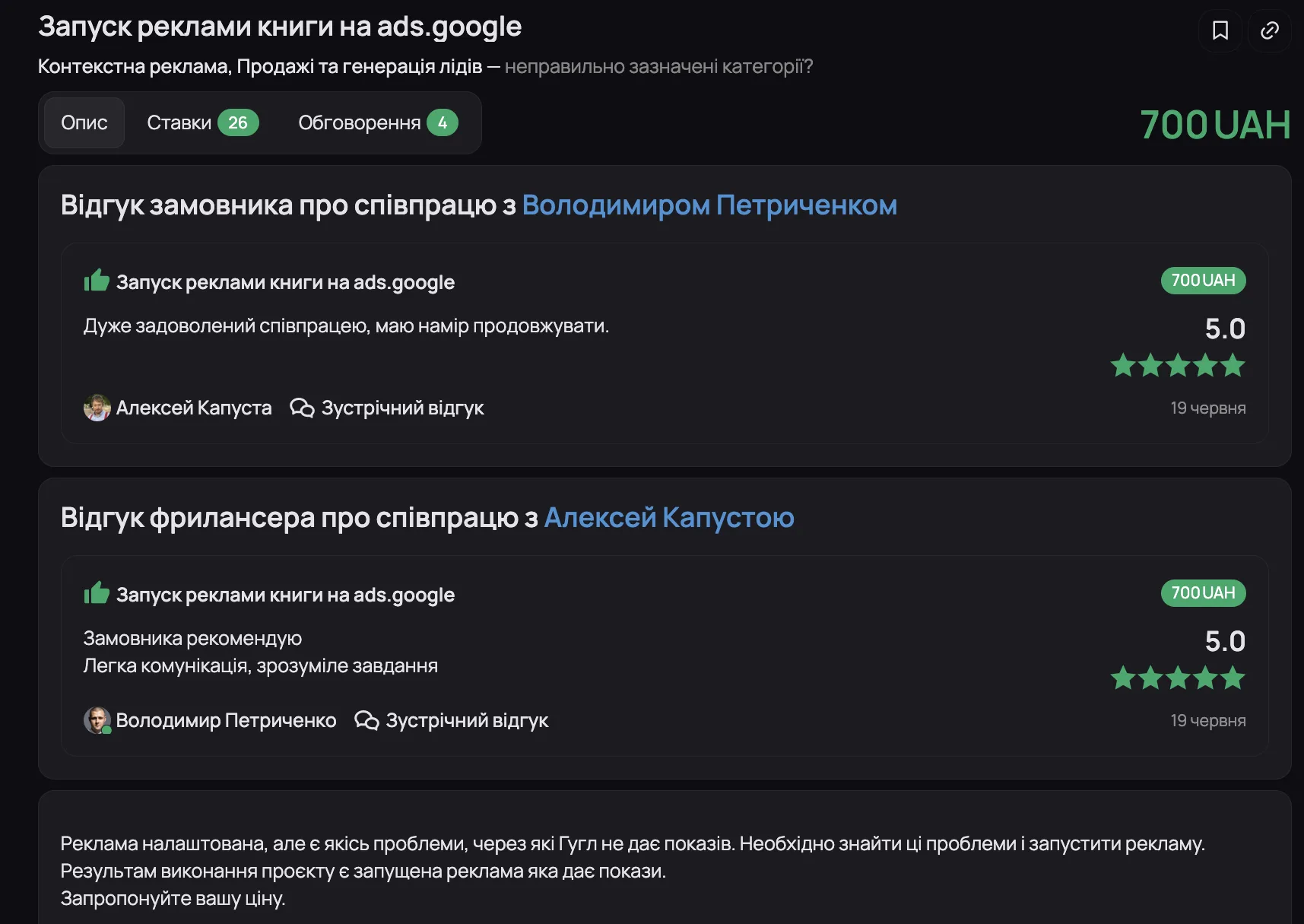
I fully reviewed the account settings and found nothing that could block impressions. Then I moved the campaigns to my own account. On mine they started almost immediately. So the problem was in the account itself, and it looked like a Google bug. That happens.
I remembered that once, when I contacted support, they explained to me: such bugs happen sometimes, and there is one fix — recreate the ad account. Luckily the ads were only at the start, there was nothing to lose. I suggested creating a new account and moving the campaign there. A few hours later impressions started.
I created the new account myself. When someone without the expertise creates an account, I don’t know what they might click and what it will lead to.
The second case is also from Freelancehunt: diagnosing an active search campaign with zero impressions.

The account was created in 2017, had been inactive for about five years, and the client decided to bring it back. The client heavily restricted the campaign with exact match keywords, so first I made three copies in his account:
- the same campaign on the “Maximize conversions” strategy;
- the same campaign on “Maximize clicks” without limits;
- the same campaign on “Maximize clicks” without limits and with broad match keywords.
In other words, I removed every restriction I could. I created these same four campaigns, the original and three copies, in my own account. On my account they started almost immediately. In the client’s account none of them did.
There were no account-level negative keywords that could stop the ads. The cause was the account again. The client got a recommendation to create a new one. He didn’t want a turnkey setup and said he’d do it himself. Whether he did, I don’t know. My task was the diagnosis.
Campaign level
Let’s go down from the account to the campaign level.
- Status. See what the system shows. Maybe the campaign or ad is still under review.
- Dates and schedule. Check the start and end dates: they are easy to set wrong. The ad schedule too.
- Location. Maybe you narrowed targeting too much. If it’s a small radius, try expanding it.
- Budget. It can be too small. The problem is rarely here, but since you’re testing, check everything. What budget it even makes sense to start with, I calculated in the article is $10 a day enough for Google Ads.
Strategies with strict targets
Most often impressions are blocked by strategies with strict targets: Target CPA or Target ROAS. When you launch a new campaign, especially in a new account, the algorithm doesn’t yet know what your cost per conversion or return can be. There is a target, but no data behind it.
With manual strategies it’s the same story: don’t limit the bid too much. Look at the low and high bid range in Keyword Planner and bid within it. Why a cheap click isn’t always better, I covered in the article what the cost per click depends on.
Sometimes even “Maximize conversions” doesn’t work at the start, because the system doesn’t yet understand what a conversion is for you. What Google counts as a conversion at all — in the article what a conversion in Google Ads is.
When a campaign sits under review for weeks
There can be a great many variants, and not all of them get solved. I have a case that still hasn’t been resolved.
I run Google Ads for a dental clinic. Google gave a 5,000 UAH (~$110) bonus for Performance Max. I launched Performance Max, and it has simply been sitting under review for a week.
I write to support. The answer: well, it’s Performance Max, what did you expect, plus you have a sensitive category — dentistry. Meanwhile, before that I had three other dental clinics, in Ukraine and in the US, and there were no moderation problems anywhere. Here it just doesn’t start. I relaunched the campaign and asked support to check it manually. Nothing.
In general, writing to support makes no sense in 99 cases out of 100. Nobody will help with anything. It’s auto-replies, a bot or an operator with a script.
Ad level
Next we look at the ads themselves. They can be disapproved or limited.
“Limited” is no reason to faint
If ads are limited, there’s nothing terrible about it. Clients sometimes nearly faint: “Our ads are limited!”
Open any account and something will be limited: campaigns, ads or budget. In Performance Max almost 90% of ads are limited, because Google has a million rules and you always do something not quite the way it wants. It’s a normal working situation.
(IMG: /blog/blog-chomu-nemaye-pokaziv-google-ads-obmezheno-biudzhetom.webp | 1542x509 | “Eligible (Limited)”: the campaign is limited by budget | “Eligible (Limited)”: the campaign is limited by budget)
The screenshot shows a campaign with the “Limited by budget” status. In case you didn’t know, Google makes money when you spend money. So you’ll always be limited by budget at the very least.
Disapproval because of the site
Ads can be disapproved because of the landing page itself. I had a case with an infected site. There were no problems with the account: the landing page ended up in a kind of shadow ban.
 Google AdsCase: a “Compromised site” in Google Ads. How to Fix It?Ads disapproved for “Compromised site” but your site is clean? Two real cases: a problem domain and Binotel call tracking code in Google Tag Manager.
Disapproval over small things
What other disapprovals are there? Plenty. I had ads disapproved even over punctuation: the description contained a building code or ISO standard number, and Google treated it as a policy violation. That happens too. I’ll cover the most common disapproval reasons in a separate article.
Keyword level
“Low search volume”
You can see this keyword status if you work in a narrow niche or come up with keywords yourself. I see this too: people generate keywords in ChatGPT and wonder why they don’t work.
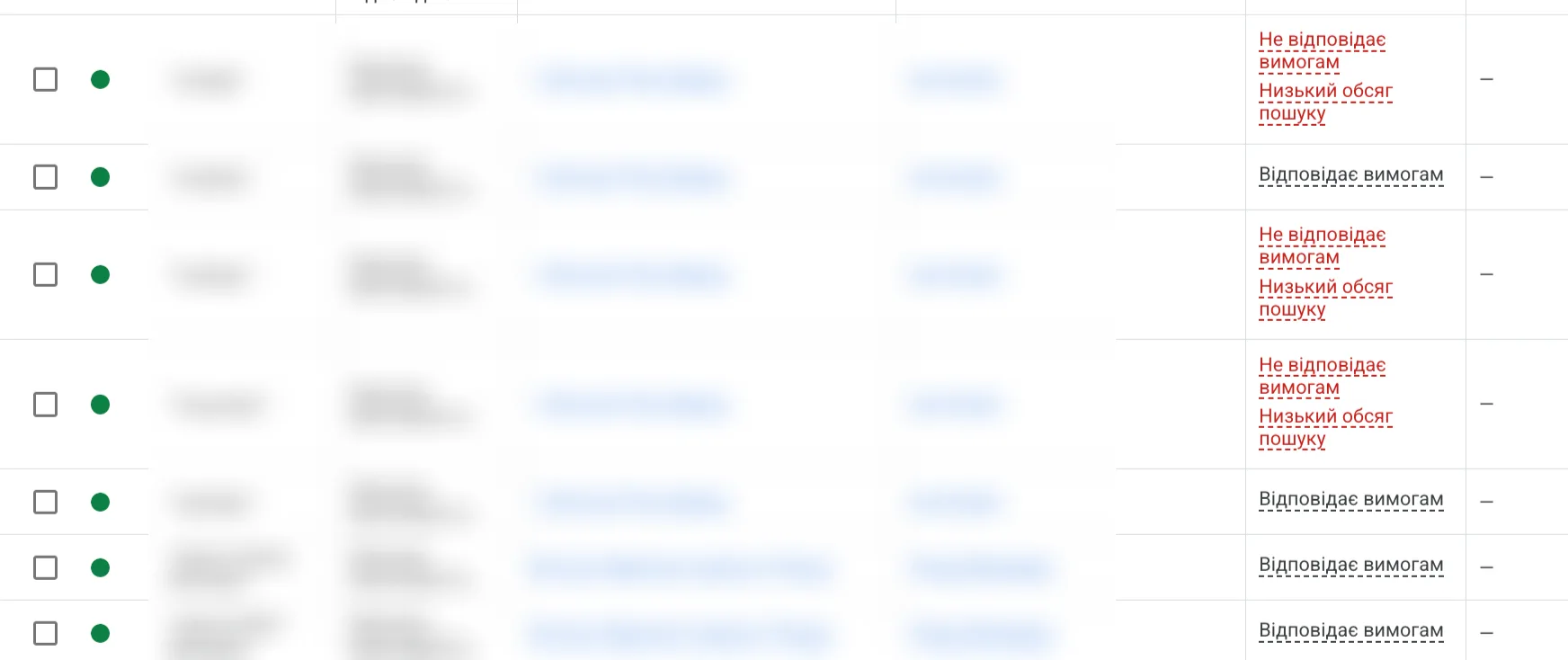
Low search volume means almost nobody searches for this keyword. Such a keyword may not trigger impressions at all.
Don’t generate keywords in ChatGPT. Use Keyword Planner, it’s the main tool for working with keywords in Google Ads.
Exact match in 2026
In the second case the client restricted the campaign with exact match keywords. There is a separate article on keyword match types. In short: exact match doesn’t work today the way it did five years ago.
When people tell me “let’s take the most exact keywords, put them in exact match and grab traffic from hot queries”, I answer: you are so dear to me.
First, in 2026 it doesn’t work that way. Google still goes beyond the targeting when it can’t find where to spend your money.
Second, there’s no longer such a thing as one keyword having more intent than another. A person types “buy facade tiles Kyiv” or just “facade tiles”, and there’s no difference in intent. Across all the accounts I’ve analyzed, I haven’t seen that difference. Queries used to be split into “buy” and general ones. Now “buy” is worth nothing: people got lazier, and the system already understands who to show which query to.
So keep such keyword “innovations” to yourself and leave the job to professionals.
Negative keywords that block your own keywords
Negative keywords can block impressions too. If you overdid it and added too many negatives at the ad group, campaign or account level, you might simply not notice that the campaign isn’t running because of them. More on negatives in a separate article, negative keywords in Google Ads.
It’s a typical mistake, and I’ve made it too. You exclude some queries at the account level, and half a year later a campaign appears that leads to exactly that service or product. Physically remembering what you excluded six months ago is impossible. So you have to check.
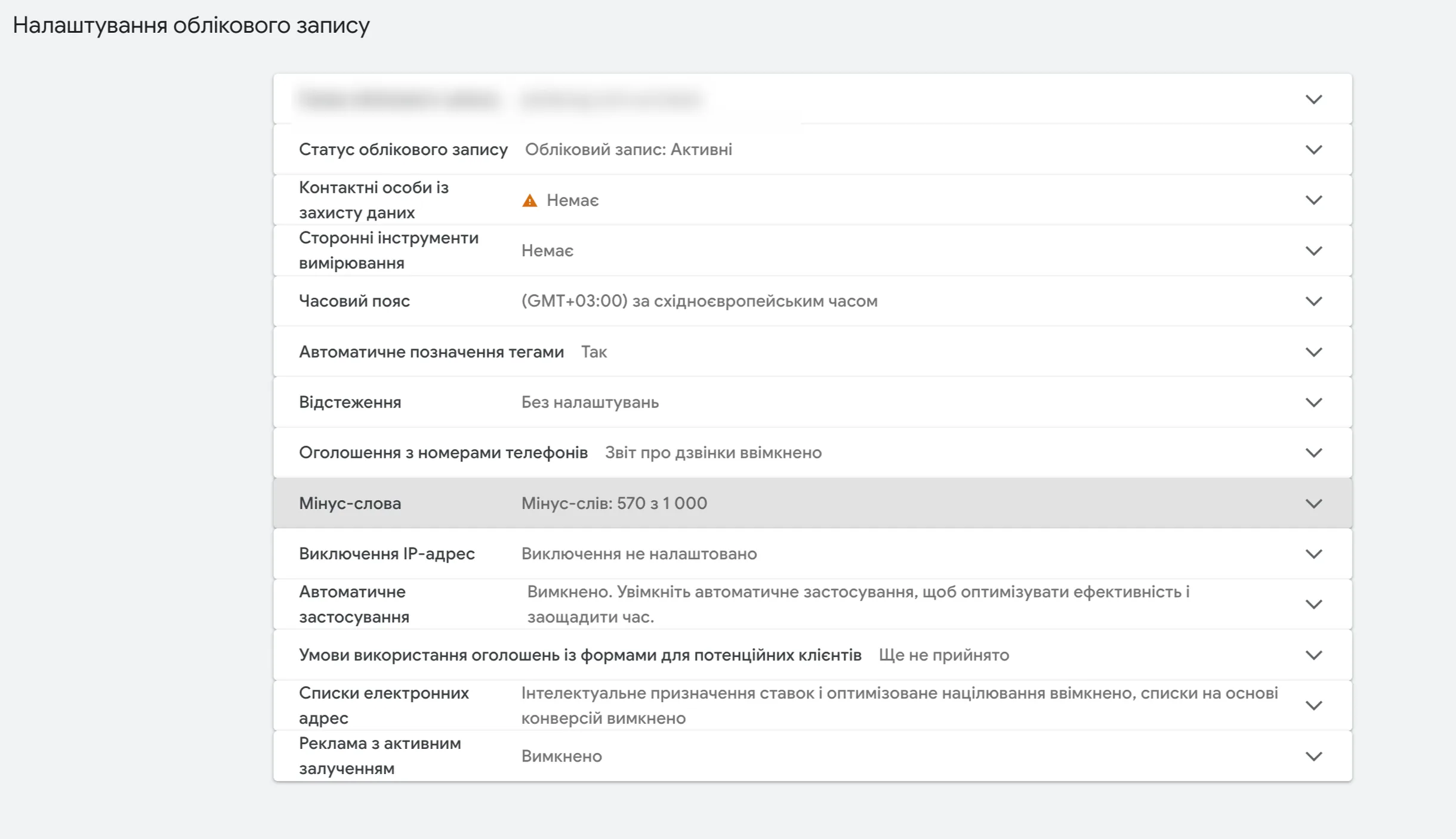
A fresh example. I run ads for a private clinic in Dnipro. Three months ago, during the first cleanup, I excluded doctors’ names at the account level. Later we decided to test ads for individual doctors. The first week — not a single impression.
First, not every doctor is searched for on Google. Second, I had excluded the most popular ones myself at the account level earlier. That’s how shit happens.
Shopping and Performance Max: problems in Merchant Center
Shopping and Performance Max deserve a separate mention. There can be even more problems there, so I’ll go through them briefly.
Disapproved products. The simplest case: some products are disapproved. It’s fixed with edits in Merchant Center itself. I have a separate service for that: product feed optimization and fixing products.
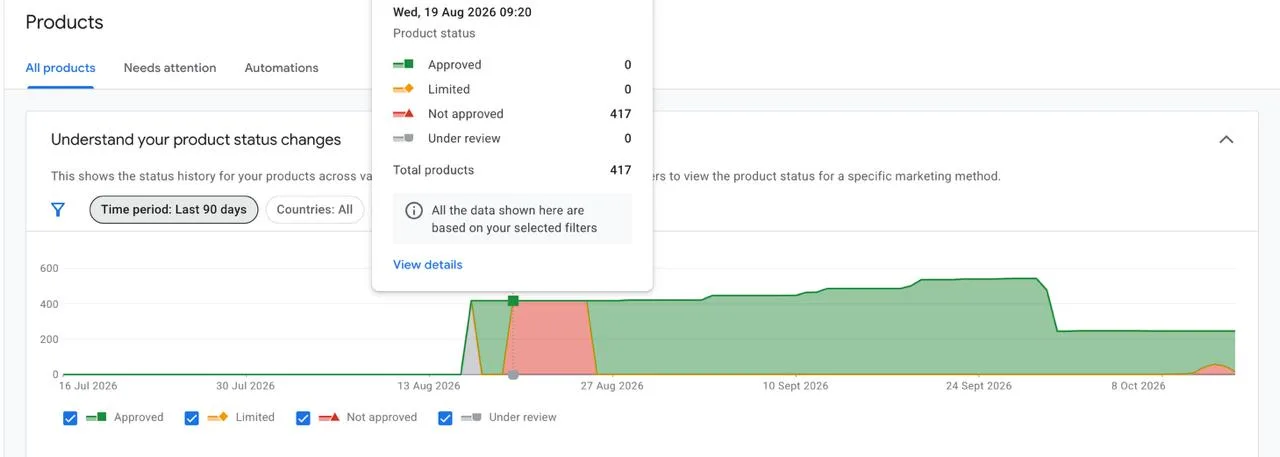
Feed errors. Banal: the developers changed URLs and the feed broke. It seems simpler now: the feed doesn’t fail completely, Google takes a snapshot of the last successful upload, and the feed keeps working. But you still need to keep an eye on it.
A suspended Merchant Center. The scariest thing that can happen. Google Ads may not show any suspension notice, and you don’t understand what’s going on. There’s one way out — get Merchant Center unsuspended. After that, impressions come back.
11 — Merchant CenterGoogle Merchant Center unblocking“Misrepresentation”, data mismatches, site suspensions. 100+ unblocks and launches without suspensions.And in general, Shopping and Performance Max traditionally take longer to start than search campaigns.
A niche without demand
The last cause is niches with low demand, where there are physically few searches. Google Ads can’t help here, because it works mostly with existing demand.
I’ve had such cases: junk AI services come for promotion that essentially carry no value, and there’s no demand for them. Their authors think demand is huge because they themselves had such a need. Unfortunately, it doesn’t work that way. You can never project marketing onto yourself.
The ads may simply not start because there are no searches in the niche. Again, you check this with Keyword Planner in the Google Ads interface.
My diagnostic order: checklist
Go from top to bottom. Move to the next item when the previous one is clean.
- Less than 48 hours since launch? Wait.
- Payment: there is money on the balance, payments go through, no warnings.
- The account isn’t suspended, verification is completed or not required.
- Campaign status, start and end dates, ad schedule.
- Location: targeting isn’t too narrow.
- The budget isn’t too small.
- Strategy: no strict Target CPA or Target ROAS at the start, manual bids within the Keyword Planner range.
- Ads: disapproved or just “limited”. Limited is normal.
- Landing page: ads aren’t disapproved because of the site.
- Keywords: no “Low search volume” status, the campaign isn’t choked by exact match.
- Negatives at the ad group, campaign and account level don’t block your own keywords.
- Shopping and Performance Max: product status, feed errors, Merchant Center suspension.
- Demand: people actually search for your product. Check it in Keyword Planner.
- Everything is clean but there are no impressions — launch the same campaigns in another account. If they run there, the problem is the account.
When to call a specialist
Went through the checklist and nothing works? Or simply don’t want to spend time digging? Then go to a specialist.
A full diagnosis, testing and reviewing everything, takes me about an hour. But I’ve been doing this for more than seven years. If you diagnose it yourself, you can spend hours and still not find the cause. So assess your abilities soberly. What you don’t understand is better left to a Google Ads expert.
07 — ConsultationGoogle Ads consultationYour specific question worked through on Zoom or Google Meet: performance drops, conversions, launch strategy.
Where to find me
Message me on Telegram or by email — I respond quickly. Telegram channel and YouTube are for those who want to see real cases before reaching out and understand my approach.