
Marketer, analyst, ex-CMO focused on the Google ecosystem (Ads, Merchant Center, GA4, GTM). Google Partner. 150+ projects, 100+ positive reviews on Freelancehunt, 12+ countries.
- I work directly, with no account managers or subcontractors
- I measure results in sales, not in-platform conversions
- Maximum expertise in the Google ecosystem
The most popular misconception about Google Ads goes like this: whoever pays more ranks first. Bring more money, get the top spot, the top spot brings sales. In practice, not a single link in this chain works.
Contents
- An auction runs on every query
- What Ad Rank is
- Why the biggest spender doesn’t win
- Quality Score: what it is and what it doesn’t do
- Where exactly the ad appears
- Auction insights: who you compete with
- Shopping and Performance Max are auctions too
- Do you need to be first
- What really affects your position
- Conclusion
- FAQ
Google Ads really does work as an auction. But it isn’t held once a month and it isn’t for your budget. An auction runs every time a person types something into search, and the highest bid doesn’t win it. Below I break down how it works, what position depends on and why the top position for most businesses isn’t a goal but an expensive toy.
An auction runs on every query
A person types “buy mattress 160x200”. In a fraction of a second Google gathers all advertisers whose keywords, products or campaigns match this query and decides three things: whose ad to show at all, in what order and how much each will pay per click.
A minute later another person types the same query from a different city, on a phone instead of a laptop, at two in the morning instead of lunchtime. That’s already a different auction, with different participants and a different result. So “my position in Google Ads” as a single number doesn’t exist. You have thousands of positions, one for each impression.
That’s exactly why the cost per click jumps from day to day, and that’s normal. More on this in the article on what drives cost per click.
What Ad Rank is
Your place in the auction is determined by Ad Rank. It’s Google’s internal score, recalculated for every query. Google discloses what goes into it, but how exactly it’s weighted, it discloses to no one:
- Bid. The maximum you’re willing to pay per click. With smart bidding, the algorithm sets the bid for each auction.
- Ad and website quality. How likely the ad is to be clicked (expected CTR), how well it matches the query and how useful the page it leads to is.
- Ad Rank thresholds. The minimum bar below which the ad won’t show at all, even if there are no competitors. It differs from query to query.
- Search context. What exactly the person is searching for, where they are, which device, what time it is, what else is on the results page.
- Assets and formats. Sitelinks, phone number, callouts, prices. Google estimates how much they will improve the ad.
So the bid is just one of five components. Important, but not the only one.
Why the biggest spender doesn’t win
A simplified example to get a feel for the logic. The numbers are illustrative, because Google doesn’t publish the real formula.
Advertiser A bids UAH 30 ($0.67) per click, but their ad is generic and the page is slow and off-topic. Advertiser B bids UAH 20 ($0.44), the ad matches the query exactly, the page loads in a second and shows exactly what the person was looking for. It’s entirely possible that B will rank above A and pay less per click.
Google’s logic is simple: it earns on clicks, and people click on what’s relevant to them. Showing first an ad nobody will click on is unprofitable for Google, even if someone pays a lot for it.
One more thing few people know: you don’t pay your maximum bid. You pay the minimum needed to hold your position against the advertiser below you and clear the Ad Rank threshold. So the bid and the actual cost per click are almost always different numbers.
Quality Score: what it is and what it doesn’t do
In the Google Ads account, keywords have a Quality Score from 1 to 10. It consists of three parts: expected CTR, ad relevance and landing page experience.
Low Quality Score for Keywords in Google Ads: a Death Sentence or Business as Usual?

An important nuance: Google explicitly states that Quality Score itself isn’t used in the auction. It’s a diagnostic tool, something like a rectal thermometer. The auction uses quality that Google calculates in real time for each specific query. So chasing a “10” in the account is treating the thermometer, not the fever.
Here’s a real account over 90 days. Keywords with a 10/10 Quality Score bring conversions at UAH 119 ($2.64) and at UAH 316 ($7.02). A keyword with a 9/10 score converts at UAH 86 ($1.91), the cheapest in the whole list. And a keyword at 8/10 has practically the same cost per conversion as the 10/10 leader: UAH 123.84 ($2.75) vs UAH 123.14 ($2.74).
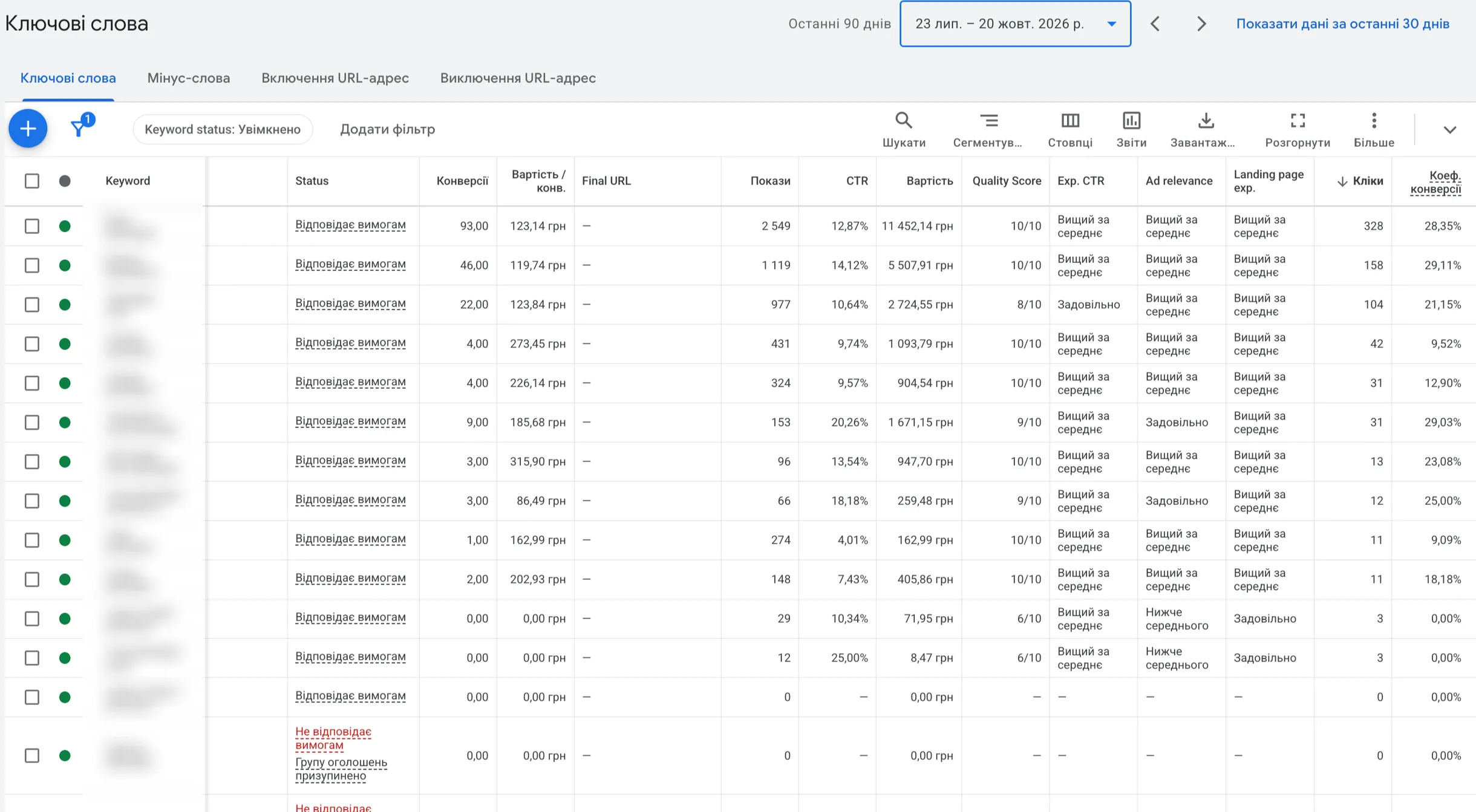
There aren’t many conversions on individual keywords here, so this is an illustration, not a statistical conclusion. But it’s enough to show that a “10” says nothing about the cost per lead. You can see Quality Score and its three components in the Keywords report: Columns → Quality Score.
And one more thing: a high Quality Score doesn’t equal quality traffic. The classic example is dynamic keyword insertion in the headline: Quality Score goes up, and so do irrelevant leads. I covered this in a separate article about DKI.
The same goes for CTR. Through expected CTR it can make a click slightly cheaper at the same position, but I haven’t used it as a main metric for many years. Why, I covered in a separate article.
 Google Ads · AnalyticsCTR in Google Ads. Does CTR Affect Business Metrics?Why I don’t treat CTR as a KPI, what research says about the link between CTR and cost per click, and when this metric is actually useful for diagnostics.
Where exactly the ad appears
Position isn’t a number from 1 to 10, as many people think. On the search results page, ads can appear above the search results, below them, or not show at all. There are usually up to four ads above the results, and to get there you need to clear a higher Ad Rank threshold.
The “average position” metric many were used to disappeared from the account back in 2019. Instead, Google provides metrics that describe reality more honestly:
- Search impression share — in how many of the auctions where you were eligible to appear you actually appeared.
- Search top impression share — the same, but only for positions above the search results: how many such impressions you got out of those you were eligible for.
- Search absolute top impression share — the same for the very first position.
- Search lost impression share (budget / rank) — how many auctions you lost because the budget ran out, and how many because of low Ad Rank.
The last one is the most useful of the whole list. If you lose impressions due to rank, the problem is in ad quality, the website or the bid. If due to budget, there’s simply not enough money for all auctions. These are different diagnoses and different solutions. How much budget you really need, I wrote about in the article “Is $10 a Day Enough”.
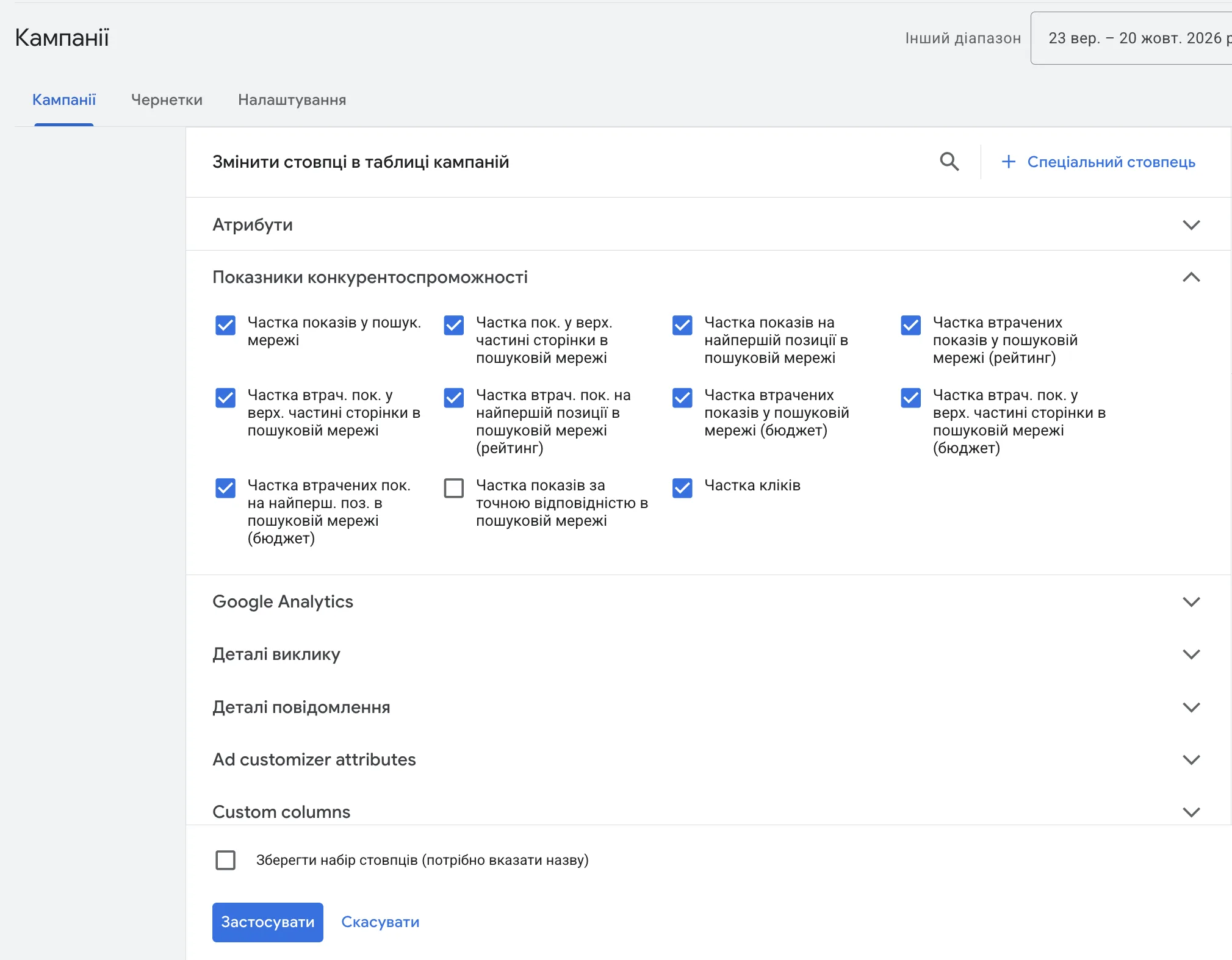
These columns are off by default. You can turn them on in the campaigns report: Columns → Modify columns → Competitive metrics.
Here’s what it looks like on a real campaign over a month compared with the previous one. Bids here are set by the algorithm on the “Maximize conversions” strategy. Top impression share is 91%, absolute top almost 88%, and both grew: by 14% and 20%. Only 2.26% of impressions were lost due to rank, 3.65% due to budget.
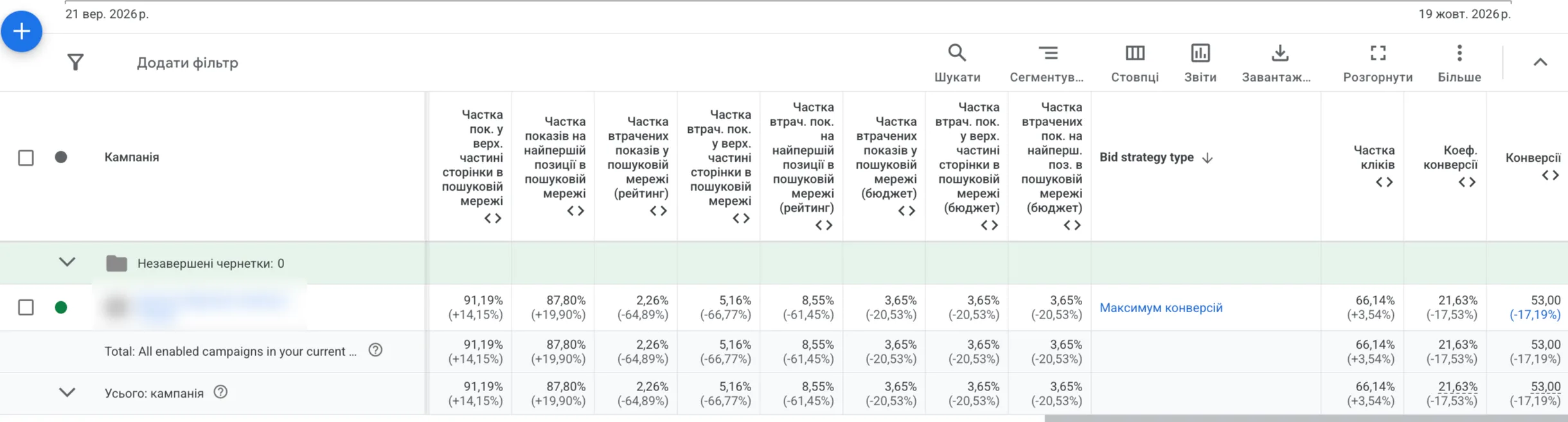
Now look at the end of the table: conversions dropped by 17%. The position went up, the result didn’t. The reasons for the drop are a separate story. For this article, what matters is something else: a high position by itself doesn’t guarantee results.
Auction insights: who you compete with
Another useful report is Auction insights. It shows who you overlap with in auctions and who outranks whom. It’s one of the few things about competitors in Google Ads where there are real numbers, not just looking at other people’s ads. I wrote about “competitor analysis” separately.
Auction Insights in Google Ads: A Walkthrough on a Real Example
What the columns mean:
- Impression share — in what share of eligible auctions each participant appeared.
- Overlap rate — how often a competitor appeared in the same auctions as you.
- Position above rate — how often their ad ranked above yours when both appeared.
- Top of page rate and absolute top of page rate — what share of the participant’s impressions were above the search results and in the very first position.
- Outranking share — how often your ad ranked above theirs or appeared when theirs didn’t.
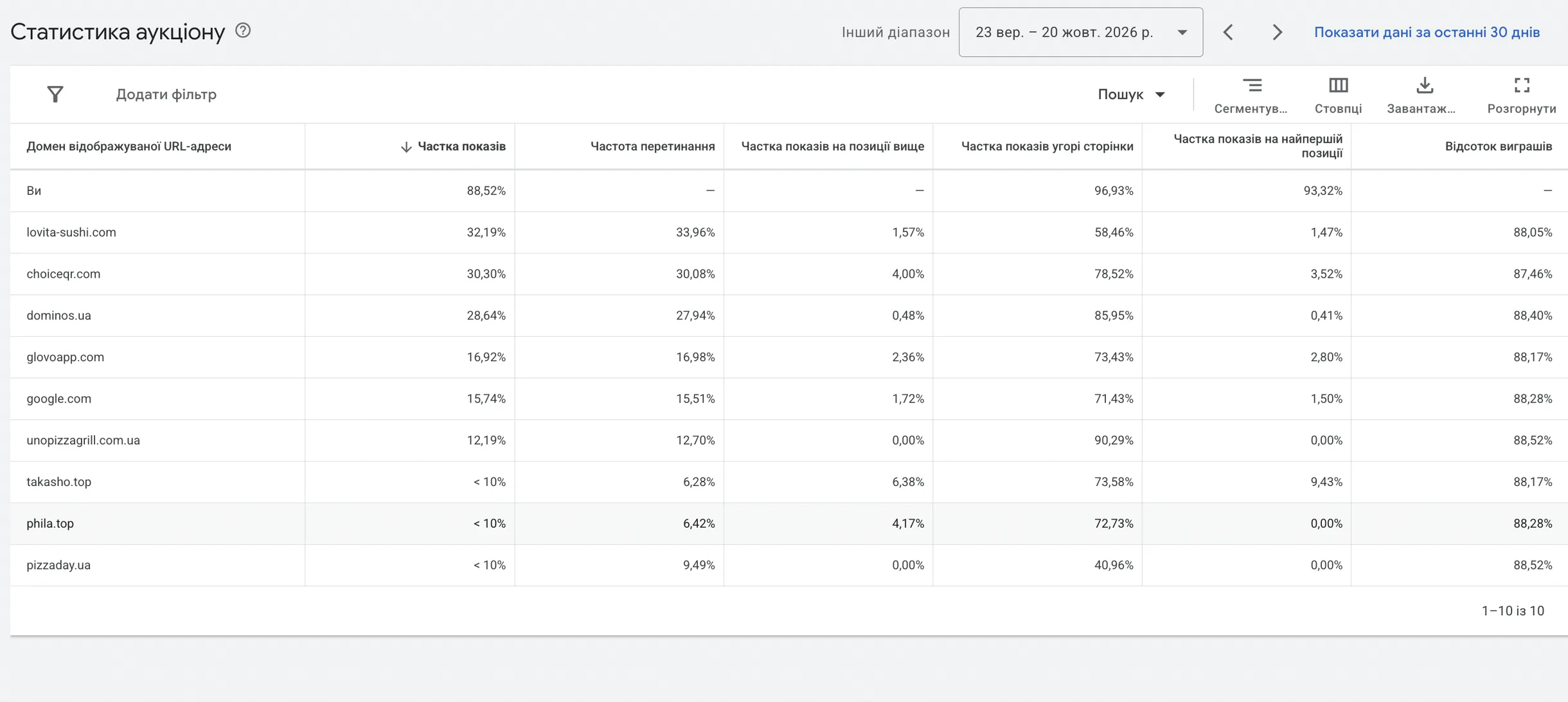
This is the food delivery niche. The client’s ads appeared in 88.5% of eligible auctions, 97% of impressions were above the search results, 93% in the very first position. The biggest competitor by impression share overlapped with them in about a third of auctions and ranked higher in only 1.6% of cases.
Looks like the client’s dream of “I want to be first”. But being first and making money are different things.
Shopping and Performance Max are auctions too
In product ads there are no keywords, but there’s an auction just the same. Google itself decides which queries to show your product for, based on the feed: title, description, category, price. So feed quality in Shopping and Performance Max plays the same role as ads and keywords in Search.
Price and photos matter here too: if your product is more expensive than the neighboring ones in the results, it gets clicked less. That’s no longer a question for the ad account settings, but for the business’s pricing policy. I wrote about choosing a campaign type in the article “Search, PMax, YouTube, Display or Shopping”.
Do you need to be first
For me it’s actually a red flag when a client says at the start that they want to be number one. People buy not from whoever is first, but from whoever has the better offer for that particular person.
Even if you remove all bid limits, you won’t win 100% of auctions. The auction runs separately for each query and takes into account more than just money. You’ll be first, then third, and sometimes you won’t show at all.
Research on ad positions shows a fairly logical picture: in the top position both CTR and cost per click are higher, while conversion rate barely depends on position. Back in Ghose & Yang’s 2009 paper, profit was often higher in middle positions, most likely because clicks there are cheaper.
The only case where being first really makes sense is urgent niches: tow trucks, emergency lockout services, emergency plumbers. There the person doesn’t compare, they take the first offer. More detail with examples in a separate article.
 Google Ads · Marketing“I Want to Be #1 on Google Ads”: When It Makes Sense and When It’s Just Burning BudgetThe top spot rarely guarantees sales. When fighting for #1 is justified, and when it’s just about impressions.
What really affects your position
In short, in the order I check things first:
- Website. Speed and how well what the person sees matches what they were looking for. Website fixes usually give more than ad fixes. More on this in the article “CRO for Google Ads”.
- Campaign structure. Separate ad groups for separate intents, so the ad matches the query instead of being “about everything”.
- Negative keywords. You don’t take part in auctions for queries that don’t sell.
- Assets. Filled-in sitelinks, callouts, phone, prices.
- Bid strategy and conversions. Smart bidding sets a bid for each auction separately, but learns only from what you pass to it. If Google Ads receives button clicks instead of real leads and sales, it will win the wrong auctions. What a conversion is in plain words.
Conclusion
The Google Ads auction isn’t a bidding war of “who pays more”. It’s thousands of separate auctions a day, where the bid is just one of five components. Position is a consequence, not a goal. And the goal, as always, is the cost per lead, per sale and profit, not a spot in the results.
03 — AuditGoogle Ads account auditI find where the budget leaks: structure, bidding, keywords, conversion tracking, website.
Where to find me
Message me on Telegram or by email — I respond quickly. Telegram channel and YouTube are for those who want to see real cases before reaching out and understand my approach.