
Marketer, analyst, ex-CMO focused on the Google ecosystem (Ads, Merchant Center, GA4, GTM). Google Partner. 150+ projects, 100+ positive reviews on Freelancehunt, 12+ countries.
- I work directly, with no account managers or subcontractors
- I measure results in sales, not in-platform conversions
- Maximum expertise in the Google ecosystem — instead of “PPC, social ads and SEO, all in one”
I built an online PPC ROI calculator. In principle, the tool works for any kind of advertising, but I calculate for Google Ads, because Google Ads is all I do.
I used to do this in spreadsheets. Every time I created a new one, because I kept losing the old ones somewhere. So I thought: why not build this calculator online? And so I did. Here it is, right in this article.
Plug in your numbers — you'll see how many orders or leads your budget will really bring and whether the ads pay for themselves, including contractor fees.
The calculation is approximate: the real conversion rate depends on the niche, website, seasonality and traffic quality. Conversion rates: $1 = ₴, €1 = ₴.
It's free to use: no sign-up, no SMS, no confirmation, no verification, no nothing.
Contents
Why this tool exists

You might ask: why this tool at all? So that right at the start you can model the potential scenarios.
Something 99% of contractors don't do. They take the project first, run ads for a couple of months, and only then do the math.
I do it right away. As soon as I meet a potential client, I get the input data and immediately run the numbers on the project. Always in three scenarios: pessimistic, base and optimistic.
If none of the three scenarios pays off, I simply don't take the project. I don't need one-month projects. I need long-term projects that are interesting to work on and to grow.
One-month projects don't interest me, even though they're paid. Why? Because in the first one to three months I invest the most of my time. In money terms, my hourly rate in the first three months is quite low compared to projects that run longer than three months. That's because of CRM integration with Google Ads, end-to-end analytics, product ratings for online stores, Google Merchant Center setup, website analysis, Google Tag Manager and Google Analytics setup, and so on.
How the calculator works
The calculator has two blocks (on desktop). The first is data input. The second is the result you can potentially get.
There is a currency switch: dollar, hryvnia, euro.
And two project types: e-commerce, i.e. online stores, and lead generation — any project where the sale goes through a request.
Calculation for an online store
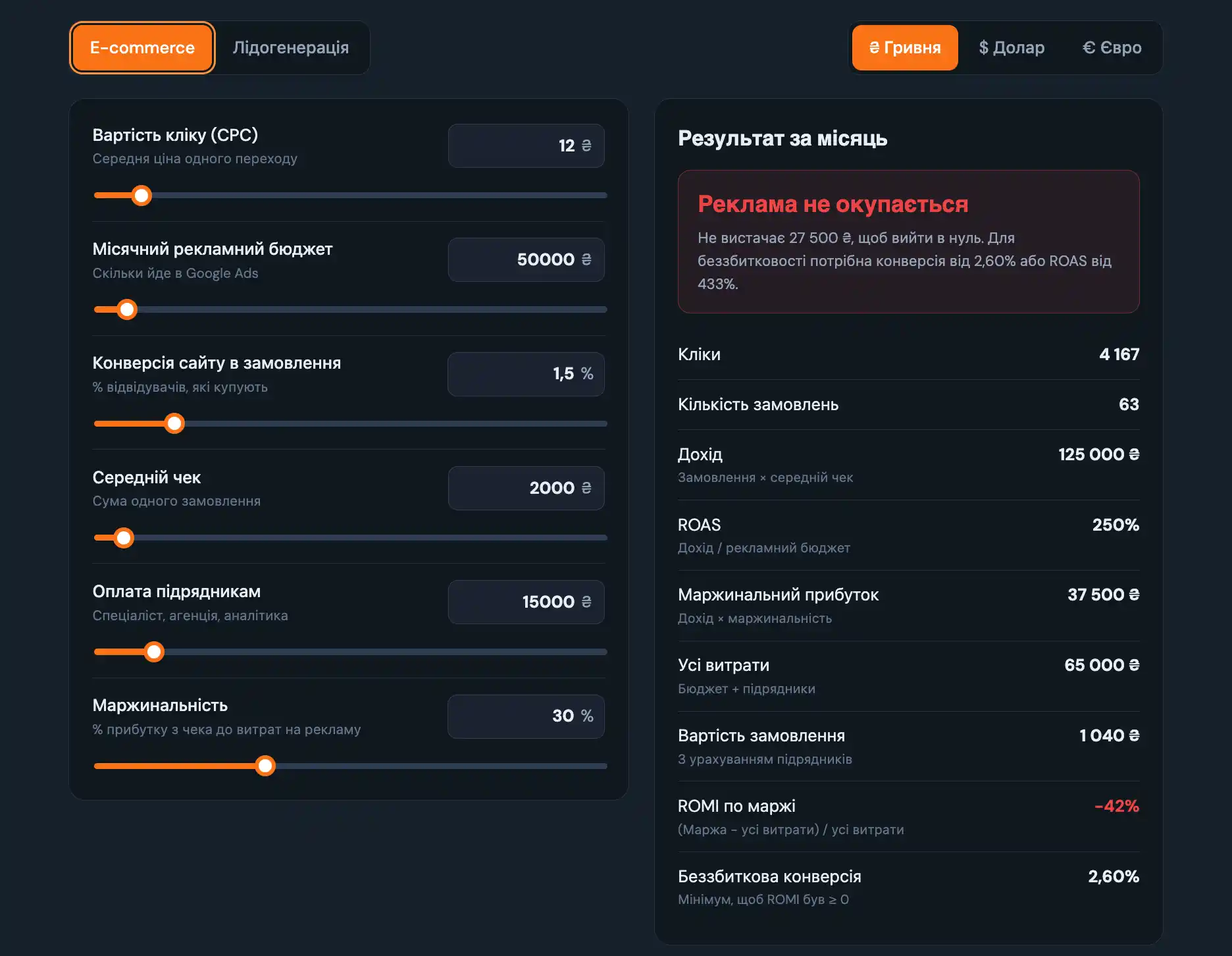
Cost per click. Taken from Keyword Planner. I take the average between the minimum and maximum. In some scenarios I calculate only from the most expensive click.
It's not a 100% guarantee you'll get exactly that click price. But at this stage we take the information we have and trust it will hold. We have no other option.
Monthly ad budget. Required. If your budget is small, first check whether $10 a day is enough.
Website conversion rate. If you already have this data, for example from other sources, use your own. If it's a first launch, for an online store I recommend calculating at 1, 2 and 3%.
Average order value. At least roughly. If you don't know your average order value, well, make it up. Estimate what it could be.
Contractor fees. This is the block agencies neglect, I've noticed. When they show a client profitability in reports, they never count their own fee. Because with it, the numbers would look different.
I do it right away and honestly. It matters to me to work with business metrics, not ad account metrics.
Key point: I work with the business and business metrics, not ad account metrics. I don't ignore account metrics, but they aren't decisive for me. The decisive metric for any business is profit — how much money was made, not the ad CTR.
Profit margin. For the same reason: I work with the business, so it's important to count margin too, to see how profitable the ads will be.
In an earlier article I explained the difference between ROAS and ROMI. Here we calculate ROMI on margin to understand whether the ads pay off on their own.
If you also need ROI — that's a broader concept, calculate it yourself. ROI is a more serious metric that shows the efficiency of the business, not the ad channel. For the ad channel there's ROMI, and in my opinion it does the job perfectly.
Calculation for lead generation
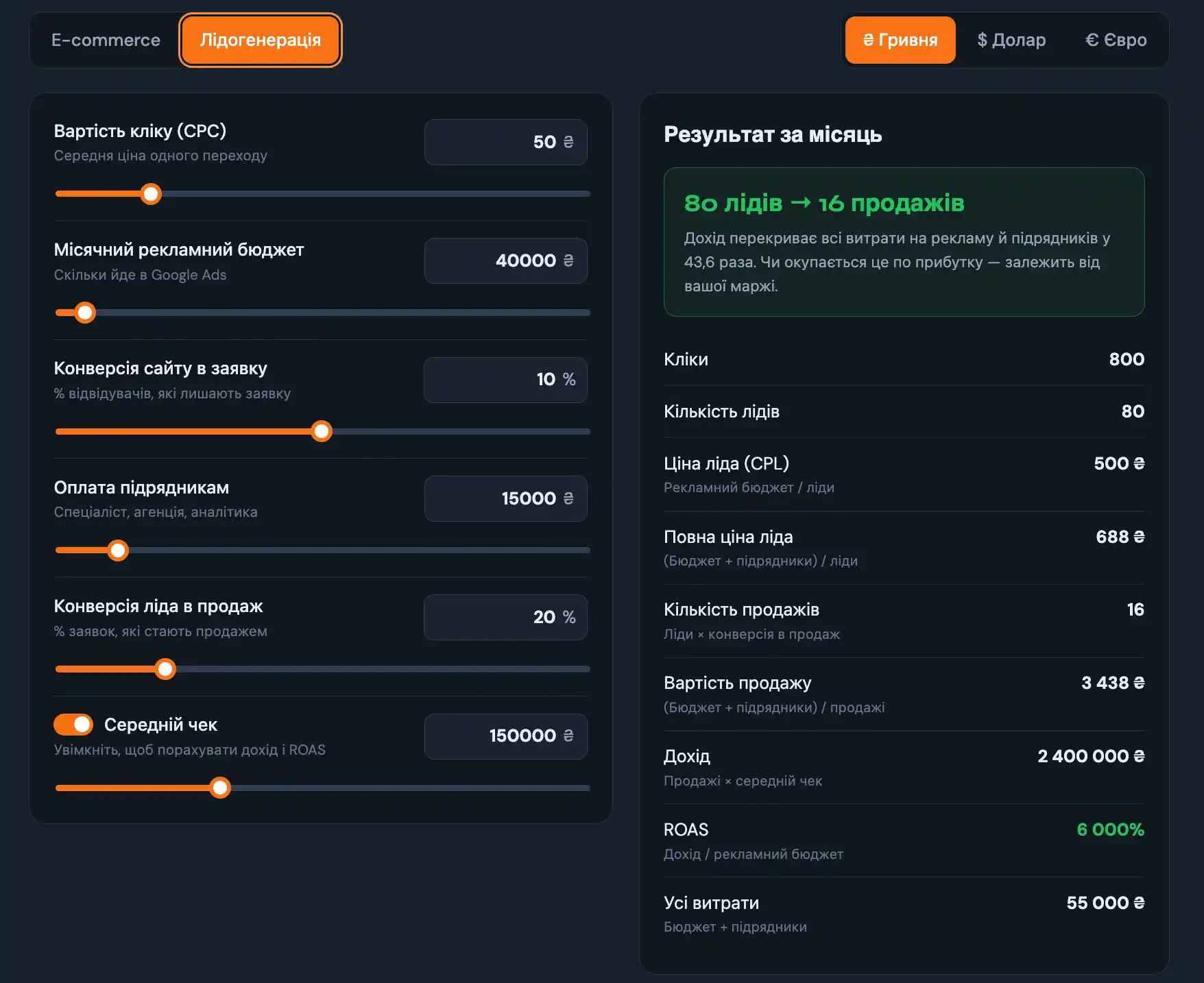
The same: cost per click, monthly budget, website lead conversion rate, contractor fees. Plus the lead-to-sale rate — here you need to know what share of your leads become sales.
And there's an optional “Average deal value” block. It's there to see all the metrics together: not just how many leads you'll get and what they'll cost, but how much revenue Google Ads actually brings and what it costs.
What the “Monthly result” block shows
Here you see the full calculation in detail: how many clicks, how many orders, revenue, ROAS, gross profit, total costs, cost per order including contractors, ROMI on margin and the conversion rate at which you break even.
For lead generation — basically the same, just without margin.
I don't build what I don't use
Key point: I don't build things that won't be used. This calculator wasn't made to show off a pretty tool. I use it myself.
Just like the Google Chrome extensions I wrote about earlier. I built them for myself and use them myself. They're not dead weight or some half-finished project.
The calculator is convenient: I can show it to a client, recalculate as fast as possible, and look for what could make the ads work.
And one more use. Not all clients keep a P&L. If you have an online store, for example, you can enter actual data from the ad account and see whether the ads pay off at all. That's also quite honest towards clients. Although that honesty isn't for everyone.
Honest scenarios instead of sweet lies
It matters to me to show the client potential scenarios before the start. And quite often even the most optimistic scenario doesn't pay off. I say so honestly right away. If the client agrees — we start working together. If not — well…
To wrap up, a case came to mind. I was talking to a furniture online store. I actually have a lot of furniture cases, they're in my Freelancehunt profile: it's not my favorite niche, though mostly successful.
I talked with this guy for maybe a week. I showed him realistic scenarios for three months. And he asks: why do you add only 10% to revenue month over month?
I say: that's a more or less normal scenario. Growing 10% a month is a good result. And that's with an unchanged budget, i.e. through optimization alone.
Then he talked to someone else. And that someone, of course, promised more: drew a scenario with 30 and 50%.
You see agency promises in ads on Instagram, TikTok, Meta yourself: everything will double, even triple, and ROI will be a million percent.
I don't know how that story ended. But he probably chose the sweet lie over truth and reality.
The calculator gives a quick estimate. How to build a full media plan with a scenario-based ROAS forecast and a website readiness checklist — in the article on Google Ads media planning.
The calculator is also available as a standalone page, without the article: Google Ads ROI calculator. My other free tools are in the Tools section.
Where to find me
Message me on Telegram or by email — I respond quickly. Telegram channel and YouTube are for those who want to see real cases before reaching out and understand my approach.