
Marketer, analyst, ex-CMO focused on the Google ecosystem (Ads, Merchant Center, GA4, GTM). Google Partner. 150+ projects, 100+ positive reviews on Freelancehunt, 12+ countries.
- I work directly, with no account managers or subcontractors
- I measure results in sales, not in-platform conversions
- Maximum expertise in the Google ecosystem — instead of “PPC, social ads and SEO, all in one”
Ever seen products in search with yellow stars next to the ad? That's Google's Product Ratings program — and it really does affect CTR, cost per click and ad profitability.
I'll walk through the requirements, the algorithms, the pitfalls, and what you actually need to do to get those stars showing in your ads.

Contents
What Product Ratings in Google Merchant Center are
The Product Ratings program lets you show customer reviews and ratings right in Shopping ads. Stars, review count, average rating — all of it appears under the product name and price.
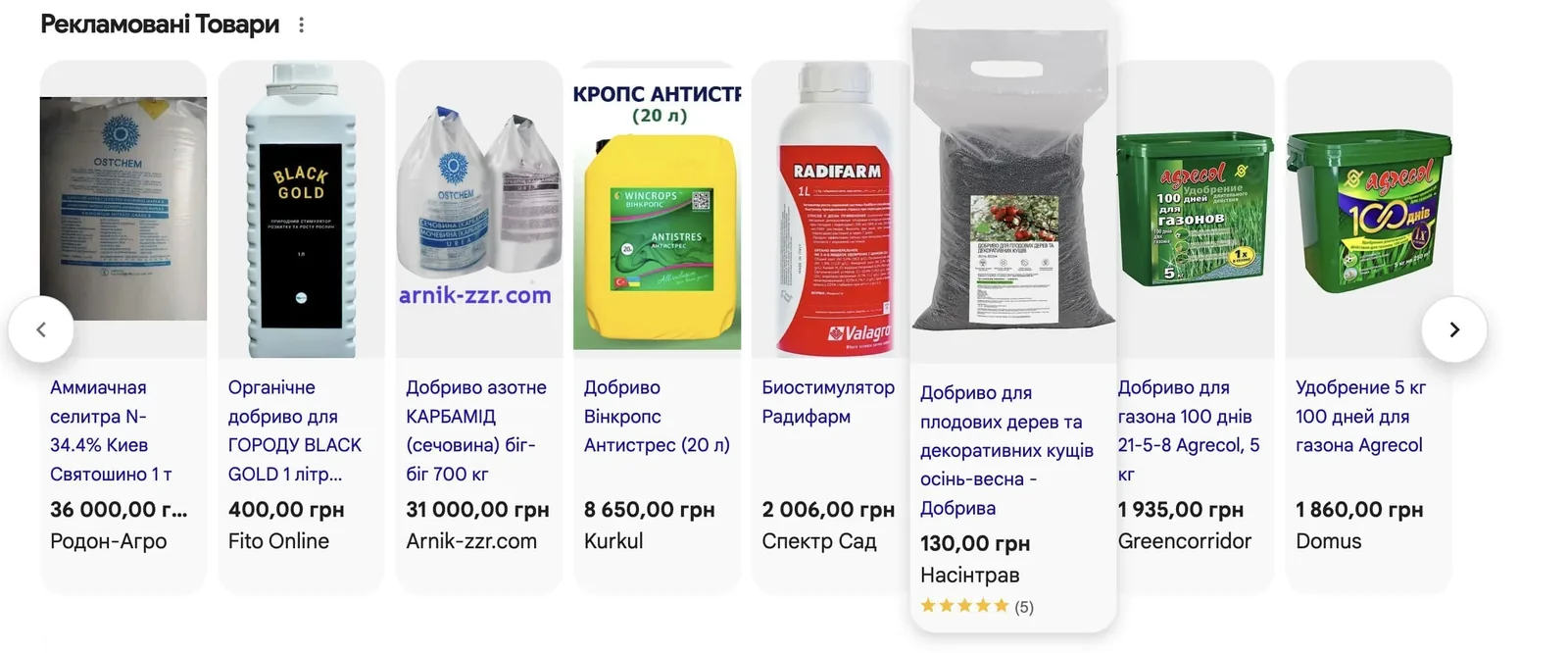
It's important to understand right away: you can't turn the stars on or off manually. Google decides on its own when and to whom to show the rating. Your job is to meet all the conditions to increase the likelihood of it showing. The likelihood, not a guarantee.
Main requirements for joining the program
- At least 50 reviews. Not per individual product — in total across your reviews feed. That's the minimum bar for joining the program.
- The reviews feed is updated at least once a month. Stale feed — the program doesn't work.
- A correctly filled-in product feed. This is where most people stumble. More on that below.
How Google matches reviews to products
This is the key technical point most people don't understand.
Google doesn't match a review to a product by your store's internal ID. The reviews feed doesn't even have that attribute. Instead, Google uses a chain of identifiers in this order of priority:
| Priority | Identifier | Match likelihood |
|---|---|---|
| 1 | GTIN (Global Trade Item Number) | Highest |
| 2 | MPN (Manufacturer Part Number) — together with GTIN, not instead of it | High |
| 3 | SKU (if none of the above) | Medium |
| 4 | Brand (required, even if it's your own) | Below medium |
| 5 | Product title (overview) | Lowest — not recommended by Google itself |
Each missing identifier is a step down the chain and a lower chance the stars will appear. If there's nothing at all, Merchant Center will show a warning about matching issues, and the products simply won't show with stars.
Bottom line: fill in the feed as completely as possible. Have a GTIN — great. Have an MPN — add it alongside the GTIN. Brand — always.
How many reviews a product needs
Google doesn't officially disclose this — the algorithms are closed. There's data from a Google product manager (a 2022 article): at least 3 reviews per product to increase the likelihood of showing in Shopping Ads.
From my own experience: I've never once seen products with 1–2 reviews in paid results, and rarely with 3. The algorithm has changed since 2022. My real recommendation is 5+ reviews per product. At 5+, the stars start showing noticeably more often.
Trustpilot (one of Google's partners in the program) confirms it: the more reviews, the higher the likelihood. 10 is better than 5, 20 is better than 10.
What else affects the likelihood of showing
The quality of the reviews themselves. Duplicate reviews — even from different authors with different dates but the same text — get rejected by Google. That's protection against fake reviews.
Review freshness. Fresh reviews matter more than old ones. Regular feed updates and a steady flow of new reviews have a positive effect on showing.
Completeness of feed data. The more accurately the product feed is filled in, the better Google matches reviews to products.
What to do in practice
- Join the Product Ratings program through Merchant Center.
- Prepare a reviews feed in a format Google accepts.
- Fill in the product feed: GTIN, MPN, SKU, brand — everything you have.
- Make sure the reviews feed updates regularly (at least once a month).
- Monitor warnings in Merchant Center — if there are matching issues, that's where they show up.
A separate note on stores on Prom.ua
Owners of stores on Prom, a Ukrainian marketplace platform, have a specific problem: the platform itself doesn't support connecting to Google's Product Ratings program. So even if your Prom store has hundreds of reviews, there won't be any stars in your Shopping ads. The platform simply doesn't offer that feature.
At the same time, most competitors on Prom don't know this and don't have stars either. But if one of them has connected the program, they get a significant advantage in the results: higher CTR, more clicks on the same budget, lower cost per conversion.
I've built a separate tool that lets stores on Prom join the Product Ratings program despite the platform's limitations. It's a solution that works around the missing native feature and gives a Prom store the same Shopping stars that stores on other platforms have.
What this gives you in practice:
- stars and review count in your Shopping ad;
- higher CTR — the ad stands out from competitors without stars;
- more clicks on the same budget;
- potentially lower cost per click and better ad profitability.
If your Prom store has reviews and you want to use them in your ads, get in touch and we'll go over the setup details.
How a store with a narrow range earned UAH 4.84M (~$108K) on standard Shopping, and why product ratings are still ahead for it — in the instant camera case.
Ratings work better on a quality feed. How to get your feed in shape — product feed setup and optimization.
Where to find me
Message me on Telegram or by email — I respond quickly. Telegram channel and YouTube are for those who want to see real cases before reaching out and understand my approach.