
Marketer, analyst, ex-CMO focused on the Google ecosystem (Ads, Merchant Center, GA4, GTM). Google Partner. 150+ projects, 100+ positive reviews on Freelancehunt, 12+ countries.
- I work directly, with no account managers or subcontractors
- I measure results in sales, not in-platform conversions
- Maximum expertise in the Google ecosystem
Server-side tracking is usually sold as something complicated and expensive: a separate server, a monthly subscription, a week of setup. I decided to check what it really costs and how long it really takes, and did it on my own site, ads-expert.online.
The result: server-side GTM runs on my subdomain sgtm.ads-expert.online, GA4 hits go through my own server, and the monthly bill is $0 within the Google Cloud free limit. It all took about an hour, roughly half of which was waiting for the SSL certificate.
Contents
| Parameter | Value |
|---|---|
| Task | move GA4 tracking to a server on your own domain at minimal cost |
| Stack | GTM (web + server), Google Cloud Run, Cloudflare DNS, GA4 |
| Time | ~1 hour, ~30 min of it waiting for SSL |
| Cost | $0 a month within the free tier (a one-off $30 prepayment is credited to your balance) |
| Result | GA4 hits go through sgtm.ads-expert.online, the tag in the server container fires without errors |
Why server-side tracking at all
Regular tracking works like this: the visitor's browser sends data to Google Analytics, Google Ads and Meta itself, straight to their domains. That is where the losses begin: ad blockers cut requests to google-analytics.com, Safari restricts cookies, and some events never arrive.
I showed what this looks like in a test with uBlock and incognito mode: in a browser with a blocker Google Tag Manager does not load at all, and analytics never sees that visitor.
 Analytics + Google AdsAnalytics at Risk: What Ad Blockers and Incognito Mode Do to the Events on Your SiteA real test: how uBlock and incognito mode block Google Tag Manager from loading. dataLayer compared in two browsers, and why data doesn’t match CRM.
Server-side GTM (sGTM) puts your own server between the site and the platforms:
- Less data loss. Requests go to your subdomain rather than google-analytics.com, so blockers and browser restrictions cut them far less.
- First-party context. Tracking runs in the context of your own domain, which is better for cookies and attribution.
- Control over data. On the server you can filter, enrich or remove extra data before it is sent to the platforms.
- A base for integrations. Google Ads conversions, Meta CAPI, TikTok Events API and offline conversions plug into the same server container.
How sGTM differs from regular GTM and Google Tag Gateway, and who actually needs it, I covered separately in detail.
 Analytics · GTMServer-Side Tracking and sGTM: What It Is, How It Differs from Regular GTM and Google Tag Gateway, and When It Makes SenseWhat server-side tracking and sGTM are, how they differ from regular GTM and Google tag gateway, when they pay off and when not, and what hosting costs.
Why Cloud Run and not Stape or a VPS
I first set up server-side tracking on this site last month through Stape. It is the simplest option: sign up, connect the container, and everything works. But Stape's free limit is 10 thousand requests a month. On my small site it ran out in a week, after which Stape wanted money.
I did not really want to pay for server-side tracking on my own site, so I went looking for an alternative and decided to test Google Cloud Run: could I stay within its free limit and not pay for sGTM at all.
Here is how the options looked:
| Option | Cost | Difficulty | Notes |
|---|---|---|---|
| Stape Free / Pro | $0 (10K requests) / $17 a month | easiest | Free is only good for tests |
| Own VPS + Docker | ~€4–6 a month | medium | SSL, updates and monitoring are on you |
| Cloud Run, min-instances 0 | $0 within the free tier | medium | cold starts after idle time |
The Cloud Run monthly free limit is 180,000 vCPU-seconds, 360,000 GiB-seconds of memory and 2 million requests. On paper that is plenty for a site with small or medium traffic. Whether my site fits these limits in practice I will see after a month of running, and I will update the case with real numbers.
And if it does not fit, there is always paid Stape as a last resort: about $17 a month. Whether you are ready to pay that for server-side tracking depends on how much you need it.
Cloud Run has one downside: the cold start. When a container sits idle for long, it "falls asleep", and the first request after a pause is handled with a delay of a few seconds. Some events can be lost when a page is closed. You can remove this with min-instances=1 so one instance always runs, but that is paid. For my site cold starts are not critical, so I kept the free option.
What I did: step by step
Step 1. The server container in GTM
I created a new container of type Server and chose manual server provisioning (Manually provision tagging server). From there I copied the Container Config, the string the server uses to know which GTM container to work with.
Step 2. Google Cloud: project and billing
I created a project in Google Cloud and linked a billing account. For Ukrainian accounts Google requires a one-off $30 prepayment. It is not a service fee: the amount is credited to your balance and spent only on what exceeds the free limit.
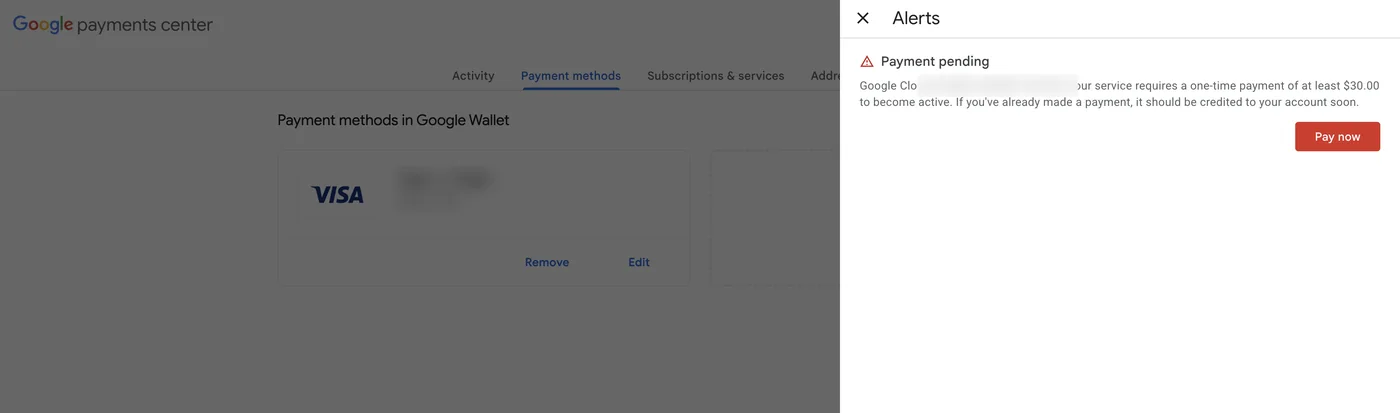
I created a budget right away: Billing → Budgets & alerts, $1 with email alerts. If something goes wrong, I will hear about it in an email, not in an invoice.
Step 3. Deploying the preview server
Everything is done in Cloud Shell, a console right in the browser, the >_ button in Google Cloud. Nothing needs installing on your computer. The europe-west1 region is in Tier 1, meaning the largest free limit.
gcloud services enable run.googleapis.com

gcloud run deploy sgtm-preview \
  --image=gcr.io/cloud-tagging-10302018/gtm-cloud-image:stable \
  --region=europe-west1 --allow-unauthenticated \
  --min-instances=0 --max-instances=1 --cpu=1 --memory=512Mi \
  --set-env-vars="RUN_AS_PREVIEW_SERVER=true,CONTAINER_CONFIG=<CONTAINER_CONFIG>"
The preview server is needed for preview mode, so that in GTM you can see which requests arrive and which tags fire.
Step 4. Deploying the tagging server
The main server that will receive the hits. PREVIEW_SERVER_URL is the address from the previous step. The max-instances=2 parameter is a safeguard: even if unexpected traffic or a bot hits the site, the server will not multiply into an unexpected bill.
gcloud run deploy sgtm \
  --image=gcr.io/cloud-tagging-10302018/gtm-cloud-image:stable \
  --region=europe-west1 --allow-unauthenticated \
  --min-instances=0 --max-instances=2 --cpu=1 --memory=512Mi \
  --set-env-vars="PREVIEW_SERVER_URL=<PREVIEW_URL>,CONTAINER_CONFIG=<CONTAINER_CONFIG>"
Step 5. Verifying the domain
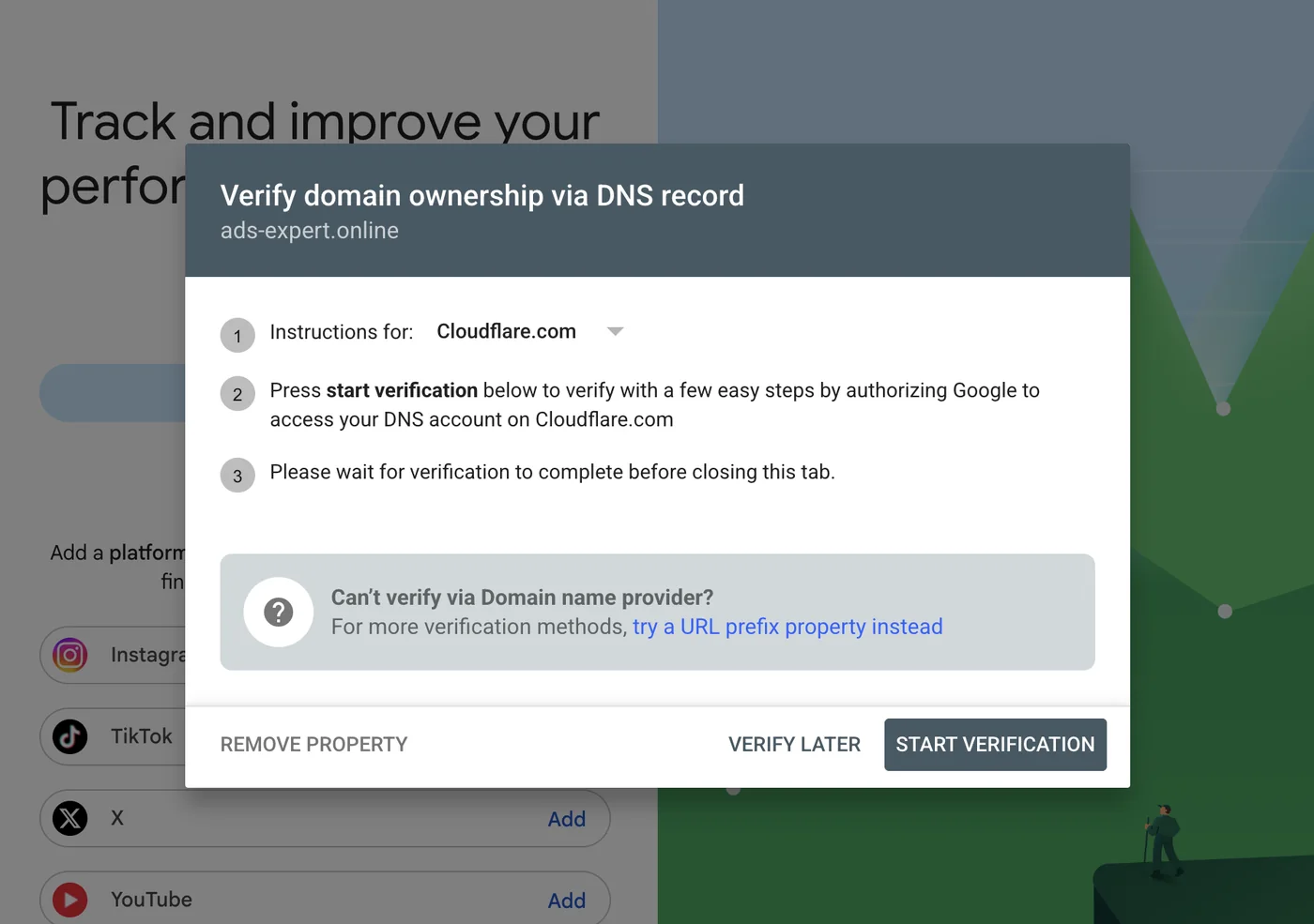
To map your own subdomain to Cloud Run, Google must be sure the domain is yours.
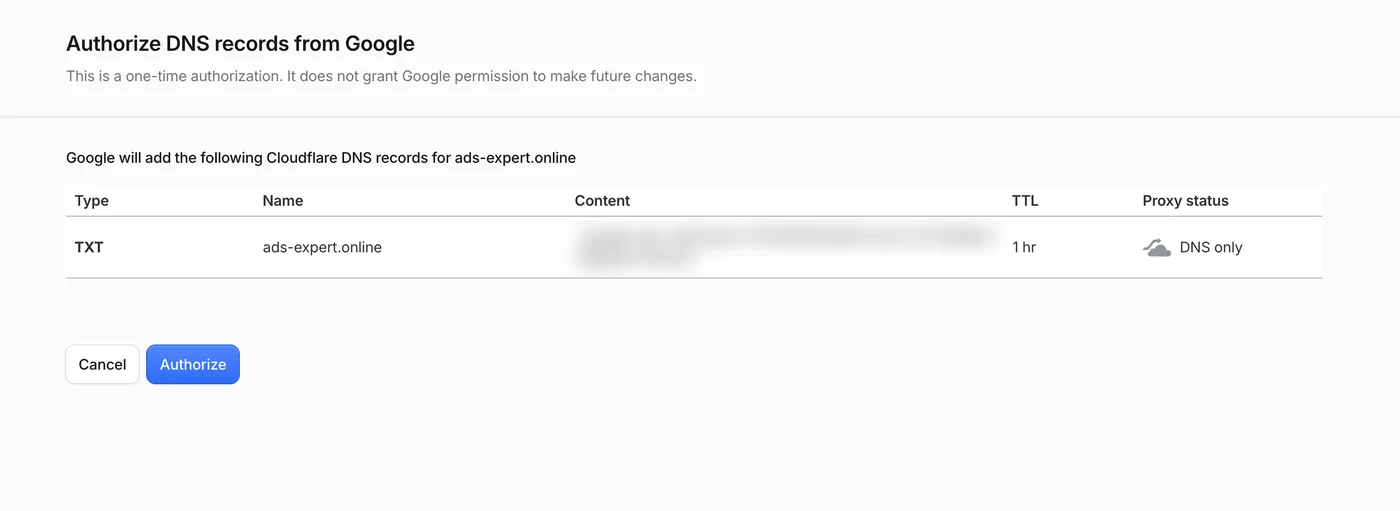
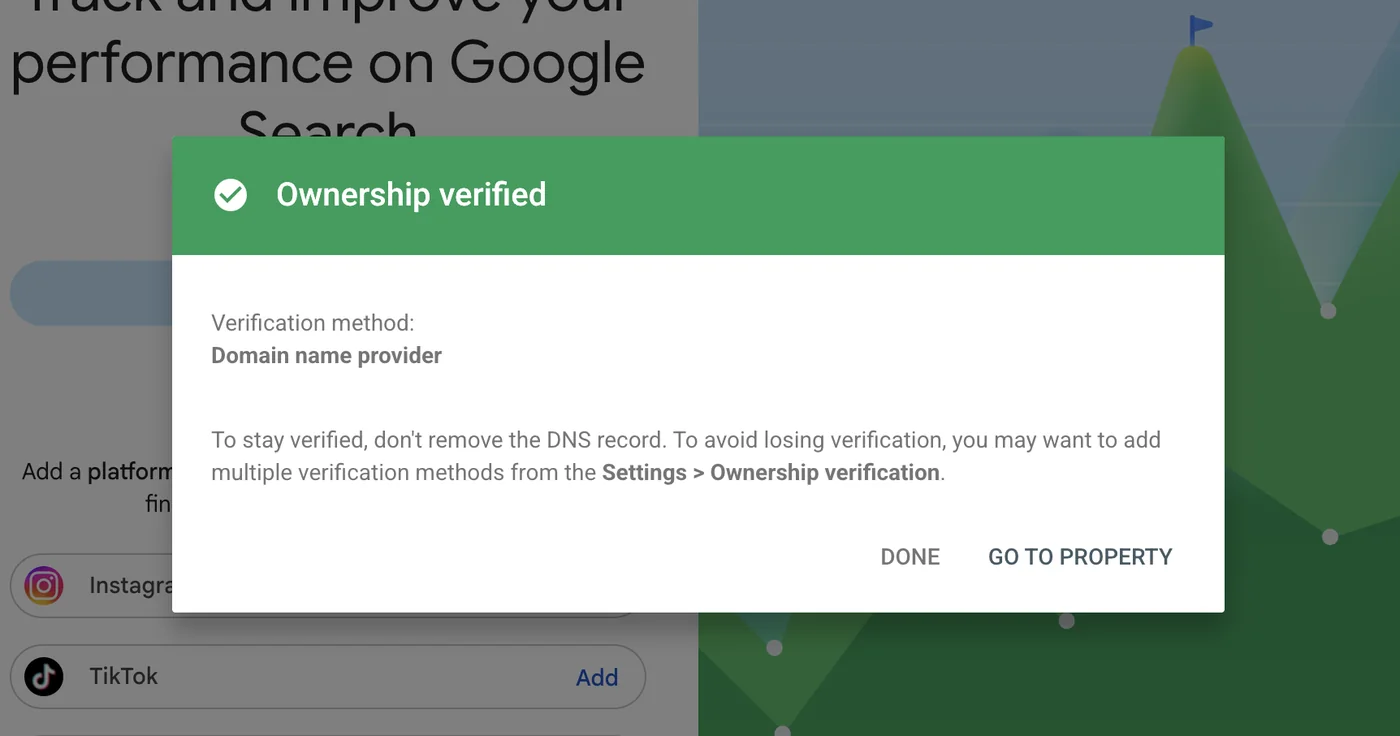
gcloud domains verify ads-expert.onlineSearch Console detected on its own that my DNS is on Cloudflare and offered one-click verification: Google adds a TXT record through authorization in Cloudflare. No manual copying of records.
Step 6. Your own subdomain for sGTM
Domain mapping in Cloud Run is free, unlike a Load Balancer, which costs about $18 a month. Google issues the SSL certificate automatically.
gcloud beta run domain-mappings create --service=sgtm \
  --domain=sgtm.ads-expert.online --region=europe-west1
In Cloudflare I added a CNAME record sgtm → ghs.googlehosted.com.
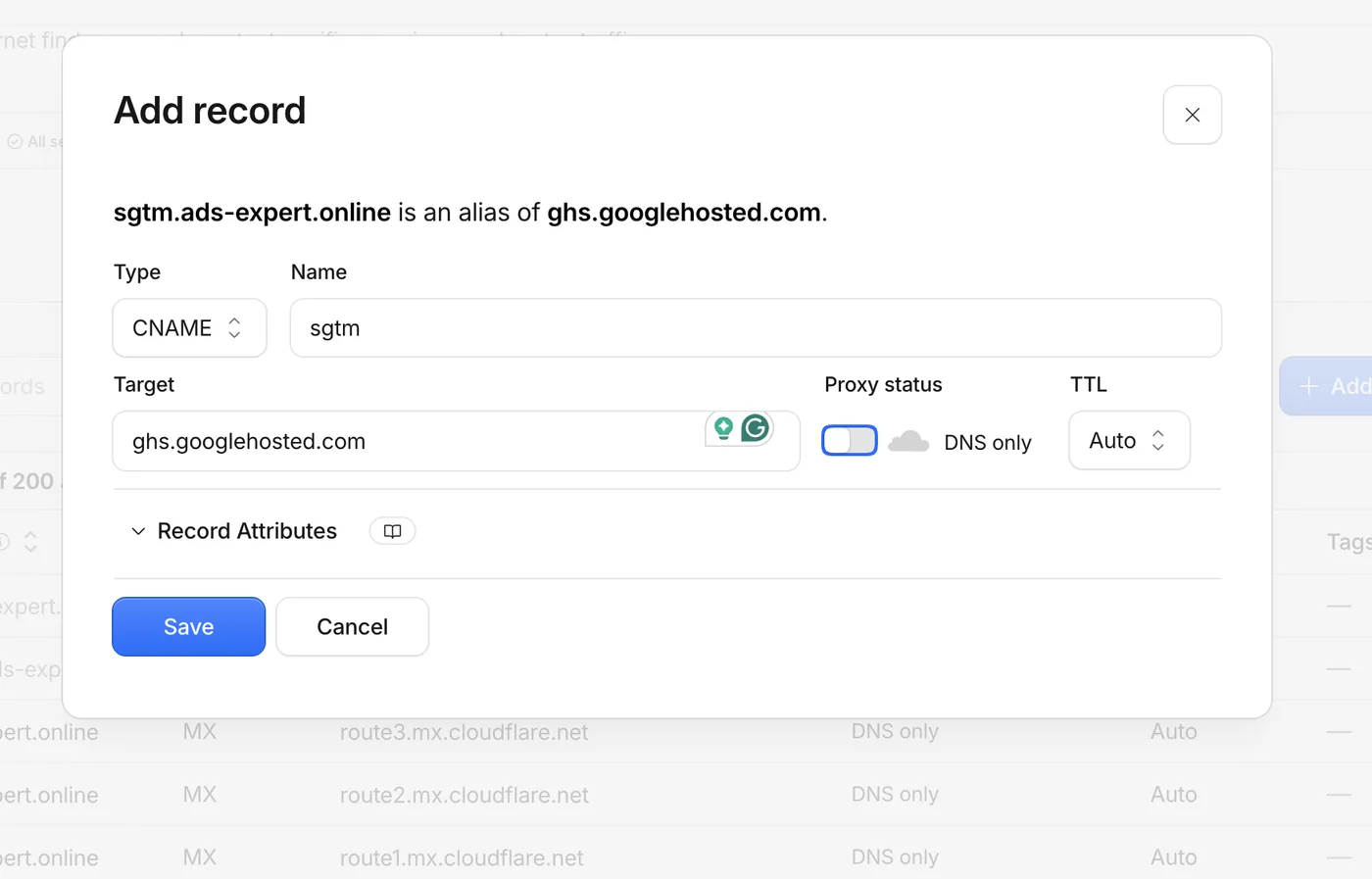
The most common stumbling block: the Cloudflare proxy (orange cloud) must be off. Otherwise Google cannot issue the SSL certificate. Issuing takes from 15 to 60 minutes, which is exactly where half of the total time went. You can check the status with the command gcloud beta run domain-mappings describe ....
Step 7. Configuring the server container
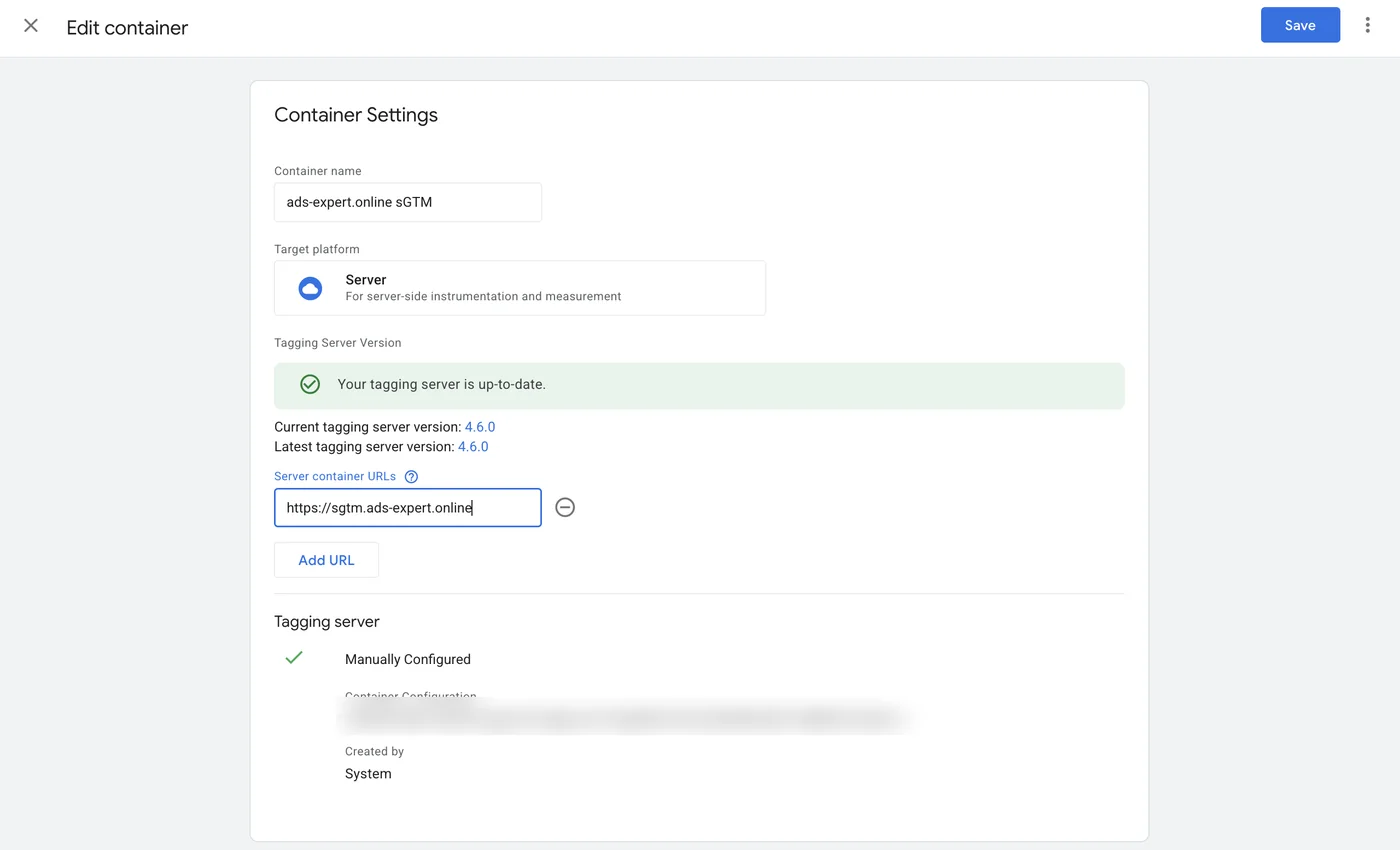
In GTM: Admin → Container Settings → Server container URL = https://sgtm.ads-expert.online.
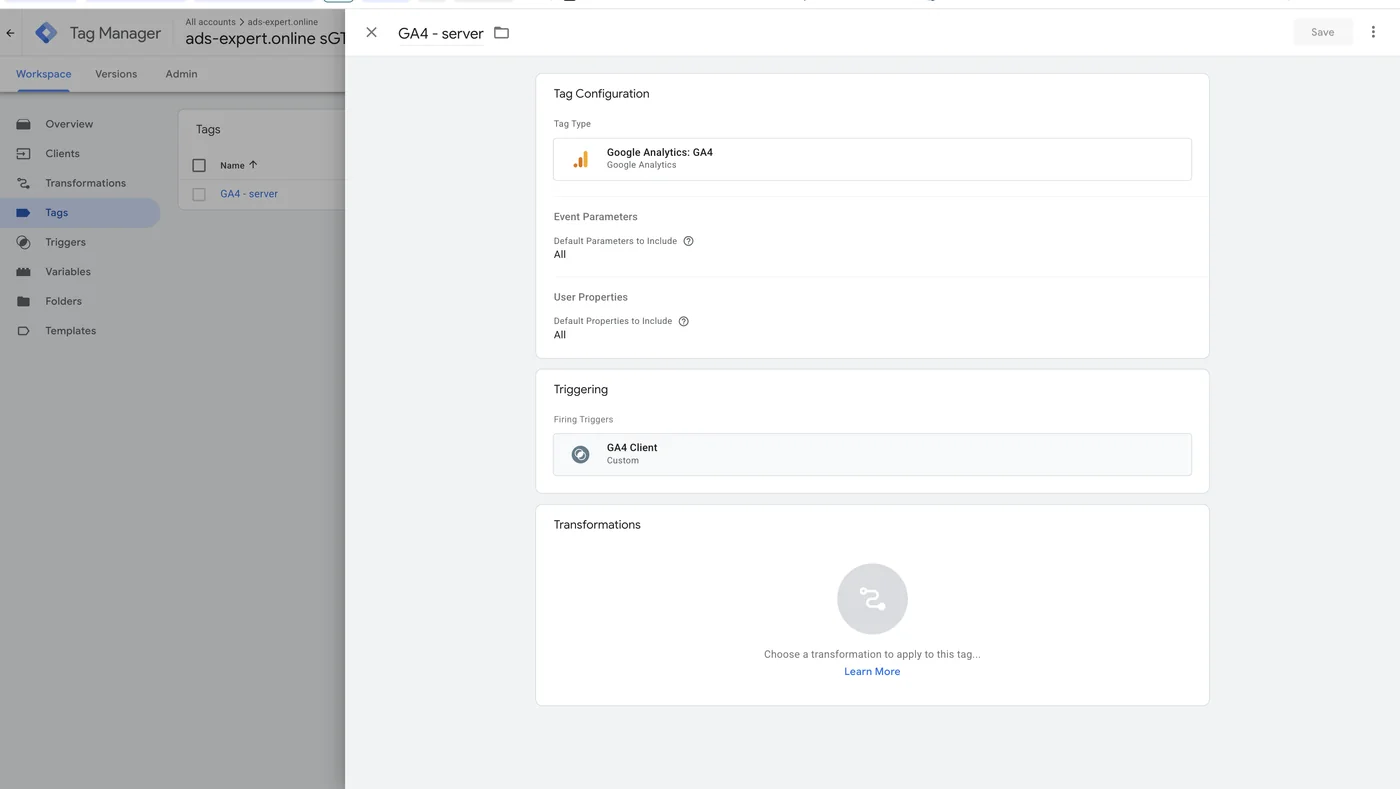
Next, the Google Analytics tag: GA4 with the trigger Client Name = GA4. The GA4 client already exists in the server container by default, so there is no need to create it.
Step 8. Configuring the web container
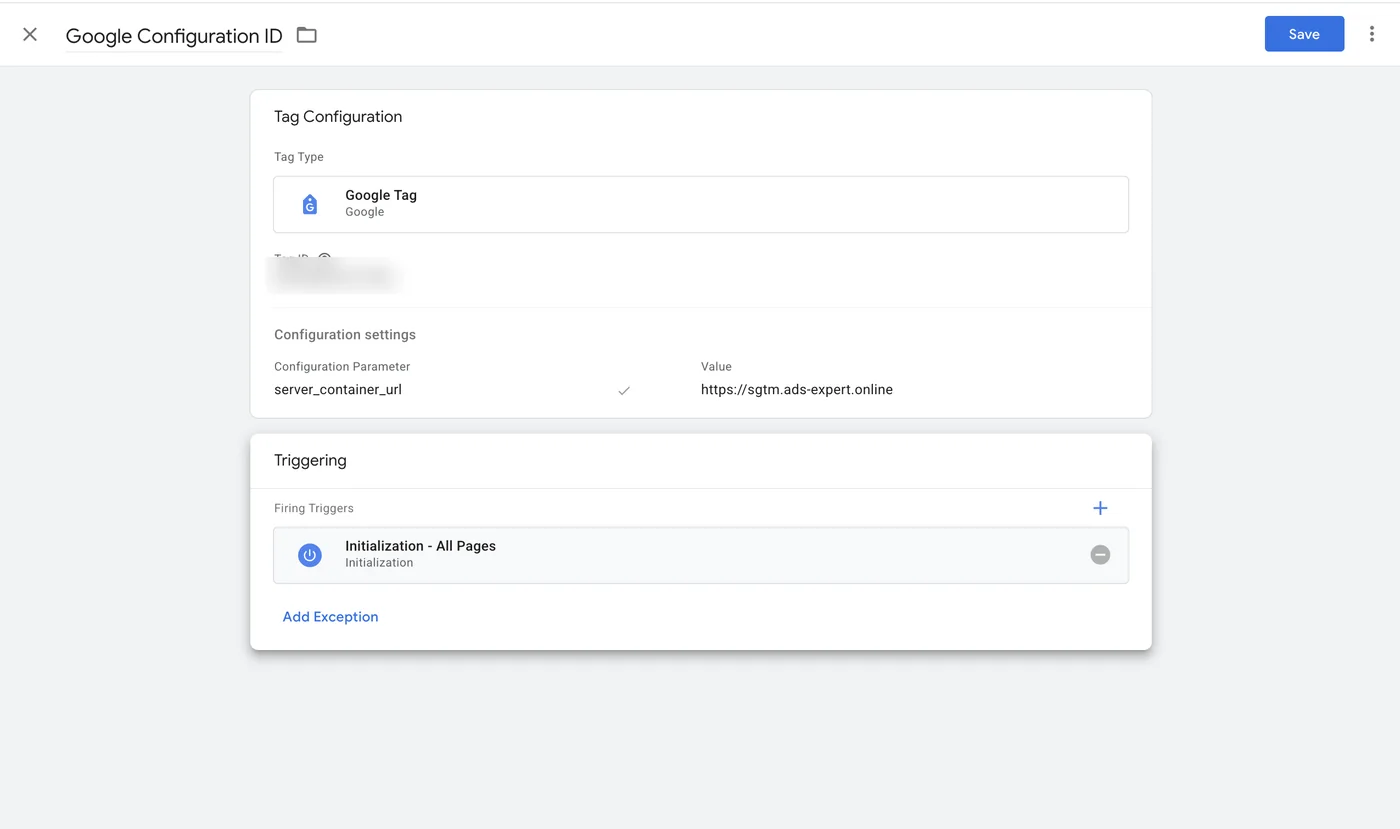
The last step is telling the site where to send data now. In the regular GTM web container, in the Google tag, I added the configuration parameter server_container_url = https://sgtm.ads-expert.online and published the container.
Verification and pitfalls
Why /healthz returns 404
The usual sGTM check is opening /healthz. On Cloud Run it returns 404, which is scary. In fact it is not an error: Cloud Run reserves paths ending in "z", so Google intercepts such a request and never passes it to the container.
You can check another way: the domain root returns HTTP 400. That means sGTM is running and responding to requests no client has claimed.

Final test in Preview
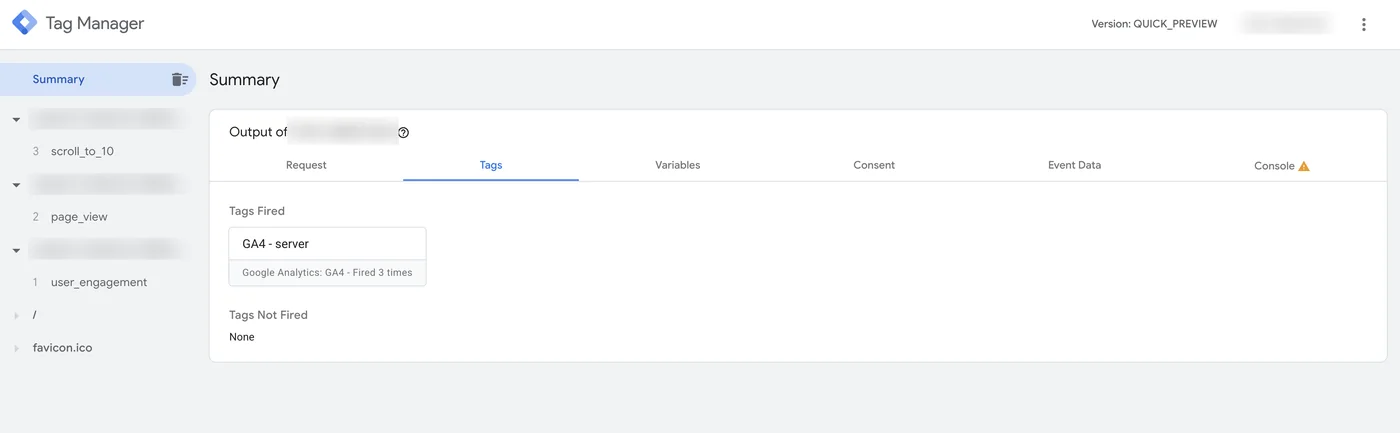
I opened the server container's preview mode and clicked through the site. The page_view, user_engagement and scroll_to_10 hits arrive through the GA4 client, and the GA4 - server tag fired without errors.
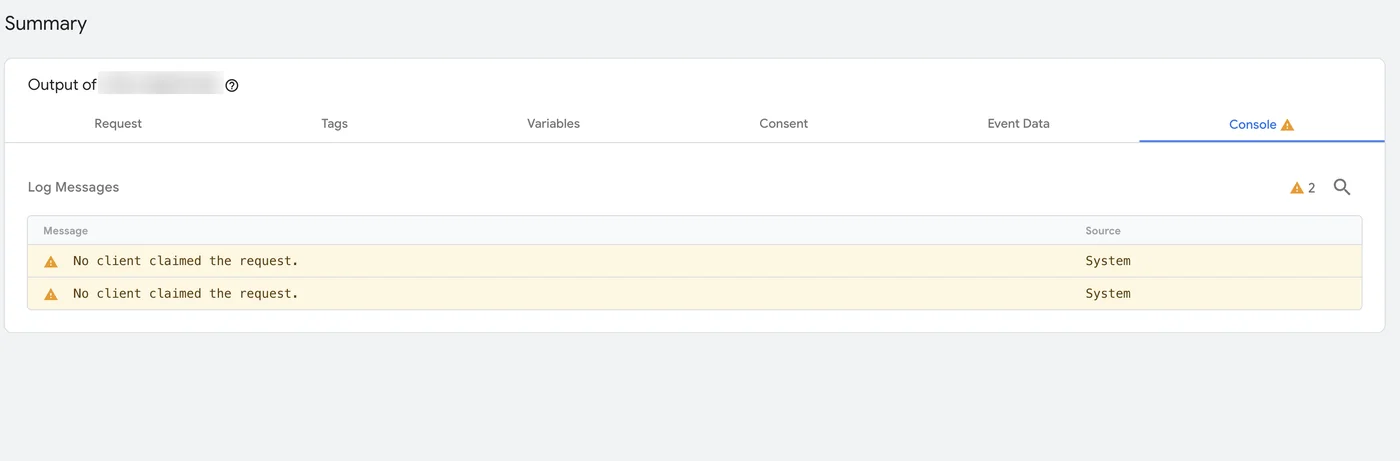
The "No client claimed the request" warnings in the Console tab are the "/" and "favicon.ico" requests that appeared when I opened the sGTM domain in a browser. This is normal and does not affect tracking.
What I got
- A working server-side GTM on my own subdomain sgtm.ads-expert.online with automatic SSL.
- GA4 hits go through my server, so blockers and browser restrictions affect them less.
- $0 a month within the free tier (I am verifying this in practice), while the safeguards, max-instances and a budget alert, protect against an unexpected bill.
- A ready base for Google Ads conversions, Meta CAPI and offline conversions in one server container.
Key idea: server-side tracking is no longer about big budgets. For a small or medium site it can be set up in an hour and kept free if you put safeguards against bills in place from the start.
Checklist of common mistakes
- Billing "not open". A $30 prepayment is required: Payments center → Pay now.
- A placeholder instead of the real Container Config in the deploy command. The server will start but will not work.
- Cloudflare proxy turned on (orange cloud). SSL will not be issued.
- Checking via /healthz on Cloud Run returns 404, which is expected.
- No budget alert and no max-instances. It is free while everything is under control. Without safeguards, the first surprise arrives together with the bill.
What next
- Add Google Ads conversion tags and the Conversion Linker to the server container.
- Connect Meta CAPI and set up event deduplication.
- After a month, check whether the site stayed within the Cloud Run free limit and update the case.
- If cold starts begin to get in the way, switch to min-instances=1 or a VPS.
If you want to move your own site's tracking to a server the same way, see server-side tracking setup.
Where to find me
Message me on Telegram or by email — I respond quickly. Telegram channel and YouTube are for those who want to see real cases before reaching out and understand my approach.