
Marketer, analyst, ex-CMO focused on the Google ecosystem (Ads, Merchant Center, GA4, GTM). Google Partner. 150+ projects, 100+ positive reviews on Freelancehunt, 12+ countries.
- I work directly, with no account managers or subcontractors
- I measure results in sales, not in-platform conversions
- Maximum expertise in the Google ecosystem — instead of “PPC, social ads and SEO, all in one”
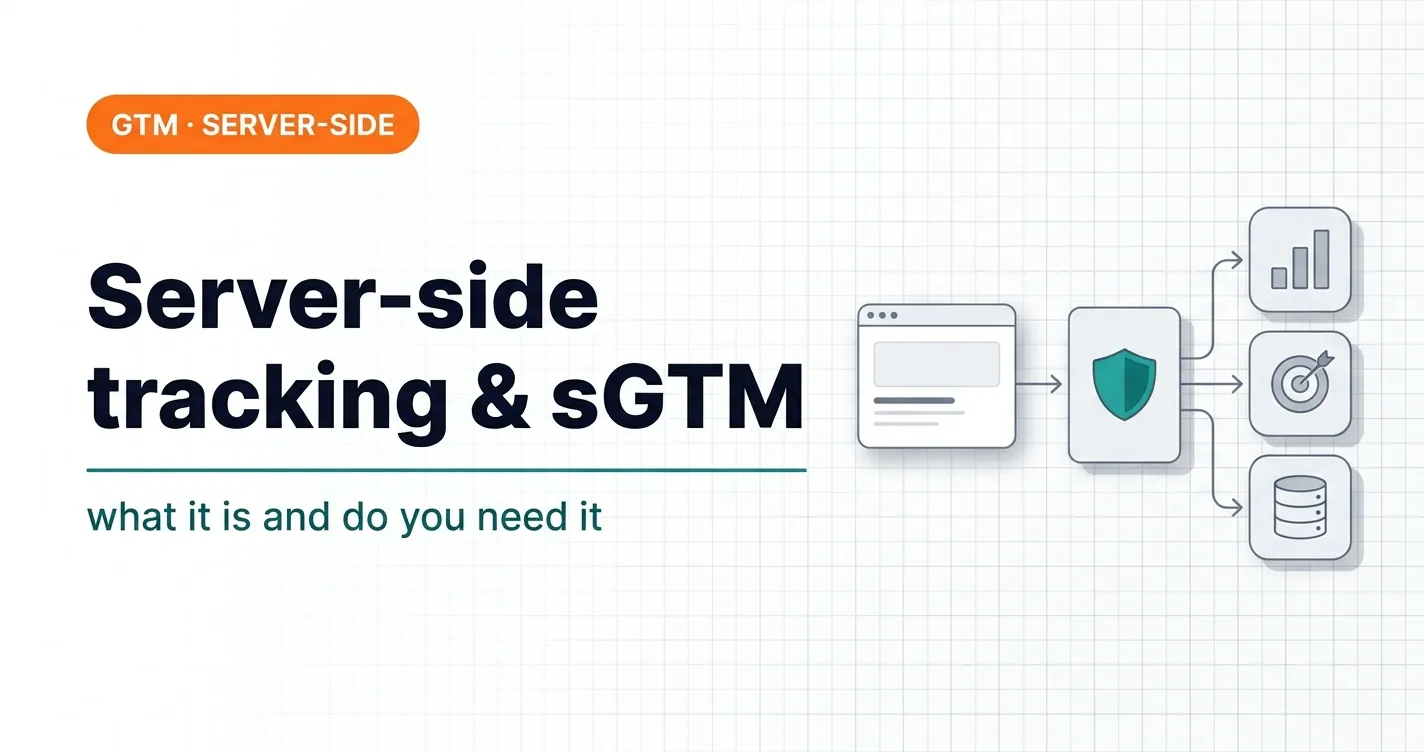
Server-side tracking is being recommended to everyone right now: “install sGTM and your data will stop getting lost.” That’s partly true. But for many websites it gives almost the same result as the free Google tag gateway, just at a higher cost and with more maintenance.
I’ll explain what server-side tracking is, how it differs from regular tracking and Google tag gateway, and when it pays off and when it doesn’t. The ads-expert.online website itself runs on sGTM, so everything below has been tested on it.
Contents
What server-side tracking is and why it matters
In regular tracking, the visitor’s browser sends data to Google Analytics, Google Ads and Meta itself. Each platform is a separate script and a separate request to someone else’s domain.
In server-side tracking, data from the website first goes to your server, and from there to Google, Meta or a CRM. The server runs on a subdomain of your site, so for the browser it’s a request to your own site. sGTM (server-side Google Tag Manager) is a server-side GTM container that receives this data, processes it and sends it on.
Why it matters:
- less data loss from ad blockers and browser restrictions;
- control over what is sent and where: you can remove unnecessary fields or add the ones you need before sending;
- a foundation for server-side conversions: Google Ads, Meta Conversions API, TikTok Events API.
Client-side, Google tag gateway and sGTM: the difference
| Parameter | Client-side GTM | Google tag gateway | sGTM |
|---|---|---|---|
| Where scripts load from | Google’s domain | Your domain | Your domain |
| Where data goes | Straight to Google / Meta | Through your domain, unprocessed | To your server, processed |
| Data control (remove / add fields) | No | No | Full |
| Meta CAPI, CRM, webhooks | No | No | Yes |
| Complexity | Basic | 2 minutes in Cloudflare | Server, DNS, a second container |
| Cost | $0 | $0 | Hosting + setup |
Google tag gateway is the quick free minimum: Google tags load through your domain, and ad blockers cut them less often. sGTM gives full control over data and server-side integrations with other platforms. They don’t get in each other’s way: both run on my site.
 Analytics · GTMGoogle Tag Gateway: +14% More Data in 2 Minutes via GTM and CloudflareWhat Google Tag Gateway is, why you need it and how to set it up via Google Tag Manager and Cloudflare in 2 minutes. A step-by-step guide with screenshots.
When sGTM makes sense
- Large ad budgets. Every lost conversion means worse bid strategy learning and real money.
- Several ad platforms. Google Ads, Meta, TikTok: one server endpoint instead of three separate pixel setups.
- An audience with ad blockers. IT, B2B, international markets — the share of people with uBlock and similar extensions is noticeably higher there.
- Sending data from a CRM or payment system. A payment event or deal status can be sent straight from the server, without the browser.
- GDPR. Personal data can be stripped on the server before it reaches ad platforms.
When sGTM doesn’t make sense
- A small site, a small budget, one GA4. Google tag gateway gives most of the effect for $0.
- Basic tracking doesn’t work. Duplicate conversions, events firing in the wrong place, messenger clicks instead of leads. sGTM will simply move the same problems to the server. I showed what typical broken tracking looks like in the article $750-a-month GTM tracking.
- Nobody to maintain it. A server container is a second container that has to be updated together with the web container, plus hosting limits you need to watch.
What you need to set it up
Briefly, without a step-by-step manual:
- A server-side GTM container.
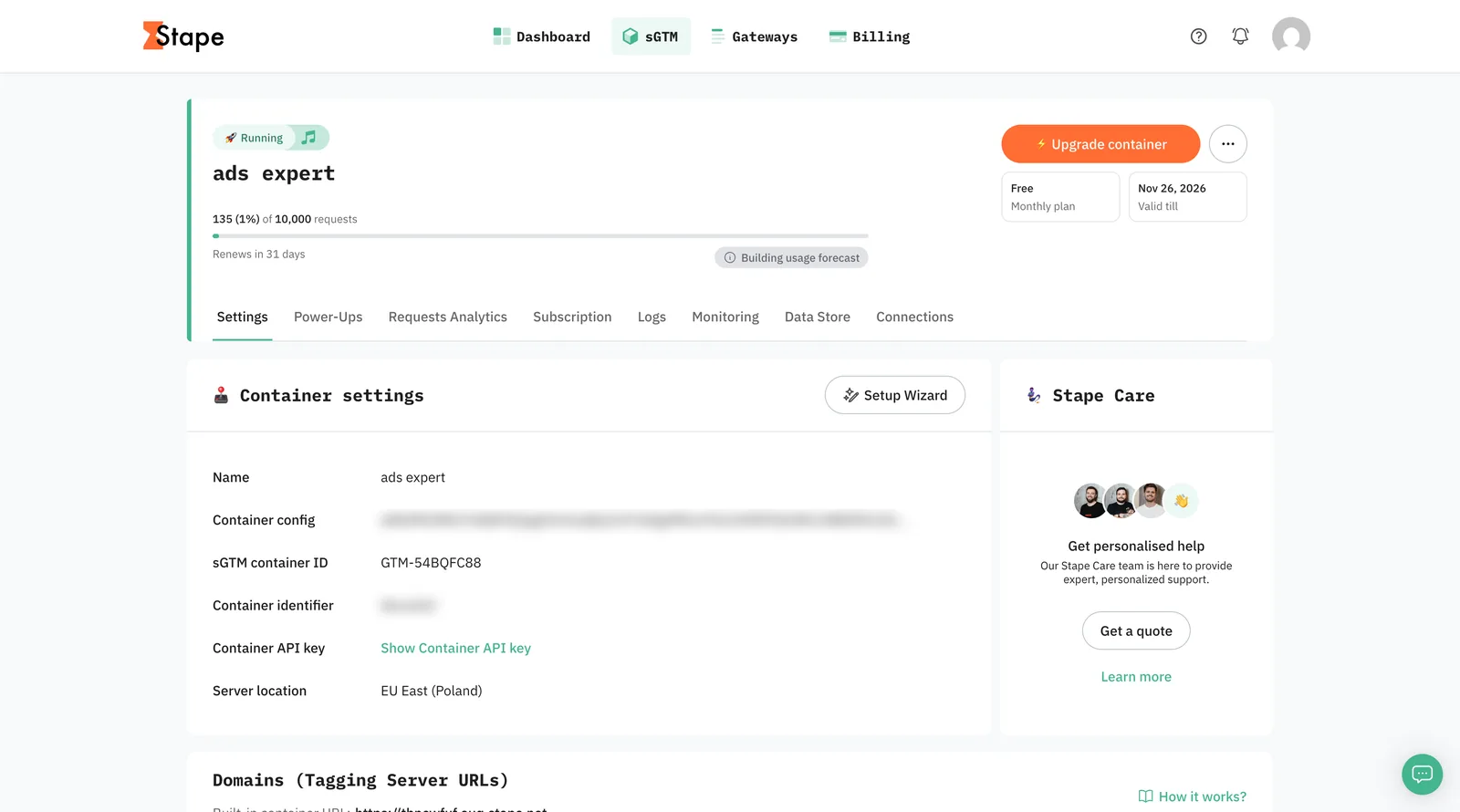
- Hosting. Stape or Google Cloud, in a region close to your audience. My Stape container runs in the EU East region (Poland).
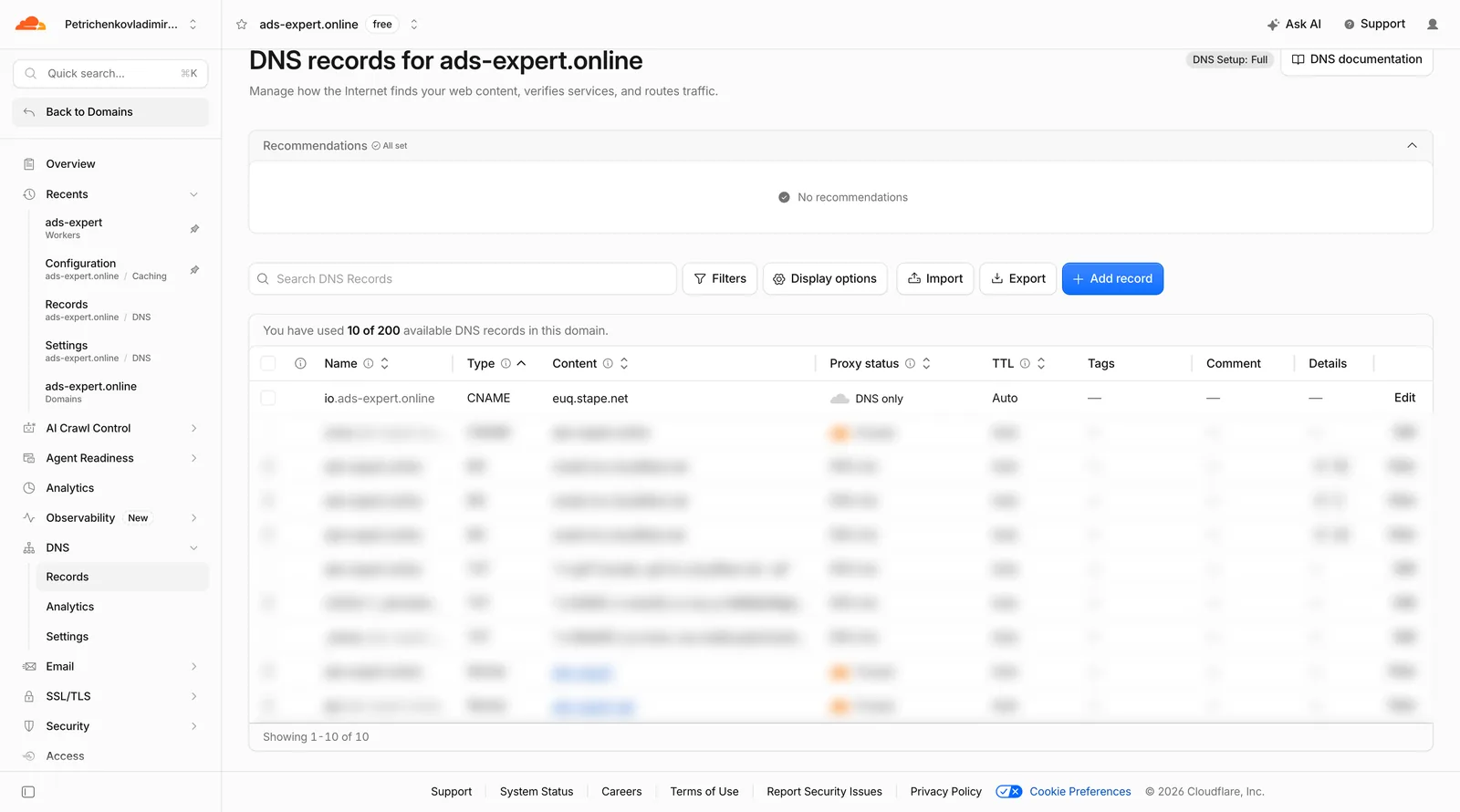
- A subdomain and a DNS record. On ads-expert.online it’s a CNAME record
io.ads-expert.online→ the Stape server. Stape advises against naming the subdomain gtm, sgtm, analytics or tracking: ad blockers recognise such names faster. - In the web container — the
server_container_urlparameter with the subdomain address; in the server container — the GA4 client and tags. - Testing in Preview of the server container before publishing.
How to tell everything works:
- in the browser’s Network tab, requests go to your subdomain;
- the request counter in Stape grows;
- GA4 shows events in the realtime report;
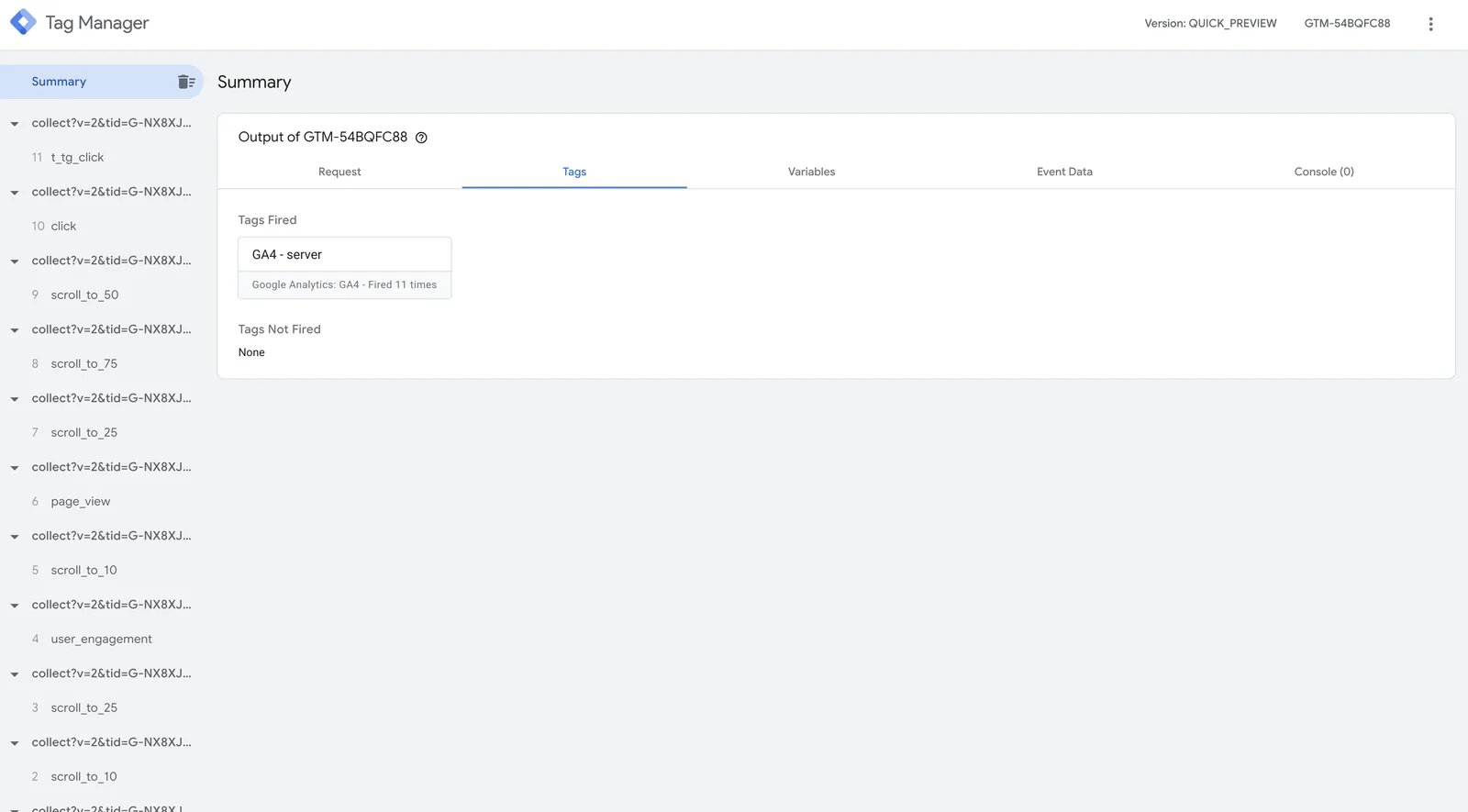
- the server container’s Preview shows incoming events and the tags that fired on them.
On my site, Preview shows page_view, scroll depth, clicks and a Telegram click. The “GA4 - server” tag fired on all 11 events.
What sGTM doesn’t solve
- Cookies in Safari. Without extra solutions (Cookie Keeper in Stape or FPID), cookies in Safari still last up to 7 days.
- Ad blockers with full rule sets. uBlock and similar extensions cut some requests even through your subdomain. Losses are smaller, but not zero.
- User consent. If a person declines cookies, there won’t be full data. Consent Mode works with a server container too, and you still need to set it up.
- Misconfigured conversions. The server passes on what it receives. If a conversion counts everything, it will keep counting everything.
- Offline conversions from a CRM. sGTM can be part of that setup, but phone sales, messenger orders and cancelled orders still have to be sent from the CRM.
How much it costs
Hosting. Stape has a free plan with 10,000 requests a month. For a small site that’s enough: at the time of the screenshot my container had used 135 requests, 1% of the limit. Stape’s paid plans at the time of writing:
| Plan | Requests per month | Price |
|---|---|---|
| Free | 10 000 | €0 |
| Pro | 500 000 | €20 |
| Pro+ | 2 000 000 | €50 |
| Business | 5 000 000 | €100 |
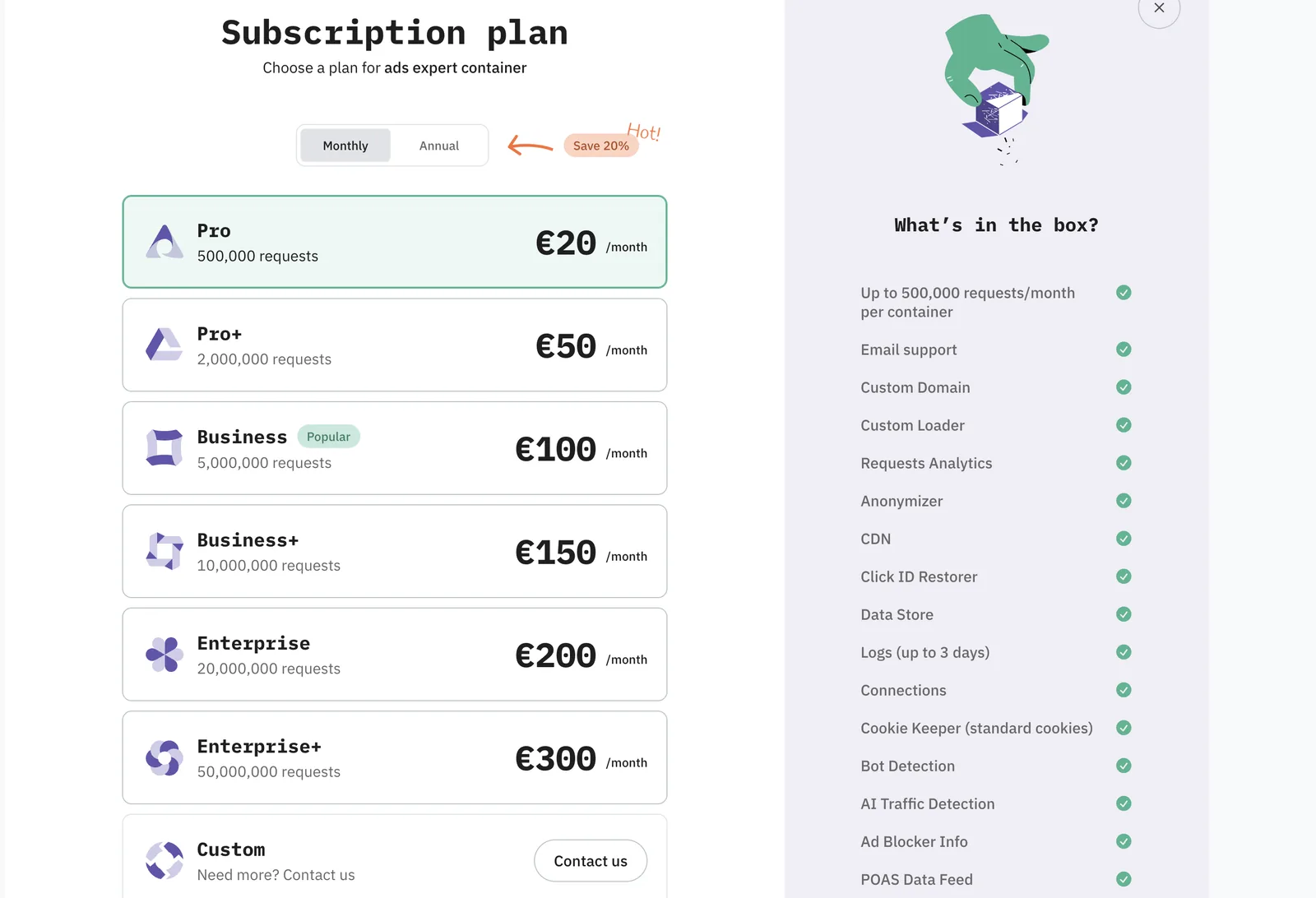
What happens if you run out. According to Stape’s help center, a free container is switched off once the limit is used up, and it can only be restored by upgrading to a paid plan. On Pro and Pro+ plans, processing stops at 110% of the limit until the next billing period. So part of your data simply won’t reach GA4 and Google Ads. To avoid this, watch the counter in Stape or turn on automatic plan upgrades.
The alternative to Stape is Google Cloud. There you pay for server resources and configure the server yourself.
Setup — from $250, depending on the number of platforms (GA4, Google Ads, Meta, TikTok) and events.
37 — AnalyticsServer-side tracking setup (sGTM)Server-side GTM on your subdomain: GA4, Google Ads, Meta CAPI and TikTok via the server.Where to start
Before installing sGTM, check that your regular tracking works: conversions in GA4 and Google Ads match the real leads or orders in your CRM. If they do, connect Google tag gateway — it’s free and takes a few minutes. sGTM makes sense when you need server-side integrations with Meta, TikTok or a CRM, or when your ad budget is large enough that every lost conversion shows up in money.
Where to find me
Message me on Telegram or by email — I respond quickly. Telegram channel and YouTube are for those who want to see real cases before reaching out and understand my approach.