
Marketer, analyst, ex-CMO focused on the Google ecosystem (Ads, Merchant Center, GA4, GTM). Google Partner. 150+ projects, 100+ positive reviews on Freelancehunt, 12+ countries.
- I work directly, with no account managers or subcontractors
- I measure results in sales, not in-platform conversions
- Maximum expertise in the Google ecosystem — instead of “PPC, social ads and SEO, all in one”
A lot of people — both specialists and clients running Google Ads — think Performance Max is some kind of Holy Grail. I don’t want to compare it to a magic wand, but, roughly speaking, many believe Performance Max solves basically every problem.
Contents
- 1. Tracking
- 2. Geotargeting
- 3. AI features
- 4. Misunderstanding how the campaign actually works
- 5. Wrong approach to bid strategies — and PMax isn’t for small data volumes
- 6. No experiments and no portfolio bid strategies
- 7. Hard to scale without losing performance
- 8. Cannibalizing traffic from Search and Shopping campaigns
- 9. Limited control over Demand Gen and Display-like inventory
- 10. No flexible A/B testing of creatives
- Summary
- FAQ
Performance Max for Lead Generation: Solution or Cringe? A Real Case

Let me debunk that right away. Performance Max does not solve all your problems. In many cases it can actually do harm — if you make certain mistakes, some of which we’ll cover in this article. Performance Max comes with a very large set of limitations that, depending on your goals, may keep it from delivering what you need.
I’ll show you exactly where the weak spots in your Performance Max campaigns are, so you can look at them and fix them. It’s a good campaign type: in good hands it works well, in bad hands it can give you what I described in the industrial heating equipment case. The audit revealed that in a very narrow niche, PMax was reporting a thousand leads a month at 66 UAH ($1.5) each in the ad account — while in reality there were zero real leads. That’s impossible in this niche, both in volume and in cost.
1. Tracking
None of my articles, cases or tips start without tracking. If your tracking is set up incorrectly, if some micro-goals are used as Performance Max conversion goals, that’s the reason PMax will sooner or later go off the rails. In some cases you won’t be able to fix it by any technical means. That doesn’t mean all is lost — it means you’ll simply lose a chunk of time, first on the campaign learning from the wrong data, and then on fixing all of it.
What’s the solution? Performance Max should receive only clean signals. Not clicks on a phone number — you’ll see plenty of those clicks, but no actual calls. The system will learn from clicks that never really turned into anything and generate even more of the same clicks. That’s how it works.
Key point: Performance Max has to run on clean data. Feed it dirty data and it produces dirty garbage.
To use Performance Max properly in lead generation projects, you need clear, 100% accurate data. Without it, PMax will work for a while, but if someone breaks the system or it starts filling up with bad data, everything just falls apart. So send it data that has already been confirmed — for example, in your CRM.
2. Geotargeting
I’ve had quite a few cases where Performance Max went outside the geotargeting. It’s especially critical for local businesses — when we advertise in Kyiv and PMax brings in traffic from the Volyn region.
I looked into this thoroughly and contacted support. Even if you exclude locations at the campaign level, Performance Max can still go beyond the targeting. You’ll never see it in the ad account — but you can see it in analytics.
The consequences are simple: if your tracking is wrong and you train the campaign on plain calls, over time the system starts generating calls from non-target locations, because it treats them as conversions — after all, you’re the one sending them into the system.
I had a case in Warsaw — a local business getting inquiries from Lublin and Kraków. I sent support the Google Analytics data: here’s the campaign, here are the locations it targeted, I excluded these locations, traffic shouldn’t be going there. The reply: “the analytics is great, of course, but we don’t see this in the ad account.” So I don’t need traffic from Kraków when I sell local services in Warsaw — and they can’t do anything to help.
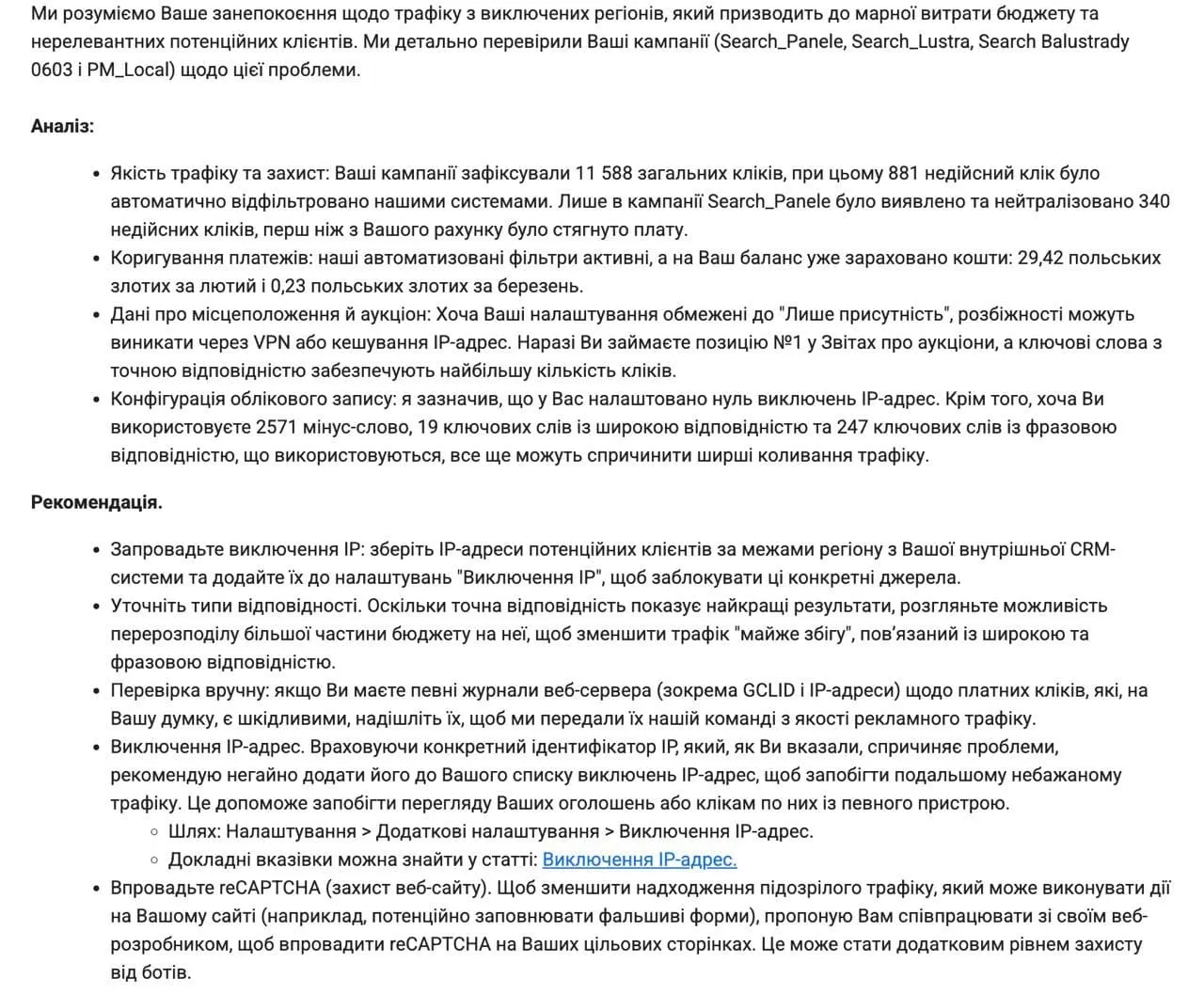
How do you deal with it? Without point number one — tracking — this can’t be solved. If you’re a local business, exclude every location you don’t need, and if a search term mentions a particular location, exclude it too. But if this problem shows up, you can’t beat it 100%.
3. AI features
Another weak spot is Performance Max’s AI features. I don’t recommend using them at all. Google recommends always using them — because it’s their money. I don’t recommend them and never use them.
Why? First, they aren’t really AI, they’re just features that generate stuff. There are three main ones worth paying attention to.
The first is text customization. Google generates headlines and descriptions itself based on your site and the query. When you carefully write ads to get specific messages across and Google rewrites them on its own — especially if you advertise in Ukraine, where Google doesn’t tell Ukrainian and Russian apart — you can end up with a real mess.
The second is Final URL Expansion. That’s when Google can swap the landing page on its own if it thinks another one is more relevant to the user. I don’t doubt Google has a huge amount of statistical data and some AI may be making decisions there — but in practice you need to land the user exactly on the page you intended. It’s excessive automation with zero control: you just tick a box and tell Google “I trust you, go ahead.” About as broken as it gets.

The third is the same feature for video assets: if you don’t add any, Google can cut videos itself from whatever it has. Let’s be honest, Google can’t even handle text properly — so it certainly can’t make a video and figure out how it should look to really work for the user. That’s why I don’t recommend using these features.
4. Misunderstanding how the campaign actually works
People often mix up several things. First, they think it’s a “sales button” — it isn’t. Second, they think that setting signals and search themes is targeting. No. It’s not targeting. You can’t target Performance Max at specific keywords — you’re just showing Google a portrait of your target audience.
In the tutoring case I talked about a campaign that was supposedly set up for math but generated leads for everything except math. Because Performance Max goes beyond whatever targeting is even there. Google looks at landing page content, looks for target actions and then tries to scale them — whether or not they’re correct. The same goes for signals, interests and audiences.
All of this is hidden from us. Nobody knows how it really works. Even Google’s own consultants, when you work with them, can’t answer that. They say: trust us, everything will be fine. And when you need to fix something — you can’t, because you don’t know what exactly to fix.
5. Wrong approach to bid strategies — and PMax isn’t for small data volumes
As of September 2026, Google states that for a PMax campaign to work properly it should get 3 to 5 target actions per day. To move to Smart Bidding strategies like Target CPA or Target ROAS, you ideally want 5 or more conversions per day per campaign.
When Performance Max runs on a small amount of data — getting one, two, three conversions — and then specialists or clients switch to Target CPA or Target ROAS, those strategies are extremely unstable. And that’s before seasonal or behavioral factors. Small data volume — the campaign can’t learn properly or find the audience.
Are there exceptions? Yes, I’ve seen it sometimes work even on small volumes, but mostly it doesn’t. In audits I always bring up micro-budgeting of campaigns — that’s the same story. Small budget, small data volume — the campaign can’t learn.
6. No experiments and no portfolio bid strategies
Performance Max lacks the experiments feature available for Search campaigns — where you can test, say, a different strategy without breaking the current campaign. PMax doesn’t have it; maybe it will someday. I believe it will, because it’s an extremely logical and important feature.
An important related point: people often take two sets of creatives for an A/B test, create two asset groups in PMax, launch them and then judge performance based on what they see in the account. That’s completely wrong. The data you see broken down by asset isn’t data that each asset generated in isolation. Google can easily go beyond any of your targeting, including asset group targeting. These assets aren’t tested against each other the way you set them up. In one asset group the banners may get served, in the other they may not run at all. Comparing that and drawing conclusions is deeply unprofessional, because you’re comparing things that can’t be compared.
Key point: in Performance Max you can’t run an isolated A/B test the way you can in a Search campaign. Carve that in stone.
Separately — PMax doesn’t support portfolio bid strategies or shared budgets, which are available for other campaign types.
7. Hard to scale without losing performance
This isn’t only a Performance Max problem — it applies to any scaling. But here it’s harder: Google says raise the budget by 20-30% at a time, once every week or two. If you need to scale fast — in peak season, for example — you have to raise the budget more aggressively.
When you aggressively increase the budget in Performance Max, the campaign may break, or it may not. More often it breaks. That’s the hard part: if you need to scale fast, you have to go all-in and take a big risk. If the campaign is doing fine and you want to scale it gradually — better to do just that. If you raise the budget by 50%, 75%, 100%, there’s a very high chance you’ll break it.
8. Cannibalizing traffic from Search and Shopping campaigns
A common question: doesn’t Performance Max cannibalize traffic from other networks? What does Google say? If a Search campaign and PMax run at the same time, only one of them enters the auction at any given moment. If the content relevance (ad, keyword, etc.) is higher in the Search campaign, it shows; if not, Performance Max shows. That’s the official position.
My personal view: Performance Max does cannibalize traffic, and Google gives it higher priority because it’s the flagship product they’re pushing. They don’t want people sitting there managing Search campaigns by hand — they want anyone to log into the account, click a few buttons, pay Google and burn the money. They need the money. That’s all you need to know.
I remember the Smart campaigns era — everything was simple: throw something in there and it sort of worked. Anything you can’t control, you later can’t analyze or scale. That’s how it was with Smart campaigns. Now it’s the same with Performance Max. But to be fair: over the 3-4 years PMax has existed, Google has been slowly opening up the black box — adding search terms, placements and exclusions. At the start, 4 years ago, it was much worse — you launched a campaign and had no idea what was going on with it.
9. Limited control over Demand Gen and Display-like inventory
About a week ago, one of my ad accounts got the ability to manage serving on specific placements — only now, four years after PMax launched, and not in every account yet. I described it in this article about the new channel impact adjustment feature.

There’s a tracking issue hiding here too. If tracking is broken, Google starts looking for traffic on YouTube — where kids click on a phone number or a messenger button, and you count that as a goal in the ad account. Google moves into YouTube very quickly because it thinks it found traffic and target actions there — and starts pouring the entire budget into it. There have been many such cases, for example in the B2B industrial electrical equipment case.
10. No flexible A/B testing of creatives
Just like with Search campaigns, flexible A/B testing of creatives isn’t possible in Performance Max — this was already covered above, in the section on experiments.
Summary
Performance Max really is a powerful tool, but with a number of significant limitations. It’s a very fragile tool, and you need to know how to work with it. Just launching Performance Max doesn’t work the way they tell you in 99 UAH ($2.2) courses or the way agency sales managers pitch it. Performance Max is a strong tool, but you need to know how to use it and account for everything described above.
Some of these weak spots can now be controlled: how to reduce the impact of individual placements in Performance Max — in “New Performance Max Feature”.
For how these weak spots look in a real account — 54% of budget on YouTube, AI features, Target CPA and a Russian-language feed — see my sneaker store audit.
When Performance Max makes sense at all, and when it is better to start with Search or Shopping — see “Search, Performance Max, YouTube, Display or Shopping: What to Choose for Your Business”.
An example of deliberately dropping Performance Max in favour of standard Shopping — the instant camera store case with a 1669% ROAS.
How to restrict PMax on a small budget in practice — Feed Only, 19,540 excluded placements and a single feed — in the footwear store case study.
If you want Performance Max set up without these mistakes — Performance Max and Shopping setup.
Where to find me
Message me on Telegram or by email — I respond quickly. Telegram channel and YouTube are for those who want to see real cases before reaching out and understand my approach.