
Marketer, analyst, ex-CMO focused on the Google ecosystem (Ads, Merchant Center, GA4, GTM). Google Partner. 150+ projects, 100+ positive reviews on Freelancehunt, 12+ countries.
- I work directly, with no account managers or subcontractors
- I measure results in sales, not in-platform conversions
- Maximum expertise in the Google ecosystem
A regular situation: a client sends a screenshot of a competitor’s ad. It has sitelinks with descriptions, an image, an address with the distance to the office. “Why is ours so modest?” I open the account: everything the same is already added.
Google decides which extensions to show to a particular person in a particular auction. You can’t pin them. So the client and the competitor can see the same ad in completely different ways.
Contents
- What it is and what it costs
- Sitelinks: shown most often
- Callouts and structured snippets
- Images, business name and logo
- Phone number: zero calls on my projects
- Location and Google Maps
- Headlines and descriptions at campaign level
- Promotions, prices, lead form, apps
- At which level to add
- Conclusion
- FAQ
Your ads are underperforming! How to use assets in Google Ads?

What it is and what it costs
In the Google Ads interface extensions are now called assets. These are extra blocks attached to an ad: links to other pages of the site, callouts, images, a phone number, an address, promotions. Headlines and descriptions are assets too, but an ad won’t run without them at all, so they are mandatory.
Adding extensions is free. You pay, as before, for clicks, including a click on a sitelink or a call button. Google charges for no more than two clicks per impression.
Extensions are part of ad rank: Google estimates how much they improve the ad. And it shows them only when the ad rank is high enough and the system predicts the extension will help. An interesting point from the help center: ads with more extensions often have a higher actual cost per click, because they become more noticeable. But, according to Google itself, that is usually cheaper than moving up a position. Either way I look at the cost per lead, not per click, and I explained why in the article on what determines the cost per click.
Sitelinks: shown most often
I’ll show it on the example of a funeral services company in Kyiv that I’ve been working with for quite a while. The site was properly reworked, and every service has its own page. That is an ideal situation: almost all pages can be turned into sitelinks.
What I added:
- Service prices — the description says “Ready-made service packages” and “No hidden fees”;
- Cemetery plot — selection and registration of a plot, Kyiv and Kyiv region;
- All-inclusive funeral — “Full support for the family” from the first call to the end;
- Free consultation — call any time, we’ll explain all the stages;
- Farewell hall — farewell hall rental, we book for your day and time;
- Transport of the deceased — funeral transport to the morgue, the cemetery, across Ukraine.
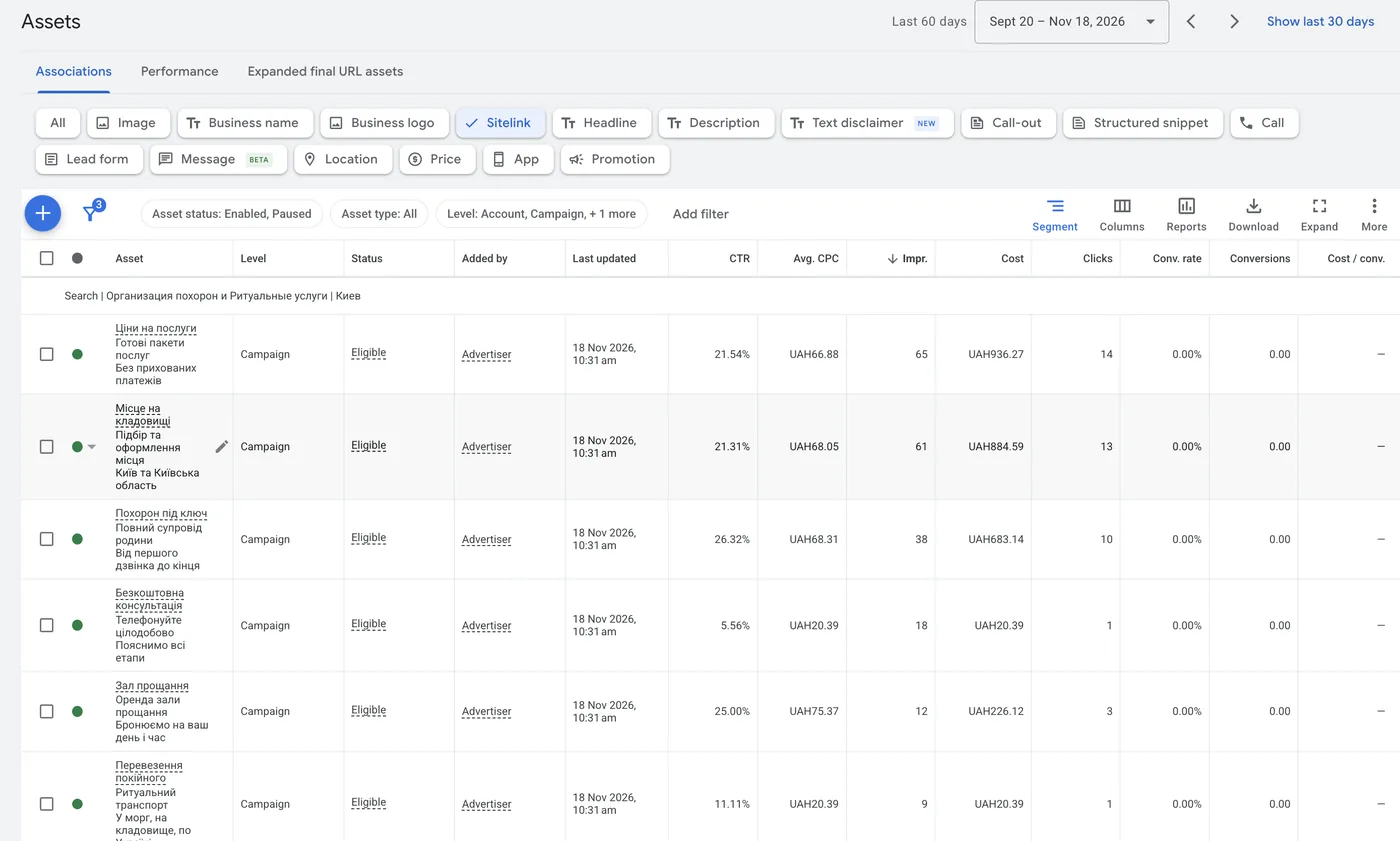
Description lines are optional, but I always fill them in when there is something to say. The main rule is that every link leads to a relevant page, not to the home page under different names.
Callouts and structured snippets
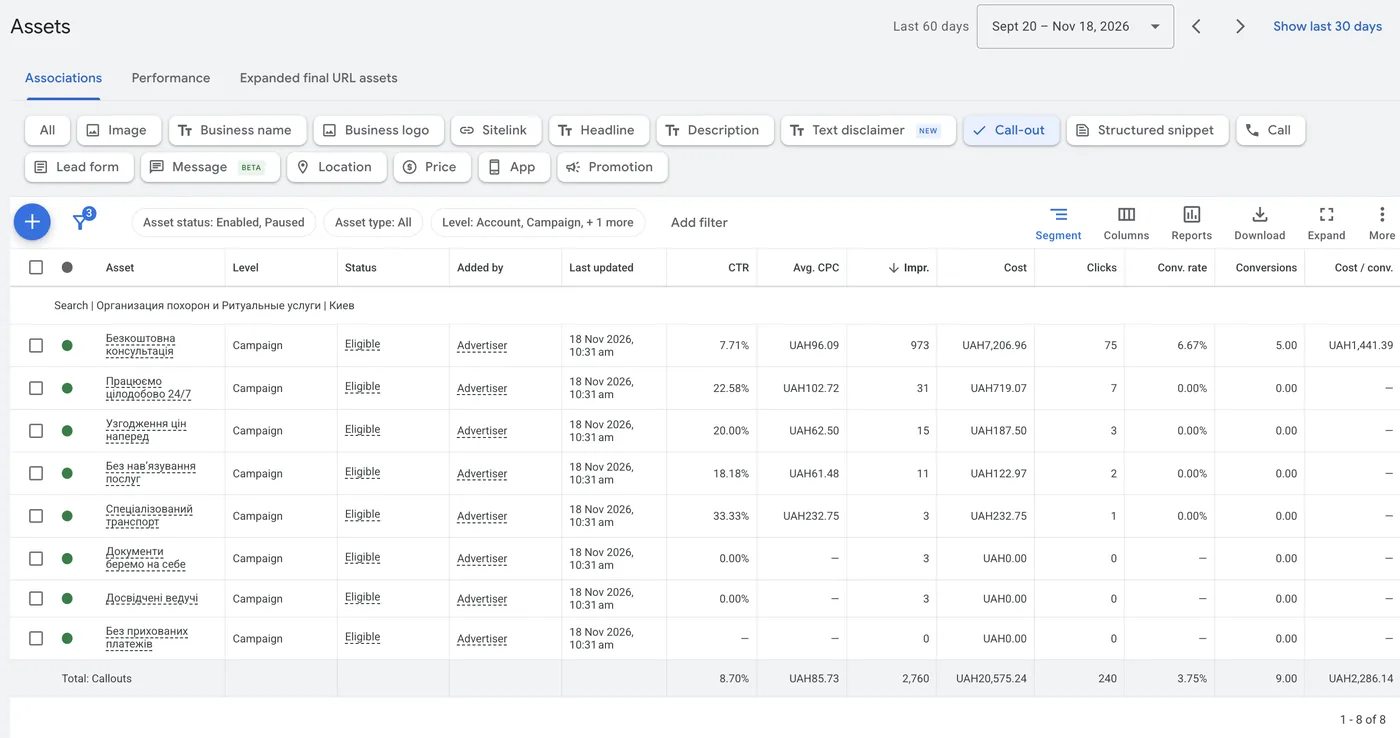
Callouts are short phrases you want to emphasize. For the same company: free consultation, open 24/7, prices agreed in advance, no pushing extra services, specialized transport, we handle the paperwork, experienced hosts, no hidden fees.
These are not random phrases. I know this project from the inside, I talk with the client from time to time and see what the leads actually come for. And the table shows how Google distributes impressions: “Free consultation” got 973 impressions, 75 clicks and 5 conversions, “Open 24/7” got 31 impressions, and “No hidden fees” was not shown even once in 60 days. So I don’t guess which callout will work, I add different ones and look at the table.
Callouts can show one at a time, two, several, in any combination Google considers appropriate.
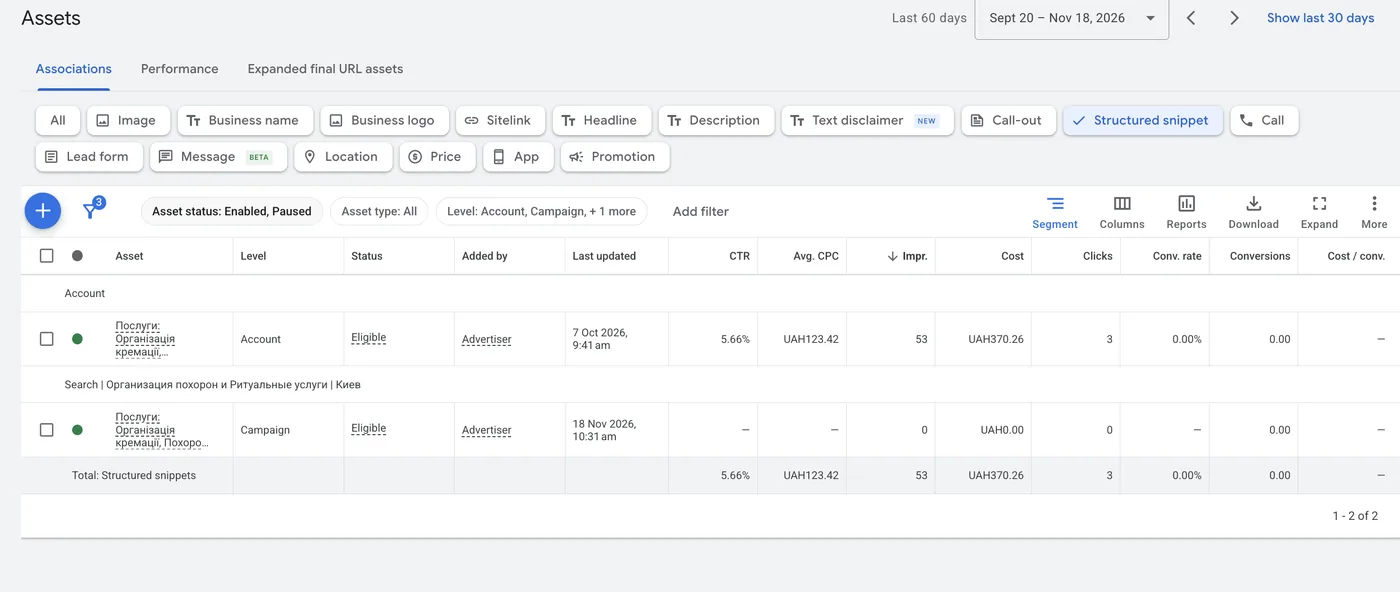
Structured snippets are similar to callouts, but have a header from a fixed Google list: “Services”, “Brands”, “Types” and so on. You pick the one that fits the business. For funeral services it is “Services”: cremation arrangement, funerals and the company’s other services. I have never hit a limit on the number of values.
Images, business name and logo
Images are simple advertising pictures next to the ad. Google restricts images with overlaid text, watermarks and logos, and in practice it often rejects them. Use general photos that make it obvious what the company does.
After uploading, check the crop. By default Google may cut out a piece of sky instead of the building that was supposed to be in the photo. The aspect ratio can be adjusted manually.
Since July 2026 images in search ads are available only to accounts that are at least 60 days old, with a good policy history and with active text ads that had spend in search over the last 30 days. So a new account gets no images for the first two months, no matter how many you upload.
Business name. Google warns directly: the name may not show even if it is approved. For quality reasons the system may show a placeholder instead.
Logo is logical to add at account level, because it doesn’t change from campaign to campaign. The exception is when one account has two different sites. That happens, and then the logo is added at campaign level for each site.
Phone number: zero calls on my projects
Auditors like to write in a report: “You haven’t added a phone number, you are earning less than you could.” On several projects I put a separate static call-tracking number only into this extension, to measure the effect honestly. It got exactly 0 calls. The screenshot shows a funeral services campaign: over 60 days 761 ad impressions, 63 clicks, and zero impressions of the number and zero calls from the extension.
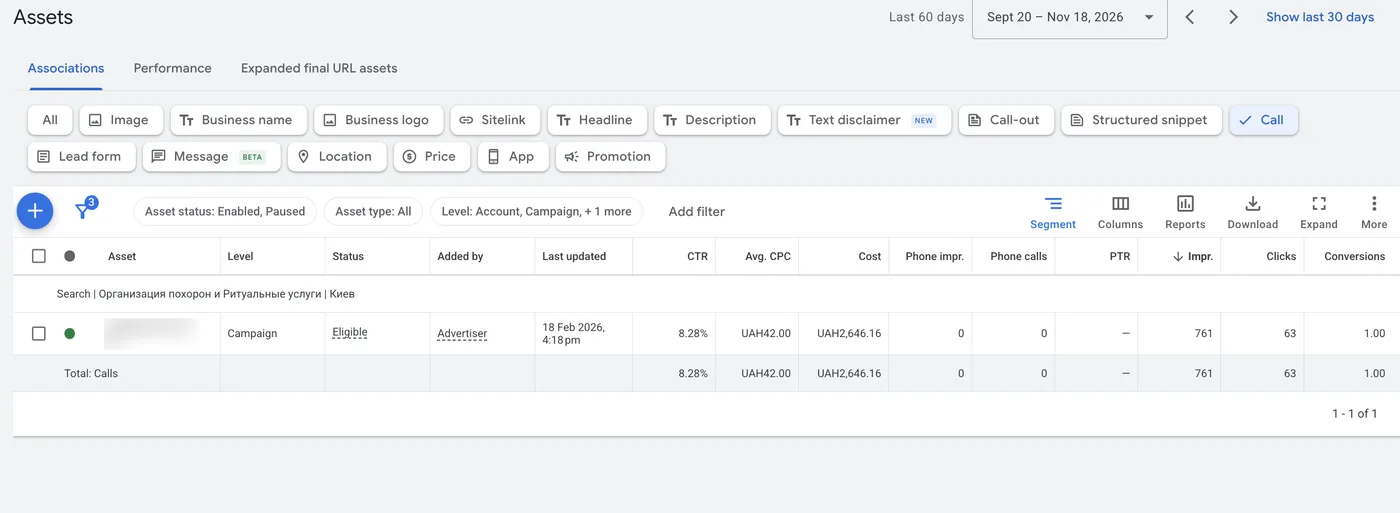
It may make sense for urgent niches: tow trucks, private ambulance. There a person calls without even opening the site. Funeral services are in that category too, and still there are no calls from the extension. For the rest of businesses it is almost fantasy.
There is also a technical nuance. Google requires the number to be verified and visible on the site the ad leads to. If the site runs dynamic call tracking, the number keeps changing, and Google will very likely reject the extension. And if it does pass, it will slightly skew the statistics. If you really want it, put a static number on the site, for example in the footer: the robot that scans the site will see it.
Location and Google Maps
The location extension is pulled from Google Business Profile, a free business profile on maps. Google shows the person the distance to your point, and the ad becomes more relevant.
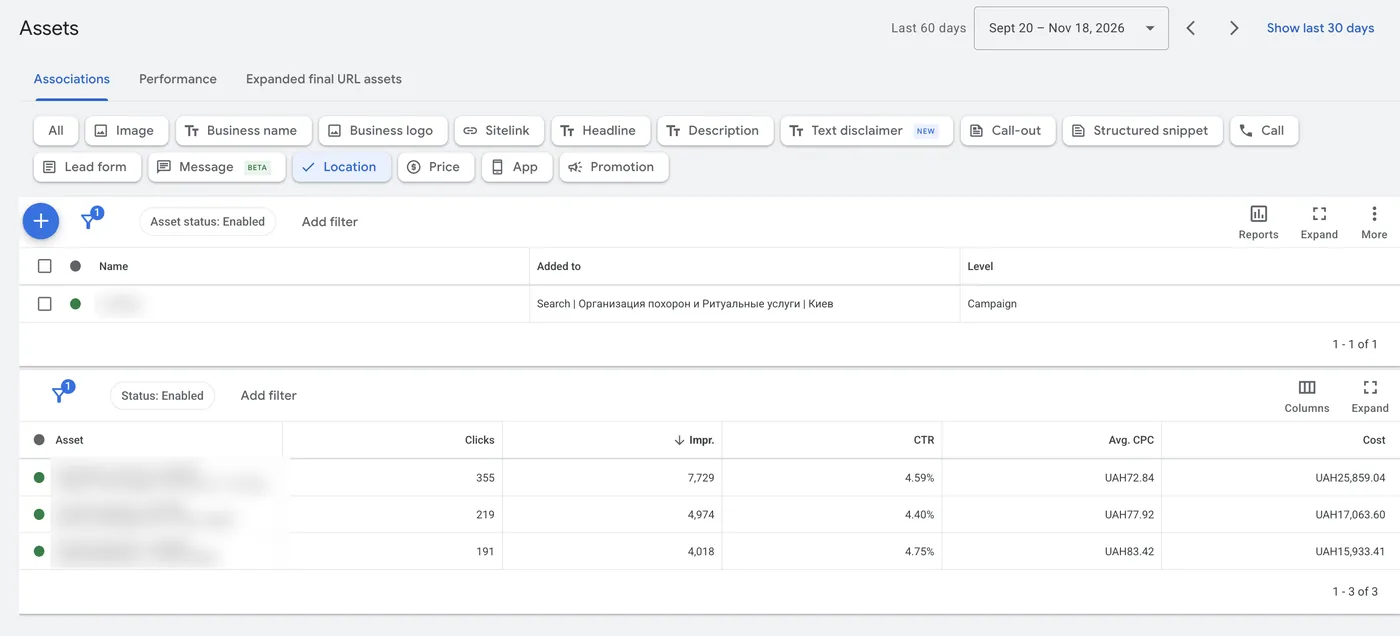
For the funeral services company it makes sense: it has three points in Kyiv, and each got clicks: 355, 219 and 191 over 60 days. For a local offline business it makes a hundred percent sense.
How many calls maps bring is visible in the case of a chain of metal warehouses. A separate static number is placed only in the maps profile there. For January to August 2026 it got 565 unique calls, while the account for the same period showed only 238 clicks on the number. The client has no other advertising besides Google Ads, organic is about 14%, so even adjusting for it, about 525 calls came from ads.
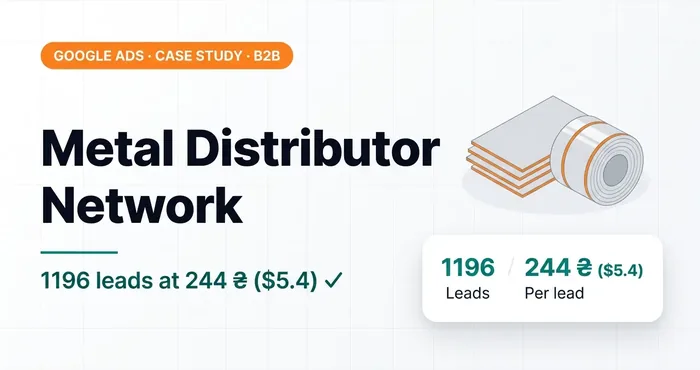 Google Ads case study · B2BGoogle Ads case study: steel distributor where the real cost per lead turned out 2.3x lower than in the accountSteel stockyard network: four attribution gaps — cart, goals, messengers, Maps calls. 1,196 leads at 244 UAH ($5.4) instead of 586 at 623 UAH ($14).
The number in the extension: zero calls, the number on maps: hundreds. The difference is that on maps a person is looking for a specific place nearby and is ready to go there.
How to set up local advertising on maps, I show here:
More customers to your location! How to launch local advertising in Google Maps?

Headlines and descriptions at campaign level
Besides headlines in the ads, you can add up to three headlines and two descriptions at the level of the whole campaign. They apply to all active responsive ads in it. You can set display dates for them, so it is a convenient way to run a temporary boost, for example “Cremation, all-inclusive: promo price” for the period of a promotion, without editing every ad separately.
Promotions, prices, lead form, apps
Promotion is a separate block with a promotional offer. I see it most often in e-commerce, especially before holidays: “for Valentine’s Day −30% on these products”. In lead generation it is possible too, if there is a real offer.
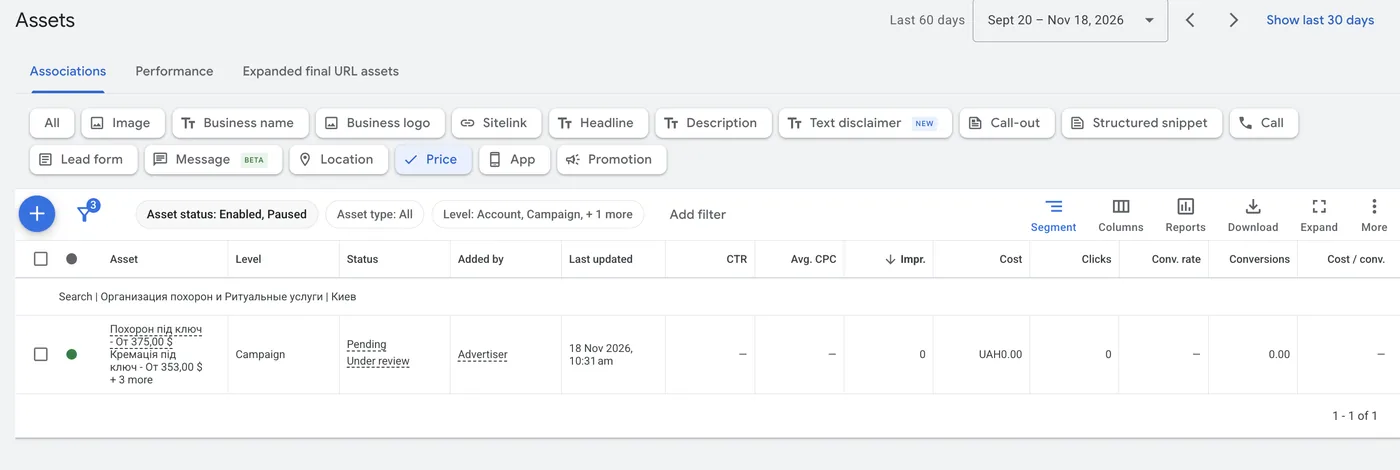
Prices are for businesses with clear prices per item, say a bicycle shop. Honestly, I rarely see this extension in real campaigns. For funeral services I added packages with prices: “All-inclusive funeral — from $375”, “All-inclusive cremation — from $353” and three more items; at the time of the screenshot the extension was under review.
Lead form lets a person leave a request right in the ad. Google offers it only in supported countries and to accounts with a good policy history. In Ukrainian accounts it doesn’t work for me, so for Ukraine you can skip considering it.
App is only if you have a mobile app.
At which level to add
Extensions are added at three levels: ad group, campaign and account. If all the advertising is in one language and some extensions are the same for all campaigns, it is convenient to keep them at account level. The phone number, the logo, and with a not-too-complicated structure the sitelinks as well. Links for specific services go at campaign or ad group level, so that a person searching for transport of the deceased doesn’t see a link to renting a farewell hall.
Conclusion
Open your search campaign, the “Assets” tab, and add everything that is available and relevant to your business: links to real pages, callouts with what the leads come for, structured snippets, images without text. The more options, the more Google has to test combinations. In a month, look in the assets table at what is actually showing.
03 — AuditGoogle Ads account auditI find where the budget leaks: structure, bidding, keywords, conversion tracking, website.
Where to find me
Message me on Telegram or by email — I respond quickly. Telegram channel and YouTube are for those who want to see real cases before reaching out and understand my approach.