
Marketer, analyst, ex-CMO focused on the Google ecosystem (Ads, Merchant Center, GA4, GTM). Google Partner. 150+ projects, 100+ positive reviews on Freelancehunt, 12+ countries.
- I work directly, with no account managers or subcontractors
- I measure results in sales, not in-platform conversions
- Maximum expertise in the Google ecosystem
AI Max is a set of AI features for Google Ads search campaigns that Google launched in 2025. It’s turned on with a single switch in the campaign settings, and after that Google itself expands search terms, rewrites ads and picks landing pages.
Google promotes AI Max very actively: recommendations in the account, personal consultants, webinars. I’ve seen both how it works and how it breaks campaigns. Below I go through what’s inside, how to control it, and use one real example to show why turning it on “because Google recommends it” is a bad idea.
Contents
What AI Max includes
When you turn on AI Max in a search campaign, three features are turned on at once:
| Feature | What it does | Level |
|---|---|---|
| Search term matching | expands delivery to search terms using broad match technology and shows ads even for terms you have no keywords for, based on your ads and site | ad group |
| Text customization | generates headlines and descriptions based on your ads, site and assets | campaign |
| Final URL expansion | picks the page on your site to send the person to | campaign |
Each of the three features can be turned off separately: search term matching in the ad group settings, text customization and URL expansion in the campaign settings. URL expansion only works together with text customization.
There are also controls worth setting up right away:
- brand exclusions and inclusions — so AI Max doesn’t show for competitors’ brands or, on the contrary, works only with the ones you need;
- URL exclusions — pages you must not send ad traffic to: the blog, contacts, delivery terms;
- URL inclusions — pages that URL expansion didn’t pick up on its own;
- locations of interest — targeting by geography in the search term, not only by the person’s physical location.
How AI Max differs from broad match
Broad match expands your keywords: it shows ads for search terms close in meaning. AI Max goes further and shows ads for search terms you have no keywords for at all. Google looks at your ads and site and decides by itself what suits you.
In essence, it’s Performance Max logic moved into a search campaign. With the same risks: Google optimizes for whatever you called a conversion and goes where it’s easiest to find it.
Case: how AI Max broke a structure that worked
A tutoring aggregator. The subjects are almost every school subject plus a lot of languages, and leads are needed for specific subjects, for a specific reason.
While our cooperation was on pause, a personal Google consultant reached out to the client. He gave the classic advice: turn on AI Max in search campaigns, use broad match, remove limits from the strategies. The client implemented it himself.
It broke everything that had worked before. AI Max started generating a chaotic flow of search terms about everything. In the account the cost per lead looked decent, but the leads came for subjects the client wasn’t interested in at all.
Why it happened: the system had one general goal — “tutor request”. Google didn’t understand what a math lead specifically looks like, and assumed: the “math” campaign brought a lead, so it’s a math lead. AI Max only amplified the problem, because it got the freedom to look for search terms far beyond the keywords.
We solved it by splitting goals by subject and sending to Google Ads, via the CRM, the people who had already paid for their first lesson. Two weeks later the client wrote: “Overall it now ranks for the subjects we need, and quality, targeted requests are coming in.”
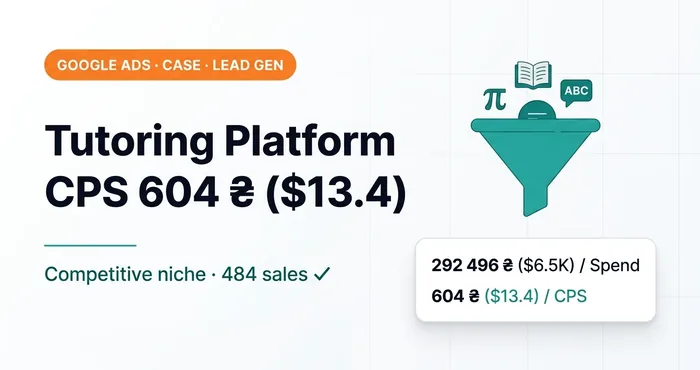 Google Ads case study · End-to-end analyticsGoogle Ads case study: tutoring platform, CPS 604 UAH ($13.4) in a competitive niche292,496 UAH ($6.5K) spent, 484 paid lessons, CPS 604 UAH ($13.4) in a competitive niche. Splitting leads by subject saved the campaign.
Text customization and URL expansion
I never use these two features, and I turn them off in Performance Max as well.
Text customization rewrites the ads you carefully wrote for specific messages. It gets especially fun with ads targeting Ukraine, where Google doesn’t always tell Ukrainian from Russian. Plus, according to Google itself, pinned headlines and descriptions are ignored when URL expansion is on.
URL expansion can send a person to a page Google considers more relevant. In practice it can be a blog article instead of a service page, or a category instead of a specific product. You need to land people where you planned.
One more technical note from Google: tracking templates can return a 404 error on dynamic landing pages. If you turn on URL expansion, check that all pages open with your tracking parameters.
When AI Max can make sense
I’m not saying AI Max is evil. It’s a tool, and it works as well as the data it learns from.
Conditions under which you can test it:
- Clean conversions. Real sales or confirmed leads from the CRM are sent to Google Ads, without phone clicks or messenger taps.
- A homogeneous product. No dozens of subjects with different lead value, as in the tutoring case.
- Enough conversions. Automation without data gropes in the dark.
- The campaign isn’t limited by budget. Google states directly that AI Max is ineffective for budget-limited campaigns and shows a warning.
- You check search terms. The search terms report now has a separate “AI Max” match type and a source column: broad match expansion or a keywordless search term. In the first weeks it needs regular review.
And test it through an experiment, not with the switch in a live campaign. Otherwise you won’t be able to separate the effect of AI Max from seasonality.
Key thought: AI Max gives Google the freedom to look for search terms beyond your keywords. If the system learns from dirty conversions, that freedom scales junk.
Check your campaigns
Open the settings of every search campaign and see whether AI Max is on. It often gets turned on through recommendations or because “a personal consultant advised it”. If it’s on, open the search terms report, filter by the “AI Max” match type and see how much spend went to search terms you would never have added as keywords.
Where to find me
Message me on Telegram or by email — I respond quickly. Telegram channel and YouTube are for those who want to see real cases before reaching out and understand my approach.